AppBrain
AppBrain
  • Apps
  • Apps being viewed right now Trending apps today Most popular apps All-time most installed apps Top rated apps iPhone and iPad apps
  • Intelligence ▾
    Intelligence overview → Track any Android app or your whole market
    Track & analyze
    Keyword Tracker & OptimizerTrack & improve Play rankings App Performance ReportOne-off PDF for any app StatisticsFree Android & Play market stats
    Promote your app
    Featured Apps App Links
  • Intelligence
  • Pricing
  • Dashboard
  • Sign up
  • Log in
App Store Apps > Photo & Video > Video Splitter: Split & Cut
App profile & analytics · Photo & Video · Data updated 2026-10-28
Video Splitter: Split & Cut icon

Video Splitter: Split & Cut

by Amandeep Singh · Free · Version 1.0.2
Availability On the App Store since October 2026 ↗
Rating on App Store
4.50/5
2 ratings
Rating
4.50
2 reviews
Best rank
–
not in the top lists
Last updated
October 26, 2026
1.0.2
AppBrain's verdict New

Video Splitter: Split & Cut came out 28 days ago. It doesn't have enough ratings yet to judge what users think.

Video Splitter: Split & Cut is made and published by Amandeep Singh. AppBrain is an independent app data site and isn't affiliated with Amandeep Singh. The app name, icon, screenshots and description belong to Amandeep Singh and are shown as published on the App Store.

About Video Splitter: Split & Cut

Video Splitter: Split & Cut is a photo & video app developed by Amandeep Singh.

User Ratings

Video Splitter: Split & Cut is rated 4.50 out of 5 stars. The rating is based on 2 ratings.

App Information

Video Splitter: Split & Cut is freely available from the App Store. The app size is 2.30 MB. The latest version available is 1.0.2. The last update was on October 26, 2026.

Technical Requirements

The app has a content rating of Everyone. The app has been available on the App Store since October 2026.

Description by Amandeep Singh (from the App Store)
Video Splitter: Split & Cut is an iPhone and iPad app that splits long videos into equal clips for Instagram Stories, WhatsApp Status and anywhere with a length limit. Every cut is frame-exact, clips keep the original quality, and everything happens on your device.


HOW IT WORKS

1. Pick a video from Photos or Files.
2. Drag the ends of the strip to trim off what you don't need.
3. Choose a clip length (30s, 60s, 2m or 3m) or a number of parts.
4. Check every clip's start and end before you split.
5. Choose the clips you want and save them to Photos in order, or share them.


GREAT FOR

• Posting a long video as a run of Instagram Stories or WhatsApp Status updates
• Fitting a video under the length limit of TikTok, YouTube Shorts or a messaging app
• Cutting a long recording, lecture or game into parts you can find again
• Keeping only the good part of a video, saved as one trimmed clip


FREE

• Clip lengths of 30 seconds, 60 seconds, 2 minutes and 3 minutes
• Split into 2 to 50 equal parts
• Trim the start and end before splitting
• Even Out: equal clips with no tiny leftover at the end, none over your limit
• Choose which clips to save or share
• Watch every clip before you save it
• No watermark and no ads, on every clip


PRO

• Custom length: any duration you choose, from a tenth of a second to 10 minutes
• Manual cuts, placed exactly where you want them
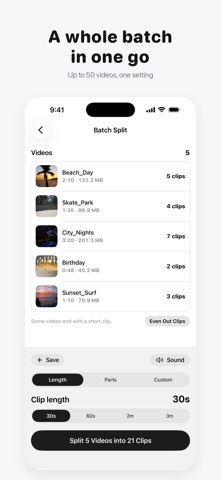
• Batch Split: up to 50 videos in one go, with one setting for all
• Remove sound: clips without their audio, ready for your own music
• Saved presets for the settings you use most
• Albums: each video's clips saved into an album of their own

Pro is a one-time purchase. There is no subscription and nothing renews.


WORKS WITH

• Videos from the Camera, Photos and the Files app, including iCloud videos
• HEVC, H.264 and ProRes, in MOV and MP4
• HDR, Cinematic and Slo-mo videos from iPhone
• Portrait and landscape, at any resolution
• Up to 300 clips from one video
• 11 languages, switchable inside the app


QUESTIONS

Does Video Splitter add a watermark?
No. Clips have no watermark, in the free version and in Pro.

Does it lower the video quality?
No. Clips are copied from the original without re-encoding, so they keep its resolution, codec, HDR and bitrate.

Is it a subscription?
No. Splitting is free, and Pro is a one-time purchase that never renews.

Are my videos uploaded anywhere?
No. Video Splitter works entirely on your iPhone or iPad. There are no uploads, no account and no analytics.

Does it work offline?
Yes. Splitting, trimming and saving all work in airplane mode.

Can I trim a video before splitting it?
Yes. Drag either end of the filmstrip, and only the part you keep is split. A trimmed part that fits in one clip can be saved on its own.

How short or long can each clip be?
The free lengths are 30 seconds, 60 seconds, 2 minutes and 3 minutes. Pro lets you type any length from 0.1 seconds to 10 minutes.

Do I have to save every clip?
No. Every clip starts selected, and you tap to leave out the ones you don't want before saving or sharing.

Can I remove the sound from the clips?
Yes, with Pro. Remove sound makes clips without audio, without re-encoding the video.

Does every frame end up in a clip?
Yes. Each frame lands in exactly one clip, so nothing repeats at a cut and nothing goes missing between two clips.


Questions or problems? Write to support@amanghuman.com. We read every message.

Terms of Use (EULA): https://amanghuman.com/eula?app=videosplitter
Privacy Policy: https://amanghuman.com/privacy?app=videosplitter
Show more Show less

Screenshots

Video Splitter: Split & Cut Screenshot 1 of 7
Video Splitter: Split & Cut Screenshot 2 of 7
Video Splitter: Split & Cut Screenshot 3 of 7
Video Splitter: Split & Cut Screenshot 4 of 7
Video Splitter: Split & Cut Screenshot 5 of 7
Video Splitter: Split & Cut Screenshot 6 of 7
Video Splitter: Split & Cut Screenshot 7 of 7
Screenshots by Amandeep Singh, from the the App Store listing
Official page on the App Store

Alternatives to Video Splitter: Split & Cut

Cut Trim Split Video Editor icon Cut Trim Split Video Editor
Farouk Elsayed
5.0
Free
1 ratings
Video Splitter - Split Videos icon Video Splitter - Split Videos
Sreenu Kistapuneni
0.0
Free
SliceIt: Split Video in Parts icon SliceIt: Split Video in Parts
RUEBEN ANSOLIWEN AKANKOBATENG
5.0
Free
2 ratings
Video Splitter: Story Splitter icon Video Splitter: Story Splitter
Somia Elkhoussi
0.0
Free
WakeWake: Easy Video Splitter icon WakeWake: Easy Video Splitter
Kensuke Hoshikawa
0.0
Free
SimpleCut - シンプルな動画編集・カバー画像作成 icon SimpleCut - シンプルな動画編集・カバー画像作成
Takaho Hayashi
0.0
Free
VidTools: Video Compressor icon VidTools: Video Compressor
Didactic Initiatives LLC
5.0
Free
1 ratings
Splitify - Cut Your Videos icon Splitify - Cut Your Videos
capsella.io
0.0
Free

More from Amandeep Singh

Metadata Remover Photo & Video icon Metadata Remover Photo & Video
Amandeep Singh
4.4
Free
10 ratings
Invoice Maker: PDF & Estimate icon Invoice Maker: PDF & Estimate
Amandeep Singh
5.0
Free
3 ratings
Compress: Photos & Videos icon Compress: Photos & Videos
Amandeep Singh
5.0
Free
1 ratings

Changelog of Video Splitter: Split & Cut

No changelog data

Developer information for Amandeep Singh

Amandeep Singh

Address:

Share Video Splitter: Split & Cut

Comments on Video Splitter: Split & Cut for iOS

We don't have enough comments to show example comments. Please check back later.

App Store Rankings for Video Splitter: Split & Cut

This app is not ranked

Technologies used by Video Splitter: Split & Cut

Price drops on Google Play Popular Photo & Video Apps Top new apps Today's trending apps Apps other people are watching
Cut Trim Split Video Editor icon Cut Trim Split Video Editor
Video Splitter - Split Videos icon Video Splitter - Split Videos
SliceIt: Split Video in Parts icon SliceIt: Split Video in Parts
Video Splitter: Story Splitter icon Video Splitter: Story Splitter
WakeWake: Easy Video Splitter icon WakeWake: Easy Video Splitter
SimpleCut - シンプルな動画編集・カバー画像作成 icon SimpleCut - シンプルな動画編集・カバー画像作成
VidTools: Video Compressor icon VidTools: Video Compressor
Splitify - Cut Your Videos icon Splitify - Cut Your Videos
Overview Alternatives Reviews Rankings Technology
AppBrain Intelligence premium content

Subscribe now to get full and unlimited access to AppBrain Intelligence. You'll have access to:

  • App Intelligence dashboard (performance timeline, competitor comparison, country rankings, insight cards)
  • Detailed ranking data per app
  • Full timeline per developer
  • Device market shares data per country
  • Unlimited keyword tracking
1 Month

$75/mo
(billed every month)

SAVE 0%
Subscribe
3 Months

$65/mo
($195 billed every 3 months)

SAVE 13%
Subscribe
1 Year

$57.50/mo
($690 billed every year)

SAVE 23%
Subscribe
Each subscription will automatically renew 3 days before the expiration date for the same time period. Subscriptions can be cancelled at any time before the renewal.

AppBrain is an app data site, we track rankings, ratings, installs for all apps and games on Google Play and the App Store. AppBrain doesn't host app files or APKs, all install links go directly to the official store. All trademarks are owned by their respective owners.

More apps

  • Top Android apps being viewed
  • Super HEXA Legend
  • ANZ Plus
  • VoltSim - circuit simulator Android App

App statistics

  • Android statistics
  • Google Play Developer stats
  • Trending Android Apps
  • Trending iOS apps
  • Top popular Apps
  • Buy the best Android phone
  • Buy & sell app businesses

About AppBrain

  • Contact
  • Privacy
  • Documentation
  • DMCA takedowns
  • Blog
  • Android Interstitial Ads: Best practices to optimize your app's earnings
© 2010-2026 - AppBrain