
DashCam: Mobile Drive Recorder
DashCam: Mobile Drive Recorder is made and published by Ankur Chauhan. AppBrain is an independent app data site and isn't affiliated with Ankur Chauhan. The app name, icon, screenshots and description belong to Ankur Chauhan and are shown as published on the App Store.
AppBrain's verdict
- Rating on App Store
- 5.00
- 5 ratings
- Last updated
- October 5, 2026
It doesn't have enough ratings yet to judge what users think.
Rankings
App Store top chartsApp Store Rankings for DashCam: Mobile Drive Recorder
Competitors
Similar apps and more from Ankur ChauhanAlternatives to DashCam: Mobile Drive Recorder


More from Ankur Chauhan


Releases
Updates seen on the App Store- Version
- 1.8
- Launched
- May 2026
No changelog data
User feedback
Ratings and reviews on the App StoreComments on DashCam: Mobile Drive Recorder for iOS
We don't have enough comments to show example comments. Please check back later.
Technology
Found in the app by AppBrain- Price
- Free
- App size
- 7.00 MB
- Content rating
- Everyone
Technologies used by DashCam: Mobile Drive Recorder
About the app and developer
About DashCam: Mobile Drive Recorder
DashCam: Mobile Drive Recorder is a navigation app developed by Ankur Chauhan.
User Ratings
DashCam: Mobile Drive Recorder is rated 5.00 out of 5 stars. The rating is based on 5 ratings.
App Information
DashCam: Mobile Drive Recorder is freely available from the App Store. The app size is 7.00 MB. The latest version available is 1.8. The last update was on October 5, 2026.
Technical Requirements
The app has a content rating of Everyone. The app has been available on the App Store since May 2026.
Developer information for Ankur Chauhan
Address:
Store listing
By Ankur Chauhan, from the App Store





Description by Ankur Chauhan Written by the developer, not by AppBrain. Click to read.
DashCam Drive Recorder turns your iPhone into a clean, reliable, and easy-to-use dashcam for everyday driving, road trips, parking situations, and unexpected moments on the road.
Record your drive, save important clips, view your trip gallery, and capture helpful driving context with speed, time, and map overlays.
Whether you are commuting, driving with family, parking in public, or taking a long road trip, this app helps you keep useful video evidence right on your iPhone.
Key Features
Loop Recording - Continuously record your drive without worrying about manually managing storage. Older non-protected clips can be replaced as new recordings continue.
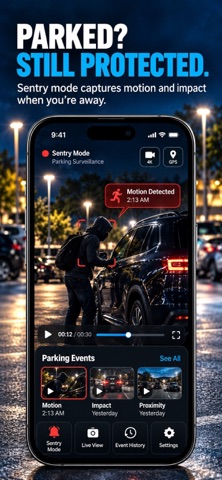
Sentry Capture - Use parked capture mode to keep an eye on your vehicle when you are away. Helpful for parking lots, suspicious activity, or unexpected movement near your car.
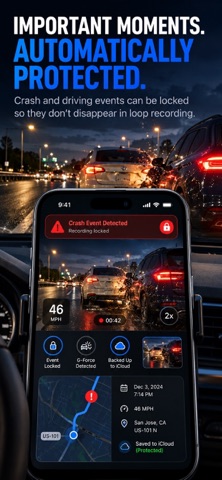
Crash-Lock Protection - Important moments can be locked so they are not accidentally deleted during loop recording.
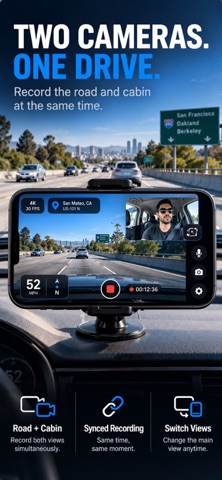
Speed Overlay -Show your driving speed directly on the recording screen for better trip context.
Map Picture-in-Picture - Use a compact map view while recording so your drive can include location context without covering the camera view.
Time-Lapse Recording - Capture long drives or parked moments in a compressed, easy-to-review format.
Built-In Gallery - Access recorded clips directly inside the app. Review, save, and share important videos when needed.
HD and Ultra HD Recording - Choose the recording quality that fits your storage and clarity needs.
Auto Start and Stop Recording - Make recording easier with smart start and stop options designed for daily driving.
Why Use This App?
A dedicated dashcam can be expensive, complicated, or another device to manage. This app gives you a practical iPhone-based option with the core features drivers expect: recording, loop storage, map context, speed overlay, sentry capture, crash-lock protection, and quick sharing.
Perfect For
Daily commuters
Family drivers
Road trips
Parking lots
Unexpected road incidents
Insurance evidence
Travel memories
Car safety awareness
Battery & GPS Usage
DashCam Drive Recorder may use your iPhone camera, GPS, and motion sensors while recording to capture video, speed, location, and driving context. Continuous camera and GPS usage can use more battery than normal apps.
For longer drives, keep your iPhone connected to a charger and use a stable windshield or dashboard mount for the best recording experience.
Designed for Simple, Safe Use
The app is built with a clean interface so you can start recording quickly and focus on driving. Controls are large, simple, and easy to understand.
Download DashCam Drive Recorder and turn your iPhone into a smarter driving companion.