

DataFastView
DataFastView is made and published by Moscoso Pacheco, Gonzalo Juvenal. AppBrain is an independent app data site and isn't affiliated with Moscoso Pacheco, Gonzalo Juvenal. The app name, icon, screenshots and description belong to Moscoso Pacheco, Gonzalo Juvenal and are shown as published on the App Store.
AppBrain's verdict
- Last updated
- September 28, 2026
- Size
- 4.29 MB
User feedback
Ratings and reviews on the App StoreComments on DataFastView for iOS
We don't have enough comments to show example comments. Please check back later.
Store listing
By Moscoso Pacheco, Gonzalo Juvenal, from the App Store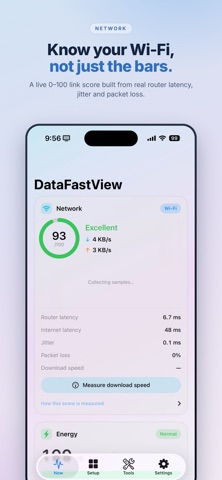


Description by Moscoso Pacheco, Gonzalo Juvenal Written by the developer, not by AppBrain. Click to read.
Live Wi-Fi quality, battery, CPU, memory, storage and the weather — in the Dynamic Island, on the Home Screen, in Control Center, and on one screen inside the app. Everything is measured on the device. There is no account, no tracking, and nothing to sign up for.
WI-FI QUALITY, NOT SIGNAL BARS
A full-bar connection with 300 ms of jitter is a bad connection, and the bars will never tell you. DataFastView scores your link from 0 to 100 using four things it measures directly:
• Round-trip time to your own router
• Round-trip time to the internet
• Jitter — how much that time varies
• Packet loss
Live upload and download rates sit next to the score, and a download-speed test runs only when you tap the button. Tap "How this score is measured" to see exactly how the four are weighted. Nothing is hidden behind a marketing number.
ENERGY AND SYSTEM
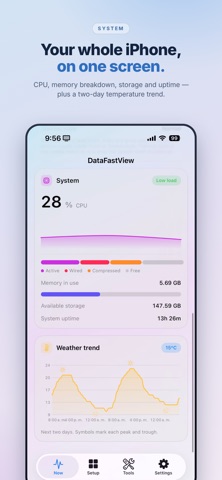
Battery level and charging state, Low Power Mode, and thermal state — Normal, Elevated, High or Critical. CPU on a fixed 0-100% scale, so a phone idling at 3% does not draw the same mountain as one at 100%. Memory split into active, wired, compressed and free. Free storage and time since the last restart.
There is no battery temperature, health or cycle count, because iOS publishes no public API for any of them. Any app showing you those is estimating. This one tells you what it actually knows.
THE DYNAMIC ISLAND
Choose one metric for the left side and one for the right, from CPU, memory in MB or percent, storage in GB or percent, uptime, battery, thermal state, network rates, Wi-Fi quality, or a clock that keeps ticking on its own. Every option shows its live value while you pick, so you are choosing from real numbers rather than names.
WIDGETS
Actions (medium) — up to ten launch buttons of your own, in two rows of five, each with a symbol or a real app icon and a colour you choose. Load a screenshot of your wallpaper and the widget reads as transparent.
Storage and network (small) — a ring of used space, free and used in GB, and the last Wi-Fi reading.
Weather (large) — current conditions, temperature, feels-like and the next five days, in the app's own palette. Weather data provided by Apple Weather.
There are Control Center controls too, and rotating phrases on the Lock Screen.
WEATHER
Current conditions, the next hours and the next days, with a two-day temperature trend on the Now tab that marks every peak and trough. Location is used only to ask for the forecast where you are, and only while you are using the app.
TOOLS
A password generator that runs entirely on the device, using the system's cryptographic random source. Set the length and character classes, exclude look-alike characters (O 0 I l 1) and keyboard runs (abc, 123, qwe), and read the real strength in bits of entropy. Nothing is stored, nothing is sent, and the clipboard copy expires.
PRIVACY
No account. No analytics. No advertising. No third-party SDKs. The app has no server, so there is nowhere for your data to go. Everything you configure lives on your iPhone and disappears when you delete the app.
ONE PAYMENT
Buy it once. No subscription, no trial that turns into a bill, no in-app purchases.
English and Spanish. iPhone only, iOS 17.6 or later.
Weather data provided by Apple Weather.
https://developer.apple.com/weatherkit/data-source-attribution/
Safety and technology
Found in the app by AppBrain- Price
- Free
- App size
- 4.29 MB
- Content rating
- Everyone
Technologies used by DataFastView
Releases
Updates seen on the App Store- Version
- 1.3
- Launched
- September 2026
No changelog data
Alternatives
Similar apps and more from Moscoso Pacheco, Gonzalo JuvenalAlternatives to DataFastView


More from Moscoso Pacheco, Gonzalo Juvenal


Rankings
App Store top chartsApp Store Rankings for DataFastView
About the app and developer
About DataFastView
DataFastView is an utilities app developed by Moscoso Pacheco, Gonzalo Juvenal.
What is the rating of DataFastView?
DataFastView has no ratings yet.
Is DataFastView free?
DataFastView is free. The app size is 4.29 MB. The latest version available is 1.3. The last update was on September 28, 2026.
What are the requirements for DataFastView?
The app has a content rating of Everyone. The app has been available on the App Store since September 2026.
Developer information for Moscoso Pacheco, Gonzalo Juvenal
Moscoso Pacheco, Gonzalo Juvenal
Address:
Frequently asked questions about DataFastView
Is DataFastView free?
Yes. DataFastView is free on the App Store.
Is DataFastView still available?
Yes. DataFastView is on the App Store, and the last update we saw was on September 28, 2026.
How large is DataFastView?
DataFastView is 4.29 MB.
Is DataFastView suitable for children?
App Store rates the content of DataFastView as suitable for everyone.
Who made DataFastView?
DataFastView was developed by Moscoso Pacheco, Gonzalo Juvenal. It is listed in the utilities category on the App Store.
What are the best alternatives to DataFastView?
People looking at DataFastView also look at these utilities apps: Compass AR - Sun & Moon, GlowVox: LED Scrolling Text, WebClear, Say In Bulbs: LED Message Sign, Element Hider.