




AppBrain's verdict
- Rating on App Store
- 4.83
- 23 ratings
- Last updated
- September 20, 2026
- Size
- 35.8 MB
It doesn't have enough ratings yet to judge what users think.
User feedback
Ratings and reviews on the App StoreComments on Date Alarm Clock for iOS
We don't have enough comments to show example comments. Please check back later.
Store listing
By Blesslin Shinie J, from the App StoreDescription by Blesslin Shinie J Written by the developer, not by AppBrain. Click to read.
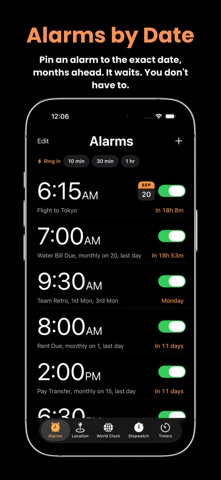
DateAlarm lets you schedule alarms for exact calendar dates — not just daily
repeats. Set reminders for birthdays, anniversaries, exams, flights, meetings,
or any important event in your life. Choose the precise day and time, even
months or years in advance.
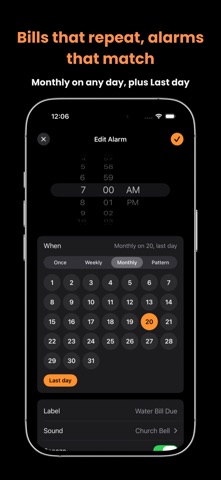
Real life doesn't repeat every day, so neither do your alarms. Set one for the
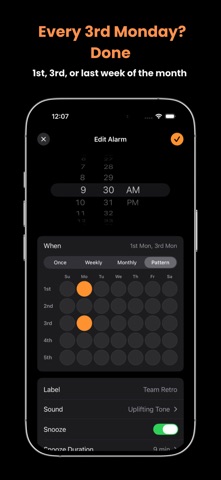
1st and the last day of every month for rent and bills. Or for the 2nd Thursday
for your team meeting, the 1st Monday for your book club. DateAlarm handles the
awkward months for you — pick the 31st and it simply skips the months that don't
have one, and "last day" always lands right whether the month ends on the 28th,
29th, 30th or 31st.
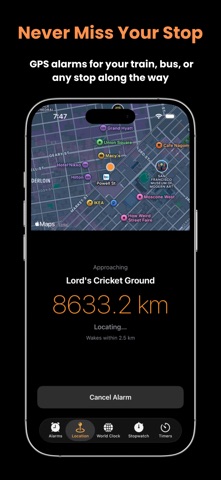
And DateAlarm wakes you by place, not just time. Set a location alarm and get
woken as you approach your destination — your train or bus stop, your station,
or anywhere you need to get off. Perfect for commuters, travelers, and anyone
who likes to nap on the way. It keeps working even when the app is closed, so
you can relax and trust it to alert you in time.
Follow every trip live with Live Activities on your Lock Screen and in the
Dynamic Island — see your remaining distance and ETA at a glance, without ever
opening the app. Your countdown timers show up there too.
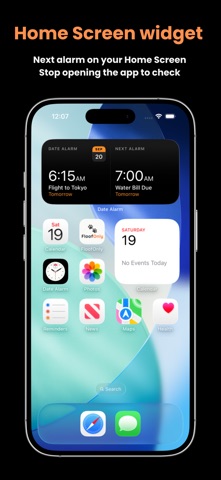
Keep your next alarm in sight with widgets for your Home Screen and Lock Screen,
or just ask Siri — "Set a date alarm", "Turn off my Flight alarm" — without
touching your phone at all.
Key Features
• Schedule alarms for any specific date — days, months, or years ahead
• Monthly alarms on the dates that matter — the 1st, the 15th, or the last day
of every month, however long that month is
• Repeat by pattern — the 1st Thursday, the 2nd Monday, the 3rd Friday
• Weekly alarms with one-tap Weekdays, Weekends and Every Day presets
• Location alarms — get woken as you near your stop or destination
• Live Activity & Dynamic Island — track distance and ETA at a glance
• Home Screen and Lock Screen widgets for your next alarm
• Siri and Shortcuts — create, turn on and turn off alarms by voice
• Quick alarms — ring in 10 minutes, 30 minutes or an hour, in one tap
• Rings through Silent mode and Focus, so you never sleep through it
• 28 alarm sounds, from gentle tones to unmissable — plus a silent option that
shows on screen without a sound
• Custom snooze, or no snooze at all
• Works in the background, even when the app is closed
• Custom labels for every alarm and trip
• Designed for iPhone and iPad
• Clean, distraction-free interface
• Built-in stopwatch with lap tracking
• Beautiful countdown timers with live updates
• World clock for global time tracking
• Simple, fast, and reliable performance
Whether you're planning months ahead, paying the rent on the last day of every
month, or just trying to wake up at the right stop, DateAlarm helps you stay on
time — every time.
Smart alarms. Real dates. Real places. Total control.
Safety and technology
Found in the app by AppBrain- Price
- Free
- App size
- 35.8 MB
- Content rating
- Everyone
Technologies used by Date Alarm Clock
Releases
Updates seen on the App Store- Version
- 1.4
- Launched
- February 2026
No changelog data
Alternatives
Similar apps and more from Blesslin Shinie JAlternatives to Date Alarm Clock



More from Blesslin Shinie J

Rankings
App Store top chartsApp Store Rankings for Date Alarm Clock
About the app and developer
About Date Alarm Clock
Date Alarm Clock is an utilities app developed by Blesslin Shinie J.
What is the rating of Date Alarm Clock?
Date Alarm Clock is rated 4.83 out of 5 stars, based on 23 ratings.
Is Date Alarm Clock free?
Date Alarm Clock is free. The app size is 35.85 MB. The latest version available is 1.4. The last update was on September 20, 2026.
What are the requirements for Date Alarm Clock?
The app has a content rating of Everyone. The app has been available on the App Store since February 2026.
Date Alarm Clock is made and published by Blesslin Shinie J. AppBrain is an independent app data site and isn't affiliated with Blesslin Shinie J. The app name, icon, screenshots and description belong to Blesslin Shinie J and are shown as published on the App Store.
Developer information for Blesslin Shinie J
Address:
Frequently asked questions about Date Alarm Clock
Is Date Alarm Clock free?
Yes. Date Alarm Clock is free on the App Store.
Is Date Alarm Clock still available?
Yes. Date Alarm Clock is on the App Store, and the last update we saw was on September 20, 2026.
How large is Date Alarm Clock?
Date Alarm Clock is 35.85 MB.
Is Date Alarm Clock suitable for children?
App Store rates the content of Date Alarm Clock as suitable for everyone.
How do people rate Date Alarm Clock?
Date Alarm Clock scores 4.83 out of 5 stars, from 23 ratings on the App Store.
Who made Date Alarm Clock?
Date Alarm Clock was developed by Blesslin Shinie J. It is listed in the utilities category on the App Store.
What are the best alternatives to Date Alarm Clock?
People looking at Date Alarm Clock also look at these utilities apps: Clock - Alarm Clock, Alarmate: Date Alarm Clock, DateAlarm - Reminder Alarm, Alarm Clock ◎, One Touch Alarm Clock.