AppBrain
AppBrain
  • Apps
  • Apps being viewed right now Trending apps today Most popular apps All-time most installed apps Top rated apps iPhone and iPad apps
  • Intelligence ▾
    Intelligence overview → Track any Android app or your whole market
    Track & analyze
    Keyword Tracker & OptimizerTrack & improve Play rankings App Performance ReportOne-off PDF for any app StatisticsFree Android & Play market stats
    Promote your app
    Featured Apps App Links
  • Intelligence
  • Pricing
  • Dashboard
  • Sign up
  • Log in
App Store Apps > Productivity > DayBox: Time Blocking Planner
App profile & analytics · Productivity · Data updated 2026-10-20
DayBox: Time Blocking Planner icon

DayBox: Time Blocking Planner

by Rene Fandida · Free · Version 1.2.0
Availability On the App Store since April 2026 ↗
Rating on App Store
–
Rating
–
0 reviews
Best rank
–
not in the top lists
Last updated
October 20, 2026
1.2.0

DayBox: Time Blocking Planner is made and published by Rene Fandida. AppBrain is an independent app data site and isn't affiliated with Rene Fandida. The app name, icon, screenshots and description belong to Rene Fandida and are shown as published on the App Store.

About DayBox: Time Blocking Planner

DayBox: Time Blocking Planner is a productivity app developed by Rene Fandida.

User Ratings

The app has no ratings yet.

App Information

DayBox: Time Blocking Planner is freely available from the App Store. The app size is 38.16 MB. The latest version available is 1.2.0. The last update was on October 20, 2026.

Technical Requirements

The app has a content rating of Everyone. The app has been available on the App Store since April 2026.

Description by Rene Fandida (from the App Store)
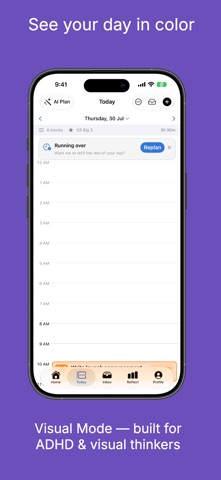
DayBox turns a chaotic to-do list into a clear daily plan you can actually finish. Drag tasks onto a visual timeline around your real calendar, protect time for deep work, focus one block at a time, and end the day knowing what you got done.

NEW IN 1.2
- Made for iPhone Duo and iPad: on the big screen, your timeline and Inbox sit side by side — drag tasks straight onto your day.
- Desk Mode on iPhone Duo: prop it up mid-block and the timer sits on the top half, every control on the bottom, and the screen stays on until the block ends.
- Visual Countdown: a color disk that shrinks as time runs out, so you can see how long you have at a glance.
- Wrap-Up Heads-Up: a nudge 5 minutes before a block ends.

THE DAYBOX METHOD - 5 STEPS, EVERY DAY
1. Capture tasks into your Inbox
2. Pick your Big 3 priorities for the day
3. Drag tasks onto your daily timeline
4. Start a focus timer for each block
5. Review your wins at the end of the day

That's it. Simple enough to actually stick with.

PLAN YOUR DAY
- Visual daily timeline with drag-and-drop time blocks
- Big 3 priorities - anchor your day to what matters most
- Calendar integration - see events beside your blocks, with optional two-way Apple Calendar sync
- Natural language input - type "Meeting 2pm 30min #work"
- Recurring tasks and day templates for your routines
- Checklists inside every task
- Tags to organize by project or life area
- A warning before you overcommit your day
- Siri & Shortcuts - add tasks hands-free

FOCUS DEEPLY
- A focus timer for every block - classic ring or the new Visual Countdown
- Live Activity on the Lock Screen and Dynamic Island
- Your task's checklist right on the focus screen
- Ambient sounds: rain, forest, ocean waves, coffee shop, fireplace, white noise
- Pomodoro mode with automatic breaks
- Log interruptions without losing your place
- Apple Watch app and Home Screen widgets

FOCUS-FRIENDLY BY DESIGN
Built with ADHD and visual thinkers in mind:
- Visual Timeline colors your blocks by tag
- Gentle Reminders swap pressure for kind wording
- Visual Countdown shows time left as a shrinking disk
- Wrap-Up Heads-Up, so a block never ends by surprise

REFLECT & GROW
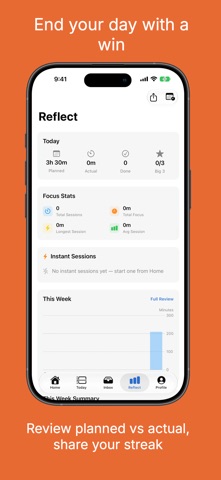
- Planned vs. actual focus, tasks done, and Big 3 progress
- Weekly review with charts and trends
- Streaks for planning, Big 3, and focus
- 20 achievement badges
- Share your day as a summary card

DAYBOX PRO
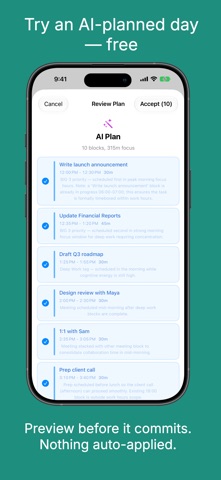
- AI daily planning around your real calendar - always previewed, never auto-applied (try an AI-planned day free)
- Adaptive replanning when your day changes
- AI time estimates for your tasks
- Time Insights: where your time goes by tag, and your best focus hours
- CSV time-log export for invoicing and timesheets

Choose monthly, yearly (free trial available), or a one-time lifetime purchase. Prices are shown in the app before you buy.

Payment is charged to your Apple ID at confirmation of purchase. Subscriptions auto-renew unless cancelled at least 24 hours before the end of the current period. Manage or cancel in Settings > Apple ID > Subscriptions.

Terms of Use (EULA): https://www.apple.com/legal/internet-services/itunes/dev/stdeula/
Privacy Policy: https://culi.app/apps/daybox/privacy-policy
Show more Show less

Screenshots

DayBox: Time Blocking Planner Screenshot 1 of 9
DayBox: Time Blocking Planner Screenshot 2 of 9
DayBox: Time Blocking Planner Screenshot 3 of 9
DayBox: Time Blocking Planner Screenshot 4 of 9
DayBox: Time Blocking Planner Screenshot 5 of 9
DayBox: Time Blocking Planner Screenshot 6 of 9
DayBox: Time Blocking Planner Screenshot 7 of 9
DayBox: Time Blocking Planner Screenshot 8 of 9
DayBox: Time Blocking Planner Screenshot 9 of 9
Screenshots by Rene Fandida, from the the App Store listing
Official page on the App Store

Alternatives to DayBox: Time Blocking Planner

Daily Task Manager, To Do List icon Daily Task Manager, To Do List
David Manso
5.0
Free
4 ratings
Bottm Transcribe Audio to Text icon Bottm Transcribe Audio to Text
DOBRE APLIKACJE
5.0
Free
5 ratings
BreakTime - work break timer icon BreakTime - work break timer
Stoyan Hristov
4.8
Free
14 ratings
Charts IQ: Chart & Graph Maker icon Charts IQ: Chart & Graph Maker
Nitish Rokade
3.7
Free
32 ratings
Expense Tracker: FinFlo icon Expense Tracker: FinFlo
AppWrapp
4.5
Free
24 ratings
Sona Mobile icon Sona Mobile
Sona Systems
2.7
Free
10 ratings
Pouch Buddy Nicotine Tracking icon Pouch Buddy Nicotine Tracking
VMGM Software LLC
4.5
Free
419 ratings
To Do List Widget - Simple icon To Do List Widget - Simple
Amit Verma
4.5
Free
1.5K ratings

More from Rene Fandida

Tiny Word Sprint icon Tiny Word Sprint
Rene Fandida
5.0
Free
1 ratings
Little Lapse: Bump Time-Lapse icon Little Lapse: Bump Time-Lapse
Rene Fandida
5.0
Free
1 ratings
Phlash: Swipe Photo Cleaner icon Phlash: Swipe Photo Cleaner
Rene Fandida
0.0
Free
Kindred: Family Care Circle icon Kindred: Family Care Circle
Rene Fandida
0.0
Free
Culi Echo: Voice Notes & Ideas icon Culi Echo: Voice Notes & Ideas
Rene Fandida
0.0
Free
Loopd: Family Chores & Pet icon Loopd: Family Chores & Pet
Rene Fandida
0.0
Free
Crashout Calendar icon Crashout Calendar
Rene Fandida
0.0
Free
MiseMate: Meal Prep & Planner icon MiseMate: Meal Prep & Planner
Rene Fandida
0.0
Free

Changelog of DayBox: Time Blocking Planner

No changelog data

Developer information for Rene Fandida

Rene Fandida

Address:

Share DayBox: Time Blocking Planner

Comments on DayBox: Time Blocking Planner for iOS

We don't have enough comments to show example comments. Please check back later.

App Store Rankings for DayBox: Time Blocking Planner

This app is not ranked

Technologies used by DayBox: Time Blocking Planner

Price drops on Google Play Top new apps Popular Productivity Apps Apps other people are watching Today's trending apps
Daily Task Manager, To Do List icon Daily Task Manager, To Do List
Bottm Transcribe Audio to Text icon Bottm Transcribe Audio to Text
BreakTime - work break timer icon BreakTime - work break timer
Charts IQ: Chart & Graph Maker icon Charts IQ: Chart & Graph Maker
Expense Tracker: FinFlo icon Expense Tracker: FinFlo
Sona Mobile icon Sona Mobile
Pouch Buddy Nicotine Tracking icon Pouch Buddy Nicotine Tracking
To Do List Widget - Simple icon To Do List Widget - Simple
Overview Alternatives Reviews Rankings Technology
AppBrain Intelligence premium content

Subscribe now to get full and unlimited access to AppBrain Intelligence. You'll have access to:

  • App Intelligence dashboard (performance timeline, competitor comparison, country rankings, insight cards)
  • Detailed ranking data per app
  • Full timeline per developer
  • Device market shares data per country
  • Unlimited keyword tracking
1 Month

$75/mo
(billed every month)

SAVE 0%
Subscribe
3 Months

$65/mo
($195 billed every 3 months)

SAVE 13%
Subscribe
1 Year

$57.50/mo
($690 billed every year)

SAVE 23%
Subscribe
Each subscription will automatically renew 3 days before the expiration date for the same time period. Subscriptions can be cancelled at any time before the renewal.

AppBrain is an app data site, we track rankings, ratings, installs for all apps and games on Google Play and the App Store. AppBrain doesn't host app files or APKs, all install links go directly to the official store. All trademarks are owned by their respective owners.

More apps

  • Top Android apps being viewed
  • Connection Stabilizer Booster
  • View 90 FPS + 120 FPS (v4.6)
  • Wyze Duo Cam Pan App

App statistics

  • Android statistics
  • Google Play Developer stats
  • Trending Android Apps
  • Trending iOS apps
  • Top popular Apps
  • Buy the best Android phone
  • Buy & sell app businesses

About AppBrain

  • Contact
  • Privacy
  • Documentation
  • DMCA takedowns
  • Blog
  • How to improve the earnings of your ad units
© 2010-2026 - AppBrain