

Daystead: Visual Daily Routine
Daystead: Visual Daily Routine is made and published by Robert Corbin. AppBrain is an independent app data site and isn't affiliated with Robert Corbin. The app name, icon, screenshots and description belong to Robert Corbin and are shown as published on the App Store.
AppBrain's verdict
- Last updated
- October 7, 2026
Rankings
App Store top chartsApp Store Rankings for Daystead: Visual Daily Routine
Competitors
Similar apps and more from Robert CorbinAlternatives to Daystead: Visual Daily Routine


More from Robert Corbin


Releases
Updates seen on the App Store- Version
- 2.0.1
- Launched
- June 2026
No changelog data
User feedback
Ratings and reviews on the App StoreComments on Daystead: Visual Daily Routine for iOS
We don't have enough comments to show example comments. Please check back later.
Technology
Found in the app by AppBrain- Price
- $0.99
- App size
- 3.05 MB
- Content rating
- Everyone
Technologies used by Daystead: Visual Daily Routine
About the app and developer
About Daystead: Visual Daily Routine
Daystead: Visual Daily Routine is a health & fitness app developed by Robert Corbin.
What is the rating of Daystead: Visual Daily Routine?
Daystead: Visual Daily Routine has no ratings yet.
Is Daystead: Visual Daily Routine free?
Daystead: Visual Daily Routine costs $0.99. The app size is 3.05 MB. The latest version available is 2.0.1. The last update was on October 7, 2026.
What are the requirements for Daystead: Visual Daily Routine?
The app has a content rating of Everyone. The app has been available on the App Store since June 2026.
Developer information for Robert Corbin
Address:
Store listing
By Robert Corbin, from the App Store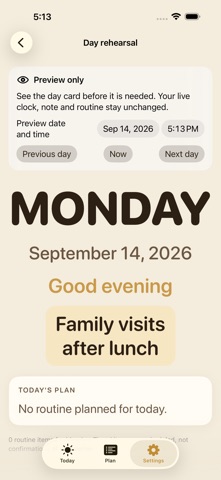


Description by Robert Corbin Written by the developer, not by AppBrain. Click to read.
HOW IT WORKS
1. Open Settings and tap Rehearse another day.
2. Choose a date and time, or step to the next or previous day.
3. Check the routine, current note behavior and quiet-hours face, then return to Now.
The live day card, weekly plan, family photo, quiet hours and caregiver handoff remain available. Snapshot date formatting now follows the same calendar time zone.
WHAT TO KNOW
Preview does not change the device clock, clear the live note or dim the screen. Timed routine items are plans, not confirmations of completion. A note appears only on its assigned date. This is a display and coordination tool, not a medical monitor.
iPhone and iPad.