

deBeam - Secure File Transfer
deBeam - Secure File Transfer is made and published by Tan Vi Minh. AppBrain is an independent app data site and isn't affiliated with Tan Vi Minh. The app name, icon, screenshots and description belong to Tan Vi Minh and are shown as published on the App Store.
AppBrain's verdict
- Last updated
- June 16, 2026
Rankings
App Store top chartsApp Store Rankings for deBeam - Secure File Transfer
Competitors
Similar apps and more from Tan Vi MinhAlternatives to deBeam - Secure File Transfer


More from Tan Vi Minh


Releases
Updates seen on the App Store- Version
- 1.4.0
- Launched
- May 2026
No changelog data
User feedback
Ratings and reviews on the App StoreComments on deBeam - Secure File Transfer for iOS
We don't have enough comments to show example comments. Please check back later.
Technology
Found in the app by AppBrain- Price
- Free
- App size
- 39.7 MB
- Content rating
- Medium
Technologies used by deBeam - Secure File Transfer
About the app and developer
About deBeam - Secure File Transfer
deBeam - Secure File Transfer is an utilities app developed by Tan Vi Minh.
What is the rating of deBeam - Secure File Transfer?
deBeam - Secure File Transfer has no ratings yet.
Is deBeam - Secure File Transfer free?
deBeam - Secure File Transfer is free. The app size is 39.71 MB. The latest version available is 1.4.0. The last update was on June 16, 2026.
What are the requirements for deBeam - Secure File Transfer?
The app has a content rating of Medium Maturity. The app has been available on the App Store since May 2026.
Developer information for Tan Vi Minh
Address:
Frequently asked questions about deBeam - Secure File Transfer
Is deBeam - Secure File Transfer free?
Yes. deBeam - Secure File Transfer is free on the App Store.
Is deBeam - Secure File Transfer still available?
Yes. deBeam - Secure File Transfer is on the App Store, and the last update we saw was on June 16, 2026.
How large is deBeam - Secure File Transfer?
deBeam - Secure File Transfer is 39.71 MB.
Is deBeam - Secure File Transfer suitable for children?
App Store gives deBeam - Secure File Transfer a medium maturity rating, so it is not meant for young children.
Who made deBeam - Secure File Transfer?
deBeam - Secure File Transfer was developed by Tan Vi Minh. It is listed in the utilities category on the App Store.
What are the best alternatives to deBeam - Secure File Transfer?
People looking at deBeam - Secure File Transfer also look at these utilities apps: Tablecast: CSV Converter, Explorer - Device Sensor Data, LocalLock: Offline Vault, Axion Photo Editor, WebDAV File Browser.
Store listing
By Tan Vi Minh, from the App Store



Description by Tan Vi Minh Written by the developer, not by AppBrain. Click to read.
--- HOW IT WORKS ---
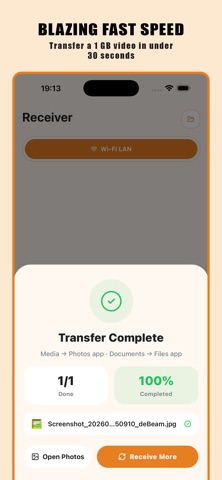
Pairing takes just 3 seconds.
The receiver taps "Receive" to show a QR code.
The sender scans it and taps "Send".
Done. No usernames, no pairing codes, no waiting for cloud servers.
--- WIRELESS TRANSPORT MODE ---
Wi-Fi LAN (Same Network / Hotspot)
Already on the same router or connected via a Mobile Hotspot? deBeam uses your existing local network path. Every device keeps its own IP, eliminating IP collisions. Fully cross-platform: transfer between iOS, iPadOS, macOS, and other mobile or desktop platforms with no setup required.
Real-world speed: 50-100 MB/s. A 1 GB video transfers in under 20 seconds.
High-performance local streaming without routing bottlenecks or cloud dependency.
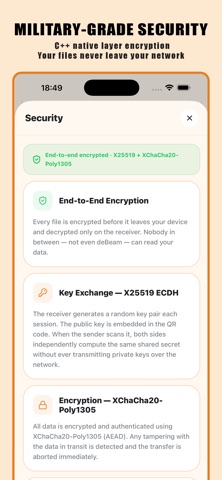
--- PROTOCOL-LEVEL END-TO-END ENCRYPTION ---
Security in deBeam is the protocol itself, implemented at the lowest native layer.
Key Exchange - X25519 ECDH
Every session generates a new keypair from scratch using random bytes from the OS secure random number generator. The receiver's public key is embedded in the QR code. Scanning performs an X25519 Elliptic Curve Diffie-Hellman exchange, producing a shared secret that exists only on those two devices for that one session.
The attacker space is 2^255 - computationally impossible to brute force.
Key Derivation - BLAKE2b
The shared secret is processed through BLAKE2b with the context string "deBeam-v3-session". This binds the derived key strictly to this protocol version, preventing key reuse or replay attacks.
Encryption - ChaCha20-Poly1305 (AEAD)
Every byte of your files is encrypted with ChaCha20-Poly1305. Files stream in 1 MB chunks, each with a unique nonce derived from its file index and chunk position.
No nonce reuse: No two chunks ever share a nonce - cryptographic reuse attacks are impossible.
Integrity: Each chunk carries a 16-byte Poly1305 authentication tag. Any tampered or replayed chunk is instantly detected and the connection terminates.
Memory Security - crypto_wipe()
After the key exchange, ephemeral private keys and session keys are immediately wiped from memory using crypto_wipe(). Past sessions cannot be recovered even if the device is compromised later.
Threat Coverage
Eavesdropping: Blocked by ChaCha20-Poly1305 encryption.
Man-in-the-middle: Blocked by X25519 (cannot forge secret without private keys).
Rogue device: Impossible without the QR-embedded public key.
Brute force: 2^255 key space - mathematically infeasible.
An 8-byte visual key fingerprint ("A1B2-C3D4...") on the receiver's screen allows quick visual verification before files move.
--- NATIVE PERFORMANCE ---
The encryption and streaming engine is written via native integration using Monocypher 4.0.2 - a compact, audited crypto library. ChaCha20-Poly1305 runs at ~500 MB/s on ARMv8. Encryption overhead is zero compared to Wi-Fi throughput - no speed penalty for maximum security.
--- NO SERVER. NO CLOUD. NO ACCOUNT. ---
deBeam has no backend infrastructure. No signup, no login, no tracking, no telemetry. QR pairing is computed entirely on-device and works 100% offline. Files travel directly from sender to receiver.
--- CORE FEATURES ---
Send multiple files in a single session
All file types: videos, photos, docs, archives, RAW files, and custom formats
Persistent local storage - chosen destination saved securely via Security-scoped Bookmarks
No file size limit
QR code pairing - no manual IP entry, no accounts
Visual key fingerprint for authenticity verification
Files saved securely to system Downloads or custom user-defined directory
Real-time transfer progress per file
Full cross-platform support across mobile and desktop devices
deBeam. Beam it.
Privacy Policy:
https://devitan-docs.gitbook.io/devitans-apps/x.-privacy-policy-for-devitans-apps
Terms of Use (EULA):
https://www.apple.com/legal/internet-services/itunes/dev/stdeula/