

Debit & Credit
Debit & Credit is made and published by Ivan Pavlov Pty Ltd. AppBrain is an independent app data site and isn't affiliated with Ivan Pavlov Pty Ltd. The app name, icon, screenshots and description belong to Ivan Pavlov Pty Ltd and are shown as published on the App Store.
AppBrain's verdict
EstablishedLoved by usersTop 10- Best rank
- #9
- Top Grossing, Russia
- Rating on App Store
- 4.78
- 2,400 ratings
- Last updated
- October 7, 2026
Users love it: 4.8 stars from 2,400 ratings. Its best ranking is #9 in Top Grossing, Finance in Russia.
Rankings
App Store top charts- Highest rank
- #9
- Chart
- Top Grossing
- Finance
- Country
- Russia
App Store Rankings for Debit & Credit
Competitors
Similar apps and more from Ivan Pavlov Pty LtdAlternatives to Debit & Credit







More from Ivan Pavlov Pty Ltd


Releases
Updates seen on the App Store- Version
- 7.9
- Launched
- August 2014
No changelog data
User feedback
Ratings and reviews on the App StoreComments on Debit & Credit for iOS
We don't have enough comments to show example comments. Please check back later.
Technology
Found in the app by AppBrain- Price
- Free
- App size
- 29.8 MB
- Content rating
- Everyone
Technologies used by Debit & Credit
About the app and developer
About Debit & Credit
Debit & Credit is a finance app developed by Ivan Pavlov Pty Ltd.
User Ratings
Debit & Credit is rated 4.78 out of 5 stars. The rating is based on 2.4 thousand ratings.
App Information
Debit & Credit is freely available from the App Store. The app size is 29.75 MB. The latest version available is 7.9. The last update was on October 7, 2026.
Technical Requirements
The app has a content rating of Everyone. The app has been available on the App Store since August 2014.
Developer information for Ivan Pavlov Pty Ltd
Address:
Store listing
By Ivan Pavlov Pty Ltd, from the App Store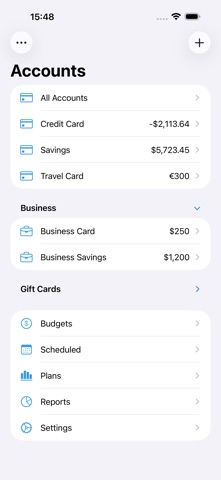



Description by Ivan Pavlov Pty Ltd Written by the developer, not by AppBrain. Click to read.
• All Accounts in One App
Keeping financial records was always a bit of a hassle. But now you can actually enjoy it. See all your accounts in one place and switch between them with one simple touch.
• Integration with Apple Card, Apple Cash, and Apple Savings
Get your transactions from Apple Card automatically imported into the app. Debit & Credit will help you to automatically categorize them using import rules.
• Super Fast
Creating a new transaction now takes a matter of seconds. It has never been easier with gestures and other features that we developed for you. And we will never require you to make dozens of unnecessary taps to accomplish simple tasks.
• Locations (Geotagging)
Shopping frequently at the same place? Save its location to record expenses even faster. You can also get a list of saved payees sorted by distance.
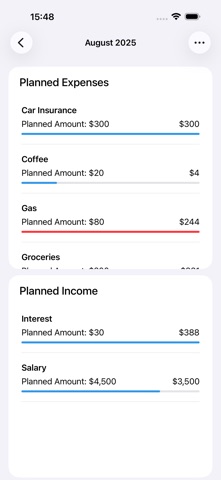
• Budgets & Scheduled Transactions
Do you want to budget expenses on a particular category? No problems. Do you plan to make a transaction in the future and want to be reminded about it? Consider it done.
• Financial Plans
Plan ahead by creating a financial plan for the next year. Compare your performance against it and see your future net wealth.
• Reports
We believe in clean, crisp reports that are easy to read and understand. See where and what do you spend your money on. Other types of reports are available too.
• iCloud Sync
We will never ask you to create an account or provide any personal details. All data is stored in iCloud, it is not available to anyone except you.
• Shared Accounts
Do you want to share some of your accounts with someone else? No problems, you can share selected accounts via iCloud while keeping other accounts private. Great for managing family finances!
• Bank reconciliation mode
Sometimes we all need extra help to keep our accounts in shape. You can easily reconcile your accounts with bank statements in the app to eliminate any disparities.
• Importing data
We know how important it is to be able to import transactions from your financial institutions. That's why we support CSV, QIF, QMTF, OFX and QFX files. And you can also choose which particular transactions to import from a file, something that not all financial apps know how to do.
• Watch App
Create new transactions on the go with the Apple Watch app. You can also check your budgets and pay scheduled transactions with it.
• Powerful features
Split categories, pending transactions, URL schemes, file attachments, transaction tags, Siri, Touch ID and Face ID support, printing reports and saving them as PDF files - all those and many other features are at your disposal when you need them.
• Mac version of the app
You can download macOS version of the app on the Mac App Store. It has even more features and syncs fast with the iOS companion via iCloud.
Some features are limited to premium version subscribers. Premium version is an annual subscription. Our privacy policy, as well as subscription terms are available at https://debitandcredit.app/privacy-policy-with-terms.html.
In case of any questions please don't hesitate to contact support@debitandcreditapp.com.