

Decibel Meter & Sound Level dB
Decibel Meter & Sound Level dB is made and published by ZeroPlay Ltd. AppBrain is an independent app data site and isn't affiliated with ZeroPlay Ltd. The app name, icon, screenshots and description belong to ZeroPlay Ltd. and are shown as published on the App Store.
AppBrain's verdict
- Last updated
- September 2, 2026
Rankings
App Store top chartsApp Store Rankings for Decibel Meter & Sound Level dB
Competitors
Similar apps and more from ZeroPlay Ltd.Alternatives to Decibel Meter & Sound Level dB


More from ZeroPlay Ltd.


Releases
Updates seen on the App Store- Version
- 1.3
- Launched
- March 2026
No changelog data
User feedback
Ratings and reviews on the App StoreComments on Decibel Meter & Sound Level dB for iOS
We don't have enough comments to show example comments. Please check back later.
Technology
Found in the app by AppBrain- Price
- Free
- App size
- 98.5 MB
- Content rating
- Everyone
Technologies used by Decibel Meter & Sound Level dB
About the app and developer
About Decibel Meter & Sound Level dB
Decibel Meter & Sound Level dB is an utilities app developed by ZeroPlay Ltd.
User Ratings
The app has no ratings yet.
App Information
Decibel Meter & Sound Level dB is freely available from the App Store. The app size is 98.49 MB. The latest version available is 1.3. The last update was on September 2, 2026.
Technical Requirements
The app has a content rating of Everyone. The app has been available on the App Store since March 2026.
Developer information for ZeroPlay Ltd.
Address:
Store listing
By ZeroPlay Ltd., from the App Store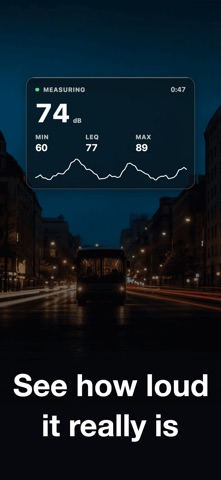


Description by ZeroPlay Ltd. Written by the developer, not by AppBrain. Click to read.
LIVE READING
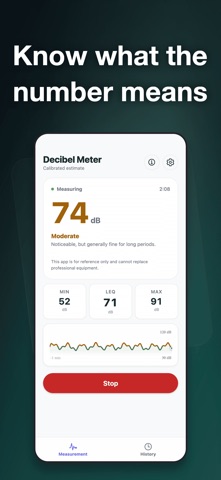
Your phone's microphone drives a live dB reading from 30 to 120. It is labeled a phone estimate, because that is what it is. The app collects three valid samples before the first value, so it spends a moment stabilizing instead of throwing out a wild opening number. If the sound pushes the mic too hard, an overload warning appears and stays on the saved measurement. Pick a refresh of 50, 100 or 200 ms and smoothing of 3, 5 or 10 samples for the headline figure.
MIN, Leq, MAX
Leq is an energy average, not the arithmetic mean. A minute at 60 dB followed by a minute at 70 dB gives 67.4 dB, not 65, because the loud part dominates. That is the number worth quoting. A rolling 60-second chart draws the last minute with color bands at 70, 85 and 100 dB, and every level also gets a plain word: Quiet below 70, Moderate 70–84, Loud 85–99, Very loud from 100.
SAVED MEASUREMENTS
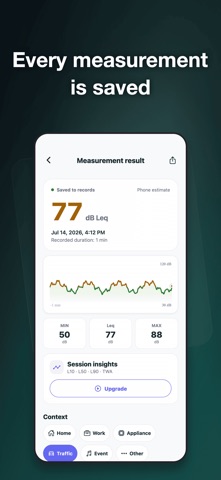
Measurements are stored on the device, newest first and grouped by date, up to 500 of them. Each keeps duration, MIN, Leq, MAX, the full sample series, calibration state, the overload flag, your alert threshold, one context tag — Home, Work, Appliance, Traffic, Event or Other — and a note of up to 240 characters. The today card totals the time you measured today, today's Leq and today's dose. Delete one, clear all, or switch saving off.
INSIGHTS
L10, L50 and L90 separate the loud, typical and quiet parts of one measurement. You get the time at or above your threshold in seconds and as a percentage, plus dose and TWA on the NIOSH criterion of 85 dB over 8 hours, an 80 dB threshold and a 3 dB exchange rate. Today exposure adds up only the measurements you actually took today — unmeasured minutes are never counted as quiet — and reads Safe, Caution or Danger.
EXPORT
Send one measurement as a CSV with the header block and every sample, or as a one-page PDF with the waveform, MIN/Leq/MAX, L10/L50/L90, dose, TWA and threshold time. Export the whole history as a 22-column CSV, one row per measurement, or as a PDF summary table.
CALIBRATION
With an external sound level meter on hand, a three-step wizard takes its value and stores an offset of up to ±50 dB. Later measurements are marked calibrated estimates, and the default returns in one tap.
SOUNDS AND ALERT
Fifteen everyday sounds run from breathing at 10 dB to fireworks at 140 dB, each with a short description and a health badge. Choose an alert at 70, 80, 90, 100 or 110 dB; crossing it gives you a haptic buzz — a vibration, nothing audible.
WHERE IT GETS USED
Two bedrooms in a new apartment. The open-plan office at 3 p.m. A window AC before and after a service call. Freeway noise from the balcony. Band practice, the gym, the leaf blower, a school cafeteria.
PRIVACY
Audio is processed on your device and is never uploaded; no recording is kept once a measurement ends. No account, no cloud sync. Measurements stay on the phone and leave only as the CSV or PDF you export. This is an everyday phone estimate, not an instrument for compliance or legal use.
FREE AND SUBSCRIPTION
Free gives you five measurements a day, up to 60 seconds each, and the full result appears every time. A subscription lifts both limits and opens history, insights, today exposure, calibration, a custom threshold and CSV/PDF export. Weekly or monthly, each with a three-day trial.
Terms of Use: https://zeroplay.io/docs/legal/terms-of-service
Privacy Policy: https://zeroplay.io/docs/legal/privacy-policy