

DEHNwork is made and published by DEHN SE. AppBrain is an independent app data site and isn't affiliated with DEHN SE. The app name, icon, screenshots and description belong to DEHN SE and are shown as published on the App Store.
AppBrain's verdict
- Last updated
- October 6, 2026
- Size
- 26.4 MB
User feedback
Ratings and reviews on the App StoreComments on DEHNwork for iOS
We don't have enough comments to show example comments. Please check back later.
Store listing
By DEHN SE, from the App Store



Screenshots by DEHN SE, from the the App Store listing
Description by DEHN SE Written by the developer, not by AppBrain. Click to read.
The DEHNwork app is an innovative application that is used in conjunction with the DEHNsense EFD (Electric Field Detector) voltage alarm. The DEHNsense EFD detects electric fields and provides adjustable visual, haptic and acoustic indicators whose frequency increases when an electric field is approached.
The DEHNwork app enables the DEHNsense EFD user to make settings and configurations and transfer them to the DEHNsense EFD. The following functions are available to users:
1. DEHNsense EFD pairing via BLE
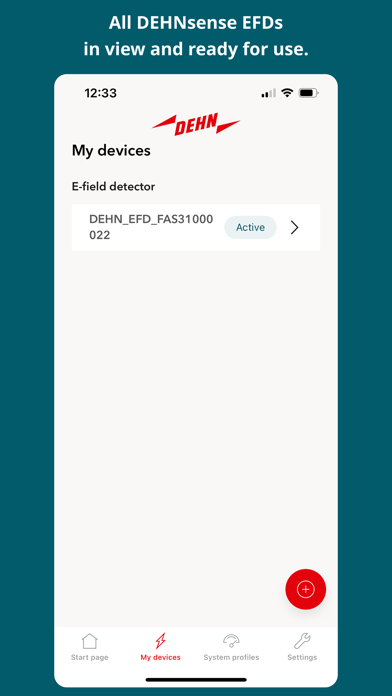
Using BLE, DEHNsense EFD devices that are in the vicinity of your smartphone are recognised and can therefore be paired. To pair the two devices, a PIN is required, which you will find on the back of your DEHNsense EFD. After successful pairing, you can activate and use your DEHNsense EFD in the DEHNwork app.
2. Display of device data
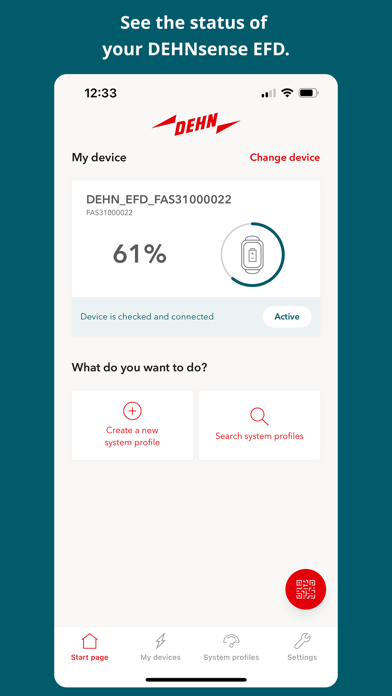
Your connected and active DEHNsense EFD provides you with a status display showing the battery level, performed device check and connection status.
3. Creating and editing system profiles
Once you have registered and logged in with your company email address, you can access all the system profiles that have already been created for your domain (@yourcompany.com). You can search, select and activate the system profiles.
Existing system profiles can also be edited. DEHNwork allows you to edit the system title and type. It is also possible to edit the location of the system and the voltage range. Finally, photos of the system can be added to a system profile.
If an installation you require has not yet been created in the system, you can create it via DEHNwork. To do this, you can either copy an existing system profile and then edit it or create the system from scratch.
4. Synchronising system profiles
All system profiles available in DEHNwork can be activated and thus synchronised with your DEHNsense EFD. After successful synchronisation, the values stored in the profile are available in DEHNsense EFD.
The required system profile can also be activated by scanning a QR code. Immediately after scanning, you can activate the stored system profile and synchronise it with your DEHNsense EFD.
5. Warning sensitivity settings
You can use the DEHNwork app to adjust the response threshold to suit your working conditions. You can use a controller to set the distance to the live working zone smaller or larger. This always takes place within the framework of the stored system profiles and there are minimum distances that cannot be breached.
6. DEHNsense EFD response value customisation
After switching off or charging the DEHNsense EFD, the response values are normally automatically reset to more sensitive settings. You can deactivate this to retain the last set response values.
7. Implementation of DEHNsense EFD firmware updates
As soon as a firmware update is available for the DEHNsense EFD, you will receive a corresponding notification via the DEHNwork app. You can start the firmware update via the DEHNwork app. The DEHNwork app and DEHNsense EFD must be connected to do this.
Note:
The DEHNsense EFD is an additional hazard warning device that protects against the dangers of electric current. It is not a substitute for compliance with the 5 safety rules of DIN VDE 0105-100 (operation of electrical installations) or for ensuring a dead condition at the work location (3rd rule).
The DEHNsense EFD warns you when entering the vicinity zone and thus helps to prevent entering the live working zone.
The DEHNwork app enables the DEHNsense EFD user to make settings and configurations and transfer them to the DEHNsense EFD. The following functions are available to users:
1. DEHNsense EFD pairing via BLE
Using BLE, DEHNsense EFD devices that are in the vicinity of your smartphone are recognised and can therefore be paired. To pair the two devices, a PIN is required, which you will find on the back of your DEHNsense EFD. After successful pairing, you can activate and use your DEHNsense EFD in the DEHNwork app.
2. Display of device data
Your connected and active DEHNsense EFD provides you with a status display showing the battery level, performed device check and connection status.
3. Creating and editing system profiles
Once you have registered and logged in with your company email address, you can access all the system profiles that have already been created for your domain (@yourcompany.com). You can search, select and activate the system profiles.
Existing system profiles can also be edited. DEHNwork allows you to edit the system title and type. It is also possible to edit the location of the system and the voltage range. Finally, photos of the system can be added to a system profile.
If an installation you require has not yet been created in the system, you can create it via DEHNwork. To do this, you can either copy an existing system profile and then edit it or create the system from scratch.
4. Synchronising system profiles
All system profiles available in DEHNwork can be activated and thus synchronised with your DEHNsense EFD. After successful synchronisation, the values stored in the profile are available in DEHNsense EFD.
The required system profile can also be activated by scanning a QR code. Immediately after scanning, you can activate the stored system profile and synchronise it with your DEHNsense EFD.
5. Warning sensitivity settings
You can use the DEHNwork app to adjust the response threshold to suit your working conditions. You can use a controller to set the distance to the live working zone smaller or larger. This always takes place within the framework of the stored system profiles and there are minimum distances that cannot be breached.
6. DEHNsense EFD response value customisation
After switching off or charging the DEHNsense EFD, the response values are normally automatically reset to more sensitive settings. You can deactivate this to retain the last set response values.
7. Implementation of DEHNsense EFD firmware updates
As soon as a firmware update is available for the DEHNsense EFD, you will receive a corresponding notification via the DEHNwork app. You can start the firmware update via the DEHNwork app. The DEHNwork app and DEHNsense EFD must be connected to do this.
Note:
The DEHNsense EFD is an additional hazard warning device that protects against the dangers of electric current. It is not a substitute for compliance with the 5 safety rules of DIN VDE 0105-100 (operation of electrical installations) or for ensuring a dead condition at the work location (3rd rule).
The DEHNsense EFD warns you when entering the vicinity zone and thus helps to prevent entering the live working zone.
Safety and technology
Found in the app by AppBrain- Price
- Free
- App size
- 26.4 MB
- Content rating
- Everyone
Technologies used by DEHNwork
Releases
Updates seen on the App Store- Version
- 1.0.6
- Launched
- March 2025
No changelog data
Alternatives
Similar apps and more from DEHN SEAlternatives to DEHNwork


Rankings
App Store top chartsApp Store Rankings for DEHNwork
This app is not ranked
About the app and developer
About DEHNwork
DEHNwork is a productivity app developed by DEHN SE.
What is the rating of DEHNwork?
DEHNwork has no ratings yet.
Is DEHNwork free?
DEHNwork is free. The app size is 26.36 MB. The latest version available is 1.0.6. The last update was on October 6, 2026.
What are the requirements for DEHNwork?
The app has a content rating of Everyone. The app has been available on the App Store since March 2025.
Developer information for DEHN SE
Address: