

SolVecConMon
SolVecConMon is made and published by JUERGEN FRAUNDORFER. AppBrain is an independent app data site and isn't affiliated with JUERGEN FRAUNDORFER. The app name, icon, screenshots and description belong to JUERGEN FRAUNDORFER and are shown as published on the App Store.
AppBrain's verdict
- Last updated
- October 2, 2026
Rankings
App Store top chartsApp Store Rankings for SolVecConMon
Competitors
Similar apps and more from JUERGEN FRAUNDORFERAlternatives to SolVecConMon








Releases
Updates seen on the App Store- Version
- 2.9.7
- Launched
- April 2023
No changelog data
User feedback
Ratings and reviews on the App StoreComments on SolVecConMon for iOS
We don't have enough comments to show example comments. Please check back later.
Technology
Found in the app by AppBrain- Price
- Free
- App size
- 3.81 MB
- Content rating
- Medium
Technologies used by SolVecConMon
About the app and developer
About SolVecConMon
SolVecConMon is a productivity app developed by JUERGEN FRAUNDORFER.
What is the rating of SolVecConMon?
SolVecConMon has no ratings yet.
Is SolVecConMon free?
SolVecConMon is free. The app size is 3.81 MB. The latest version available is 2.9.7. The last update was on October 2, 2026.
What are the requirements for SolVecConMon?
The app has a content rating of Medium Maturity. The app has been available on the App Store since April 2023.
Developer information for JUERGEN FRAUNDORFER
Address:
Frequently asked questions about SolVecConMon
Is SolVecConMon free?
Yes. SolVecConMon is free on the App Store.
Is SolVecConMon still available?
Yes. SolVecConMon is on the App Store, and the last update we saw was on October 2, 2026.
How large is SolVecConMon?
SolVecConMon is 3.81 MB.
Is SolVecConMon suitable for children?
App Store gives SolVecConMon a medium maturity rating, so it is not meant for young children.
Who made SolVecConMon?
SolVecConMon was developed by JUERGEN FRAUNDORFER. It is listed in the productivity category on the App Store.
What are the best alternatives to SolVecConMon?
People looking at SolVecConMon also look at these productivity apps: Klarsolar HERO, TimeOfYourLife Timer, KRONE Drivers Club, CS Climastore, Pintexx Workplace.
Store listing
By JUERGEN FRAUNDORFER, from the App Store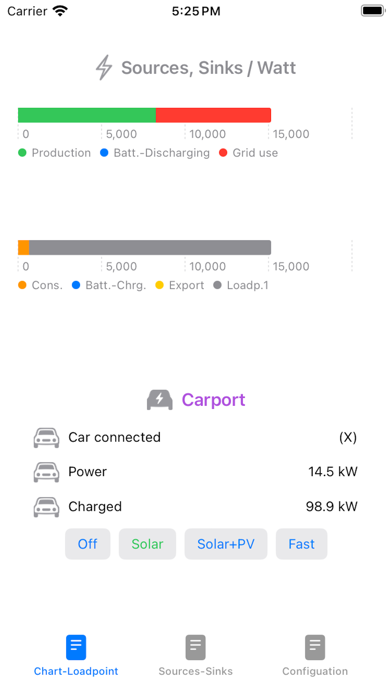


Description by JUERGEN FRAUNDORFER Written by the developer, not by AppBrain. Click to read.
It is a watchOS app that has a Companion iOS app, but can be installed and run independently of the Companion App. SolVecConMon is configured in the watchOS app as well as in the iPhone - depending on use. Up to and including version 2.0 it was purely a watchOS app. From version 2.1 on there is also a companion app - because with IOS17 and visonOS a Companion app will bring advantages in the future. However, the focus is still on the watchOS app.
Please note!
• For a first Look&Feel impression it's enough to download the App - it automatically connects to the cloud based evcc Demo System - https://evcc.io.
• Prerequisite for real operation is to have a locally installed Solar Charging evcc System (at least Version v0.316.1) - https://evcc.io - SolVecConMon is powered by evcc!
• App access outside of the local network requires additional software components. For the RaspberryPi 4, an image is available for download at https://jfraundo251158.github.io, which contains all software components preconfigured and thus significantly simplifies the system setup.
Good to know!
• App updates after the first App download are done in the Apple Watch. Please search for solvecconmon in the Apple Watch App Store and click the download-cloud.
• It's much easier to edit the Apple Watch App Store and App Configuration tab fields through your iPhone/iPad. For this please take care that in the iPhone/iPad Settings for Apple Watch Keyboard - Allow Notifications - is set.
Track IN REAL TIME
• solor power generation
• house consumption
• house batterie charging/discharging
• Vehicle(loadpoint) monitoring
• Vehicle(loadpoint) charge mode control
This version supports
• one solor grid - mandatory
• one house battery - optional
• 1st loadpoint - mandatory
• 2nd loadpoint - optional
(after selection "Number of loadpoints: 2" the App or Apple Watch restart is necessary to make it effective)
• Complications (Watch face externsions) - optional
Proven data exchange with evcc - versions
• v0.316.1
The application is working in your local network with running a local installation of https://evcc.io. For that you need to enter your evcc installation server in the App's Configuration tab like http://mymachine:7070 or http://myIP:7070 (expected you are using the default evcc port 7070).
If you want the App having access outside your local network you need additionally setup an 'Edge Router' (reverse proxy), which provides basic authentification feature and https secure connection. A detailed instruction guide along with an RaspberryPi 4 Image for download is to be found on https://jfraundo251158.github.io.
SolVecConMon is in operation on below Server setup.
Hardware: RaspberryPi 4 (LAN connected)
Software:
• Image/Container Management Docker - https://docs.docker.com - open source
• Solar Charging evcc container - https://evcc.io - open source
• Edge Router Traefik proxy - https://doc.traefik.io - open source
• Let's Encrypt - https://letsencrypt.org - a nonprofit Certificate Authority
With that SolVecConMon is additionally powered by Raspberry, Docker, Traefik and Let's Encrypt.
We are looking forward to get your feedback on jfr251158gm@gmail.com.
If you like this app then please support us with a review in the Apple App Store.
SolVecConMon comes without any kind of guarantee. You use the software at your own risk. It is your responsibility to ensure that it runs as intended.