DelayCam is made and published by
Eric Hochstrate.
AppBrain is an independent app data site and isn't affiliated with Eric Hochstrate.
The app name, icon, screenshots and description belong to Eric Hochstrate and are shown as
published on the App Store.
About DelayCam
DelayCam is a sports app developed by Eric Hochstrate.
User Ratings
The app has no ratings yet.
App Information
DelayCam is freely available from the App Store. The app size is 10.85 MB. The latest version available is 1.0. The last update was on October 11, 2026.
Technical Requirements
The app has a content rating of Everyone. The app has been available on the App Store since October 2026.
Description by Eric Hochstrate(from the App Store)
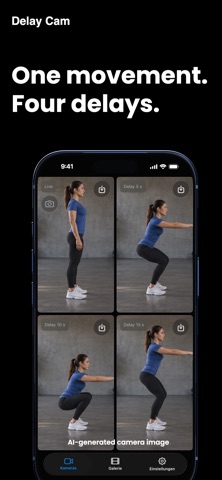
Perform an exercise, look at the screen, and watch your own movements again: Delay Cam turns your iPhone or iPad into a handy tool for training and video analysis.
Whether you’re into track and field, handball, strength training, golf, tennis, dancing, or gymnastics: Set a suitable delay and observe your technique immediately after performing the move. Save interesting moments as replays and analyze them later in slow motion or frame by frame.
YOUR TRAINING AT A GLANCE
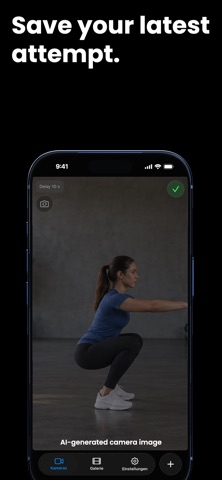
• Live and time-lapse: Choose a delay between 0 and 120 seconds for each view. Compare the live feed with earlier footage from the same camera. • Multiple views: Use two views simultaneously for free; with Pro, up to four. Delays and annotations can be adjusted individually. • Save replays later: Save the last 10 to 120 seconds of the selected view—provided they’re already in the buffer. • Frame rate on demand: Choose the recording frame rate that suits your training. Up to 240 frames per second are available on supported devices.
UNDERSTAND MOVEMENTS MORE PRECISELY
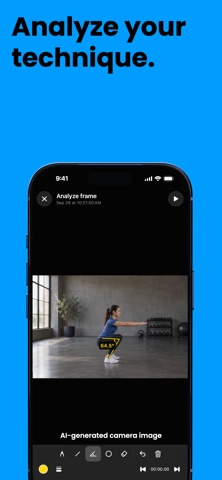
Play back saved replays in slow motion or go through the recording frame by frame in analysis mode. Use freehand drawings, lines, angles, triangles, and circles to mark positions and movement sequences directly on the still image.
The markings are temporary and do not alter your saved video.
MANAGE AND SHARE RECORDINGS
Your replays are saved in the local gallery. Share videos with others or have them automatically saved to Photos as well. If you grant microphone access, replays will also include audio.
The interface supports German and English, as well as portrait and landscape orientations on iPhone and iPad.
MANY FEATURES FOR FREE, PRO AT A LOW PRICE
The free version offers two camera views, replay storage, and video analysis. In the gallery, you can open the ten most recent recordings. Older recordings remain stored; you’ll need Pro to access them. The free version contains ads.
Delay Cam Pro adds: • Up to four camera views simultaneously • Access to all saved gallery recordings • Practical analysis tools: freehand drawings, lines, circles, ovals, triangles, and angle measurement • Ad-free use
Choose between a one-time payment of €4.99 for permanent Pro access and €0.99 per month. Both options offer the same Pro features. There are no introductory offers or free trial periods. The price displayed at the time of purchase is final.
The monthly subscription renews automatically unless you cancel it. You can manage and cancel it in your App Store subscriptions. There are no recurring charges with the one-time purchase.
Privacy Policy: https://delaycam.app/privacy/ Terms of Use: https://delaycam.app/terms/
Each subscription will automatically renew 3 days before the expiration date for
the same time period. Subscriptions can be cancelled at any time before the renewal.