

Designer From Nameplates
Designer From Nameplates is made and published by Yuhsiu Lai. AppBrain is an independent app data site and isn't affiliated with Yuhsiu Lai. The app name, icon, screenshots and description belong to Yuhsiu Lai and are shown as published on the App Store.
AppBrain's verdict
- Last updated
- July 29, 2026
Rankings
App Store top chartsApp Store Rankings for Designer From Nameplates
Competitors
Similar apps and more from Yuhsiu LaiMore from Yuhsiu Lai






Releases
Updates seen on the App Store- Version
- 1.0
- Launched
- July 2026
No changelog data
User feedback
Ratings and reviews on the App StoreComments on Designer From Nameplates for iOS
We don't have enough comments to show example comments. Please check back later.
Technology
Found in the app by AppBrain- Price
- $1.99
- App size
- 4.77 MB
- Content rating
- Everyone
Technologies used by Designer From Nameplates
About the app and developer
About Designer From Nameplates
Designer From Nameplates is an utilities app developed by Yuhsiu Lai.
User Ratings
The app has no ratings yet.
App Information
Designer From Nameplates costs $1.99. The app size is 4.77 MB. The latest version available is 1.0. The last update was on July 29, 2026.
Technical Requirements
The app has a content rating of Everyone. The app has been available on the App Store since July 2026.
Developer information for Yuhsiu Lai
Address:
Store listing
By Yuhsiu Lai, from the App Store



Description by Yuhsiu Lai Written by the developer, not by AppBrain. Click to read.
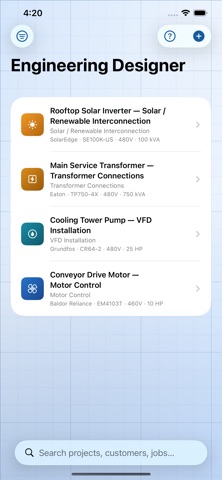
Engineering Designer helps engineers, electricians, technicians, and students quickly create engineering documentation by simply photographing an equipment nameplate. The app automatically extracts key technical information, asks a few project-specific questions, and generates professional design drawings, calculations, and documentation — right on your iPhone.
WHY YOU'LL USE IT
Standing in front of a motor, transformer, or panel with no time to start a design from scratch? Photograph the nameplate, answer a few questions about your application, and walk away with a conceptual one-line diagram, schematic, and bill of materials before you leave the site.
NAMEPLATE SCANNING
• Scan equipment nameplates using the iPhone camera
• Automatically identify manufacturer, model, voltage, current, horsepower, frequency, phase, RPM, efficiency, power factor, and other technical data
• Supports motors, transformers, generators, pumps, compressors, VFDs, PLCs, circuit breakers, panels, HVAC equipment, and industrial control devices
DESIGN GENERATION
• Select the application: motor control, power distribution, PLC control, VFD installation, transformer connections, generator systems, pump controls, conveyor controls, and more
• Answer a few simple design questions to customize project requirements
• Generate conceptual one-line diagrams
• Generate electrical schematics and control diagrams
• Create ladder logic diagrams for motor control and industrial automation applications
• Produce wiring diagrams and terminal connection diagrams
• Generate panel layouts and equipment arrangements
DOCUMENTATION & CALCULATIONS
• Build equipment schedules and device lists
• Automatically generate bills of materials (BOM)
• Create wire schedules and cable schedules
• Perform common engineering calculations, including conductor sizing, overcurrent protection, voltage drop, motor loading, and transformer sizing
• Generate engineering reports and design documentation
• Export drawings and reports for sharing and documentation
PROJECT MANAGEMENT
• Save projects for future editing and revisions
• Modify generated designs by changing design options, control methods, voltages, equipment selections, or application requirements
• Organize projects by customer, facility, or job number
• Maintain a searchable library of scanned equipment and previously generated designs
WHY ENGINEERING DESIGNER
• Works entirely on your iPhone — no uploads, no waiting, in the office or in the field
• Built for both educational and professional engineering workflows
• Turns a routine nameplate photo into a real head start on a design
• One app for one-line diagrams, schematics, ladder logic, wiring diagrams, panel layouts, schedules, BOMs, and calculations
Engineering Designer is a design aid intended to speed up conceptual documentation. Always verify calculations, code references, and component selections against the current edition of the National Electrical Code and applicable local requirements before construction or stamping.
Photograph a nameplate. Answer a few questions. Get a design.