

Digital Bearing Compass
Digital Bearing Compass is made and published by Thomas Oswald. AppBrain is an independent app data site and isn't affiliated with Thomas Oswald. The app name, icon, screenshots and description belong to Thomas Oswald and are shown as published on the App Store.
AppBrain's verdict
Established- Best rank
- #14
- Top Paid, Austria
- Rating on App Store
- 4.23
- 13 ratings
- Last updated
- June 17, 2026
It doesn't have enough ratings yet to judge what users think. Its best ranking is #14 in Top Paid, Navigation in Austria.
Rankings
App Store top charts- Highest rank
- #14
- Chart
- Top Paid
- Navigation
- Country
- Austria
App Store Rankings for Digital Bearing Compass
Top rankings
| Rank | Country | Category | List |
|---|---|---|---|
| 14 | Austria | Navigation | Top Paid |
Ranking history in Austria
Competitors
Similar apps and more from Thomas OswaldAlternatives to Digital Bearing Compass







More from Thomas Oswald




Releases
Updates seen on the App Store- Version
- 3.3
- Launched
- April 2019
No changelog data
User feedback
Ratings and reviews on the App StoreComments on Digital Bearing Compass for iOS
We don't have enough comments to show example comments. Please check back later.
Technology
Found in the app by AppBrain- Price
- $3.99
- App size
- 946.0 KB
- Content rating
- Everyone
Technologies used by Digital Bearing Compass
About the app and developer
About Digital Bearing Compass
Digital Bearing Compass is a navigation app developed by Thomas Oswald.
User Ratings
Digital Bearing Compass is rated 4.23 out of 5 stars. The rating is based on 13 ratings.
App Information
Digital Bearing Compass costs $3.99. The app size is 946.00 kB. The latest version available is 3.3. The last update was on June 17, 2026.
Technical Requirements
The app has a content rating of Everyone. The app has been available on the App Store since April 2019.
Developer information for Thomas Oswald
Address:
Frequently asked questions about Digital Bearing Compass
Is Digital Bearing Compass free?
No. Digital Bearing Compass costs $3.99 on the App Store.
Is Digital Bearing Compass still available?
Yes. Digital Bearing Compass is on the App Store, and the last update we saw was on June 17, 2026.
How large is Digital Bearing Compass?
Digital Bearing Compass is 946.00 kB.
Is Digital Bearing Compass suitable for children?
App Store rates the content of Digital Bearing Compass as suitable for everyone.
How do people rate Digital Bearing Compass?
Digital Bearing Compass scores 4.23 out of 5 stars, from 13 ratings on the App Store.
Who made Digital Bearing Compass?
Digital Bearing Compass was developed by Thomas Oswald. It is listed in the navigation category on the App Store.
What are the best alternatives to Digital Bearing Compass?
People looking at Digital Bearing Compass also look at these navigation apps: GPS Coordinates Finder Pro, Lead The Way, CourseSpeed, Perpetual Nautical Almanac, Compass Eye Bearing Compass.
Store listing
By Thomas Oswald, from the App Store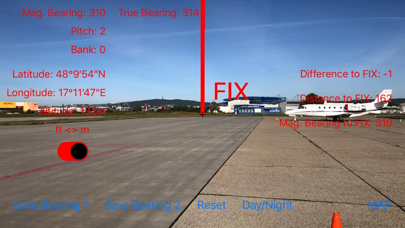

Description by Thomas Oswald Written by the developer, not by AppBrain. Click to read.
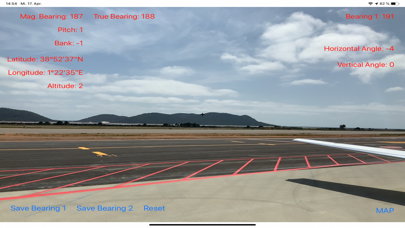
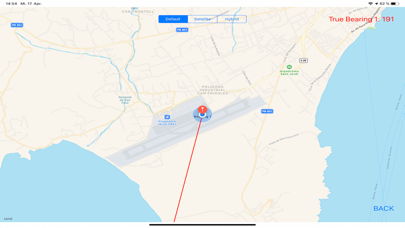
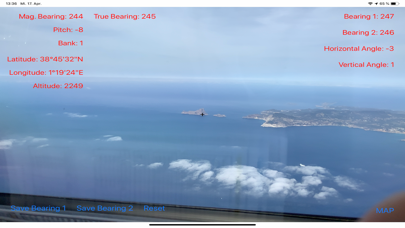
Are you a pilot, sailor or an outdoor adventurer ? Then the Digital Bearing Compass augmented reality app will be a valuable tool for you. Aim at objects in sight and directly read the true and magnetic bearing. Then you can check your bearings on the map. In addition, the current position, including the altitude above sea level is displayed.
Or you can set a fix in the map view. Bearing and distance to the fix is constantly computed. In the camera view, the difference angle between current bearing and the fix is also displayed. There is also a red marker at the location of the fix in camera view displayed by augmented reality technology.
Since version 3.x you can also set a mark on the current location. This mark is also displayed in the camera view. The app shows the distance and bearing to this marked location.
By taking 2 bearings or by using the fix, you can measure the angle between 2 points or objects ... if you are a sailor or yachtsman, you know what you can do with this information. You can use them directly for navigation, since this corresponds to the functionality of a sextant. You can also use trigonometry to determine the size of a distant object. By getting 2 bearings you can also apply the method of cross bearing directly. The bearings are automatically saved, so they will be available when you start the app the next time.
Benefits:
- The App uses the high-tech sensors of your iPhone or iPad to measure orientation, device and declination (the angle between the direction to Geographic North and Magnetic North, pilots call it variation).
- Augmented reality technology, available since iOS 11. The app will also be continuously improved, further developed and equipped with new features.
- You can switch between camera mode and map mode.
- The angle between 2 points or objects can be measured.
- A fix can be set in map view which is shown also in camera view.
- You can set a mark on the actual position. This mark is also displayed in the camera view.
- The position and direction of the bearings and the fix are drawn in the map.
- This way a cross bearing is possible.
- day/night mode
- you can choose between different coordinate formats
- you can choose between different distance and altitude units
- the cardinal directions are shown in the camera view
No matter if you are a pilot, seal, scientist, astronomer, technician, geographer or outdoor athlete, you will find the app extremely valuable for your orientation and navigation. And it is fun.
Please note that some sensors require a time to calibrate. Sometimes it might be the case that after starting the app, for a few seconds a wrong direction will be displayed. The camera should be moved slowly back and forth in this case so that the device can perform the calibration.
The app needs the permission to use the GPS. No data will be sent from the app to the outside world.
The app also uses augmented reality, a brand new technology which is supported only by the newest devices. You need at least an iPhone 6s or later, an iPad pro 2nd generation or later, or an iPad 2017 or later. Future devices will all support augmented reality.