

0.00
0 reviews
Free


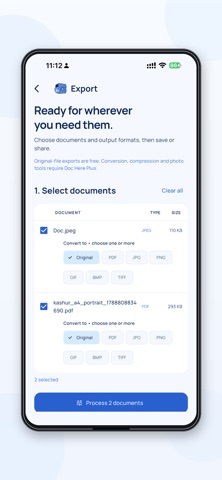

Screenshots by Akeed Bhat, from the the App Store listing
AppBrain's verdict
- Last updated
- September 14, 2026
- Size
- 35.2 MB
User feedback
Ratings and reviews on the App StoreComments on Doc Here for iOS
We don't have enough comments to show example comments. Please check back later.
Store listing
By Akeed Bhat, from the App StoreDescription by Akeed Bhat Written by the developer, not by AppBrain. Click to read.
Keep your important documents together, protected and ready when you need them.
Doc Here is an offline document vault for PDFs, photos, certificates, identity documents, videos and other files. Store your files encrypted on your iPhone and unlock your vault with Face ID, Touch ID or your device passcode. No Doc Here account or extra password is needed.
YOUR EVERYDAY VAULT, FREE
• Store documents, images, videos and other files, up to 100 MB per file.
• Organize everything in a clear grid with built-in and custom categories.
• Keep photos, birth certificates, mark sheets, passports and ID cards easy to find.
• Crop images and individual PDF pages before saving them to your vault.
• View supported images and PDFs, search your files and manage your categories.
• Export and share original files whenever you need them.
SAVE FILES YOUR WAY
Select documents from the export list and prepare them together. Save every prepared file separately with one destination selection, save a specific file, or save the whole batch as a ZIP. You can also share files with other apps.
DO MORE WITH DOC HERE PLUS
• Choose multiple output formats for each PDF or image: PDF, JPG, PNG, GIF, BMP and TIFF.
• Convert PDF pages into separate, numbered images.
• Turn images into PDFs or convert between supported image formats.
• Reduce photo and PDF file sizes with maximum-size settings in KB or MB.
• Set output dimensions in pixels, inches, centimeters or millimeters.
• Remove portrait backgrounds or replace them with a color or image.
• Add a name, caption, date or time below a photo.
• Review prepared file sizes and dimensions before saving or sharing.
Your original vault files stay unchanged when you prepare export copies. Office documents, videos and other unsupported conversion types can be stored and exported in their original format.
CHOOSE YOUR ACCESS
The basic vault and original-file exports are free. Doc Here Plus unlocks advanced export, conversion and photo tools through an automatically renewing monthly subscription or a one-month pass that does not renew.
Manage or cancel your monthly subscription through your App Store account settings. Restore active paid access after reinstalling or on another iPhone using the same Apple Account. An internet connection is needed for purchases, restoration and refreshing store status.
YOUR FILES STAY UNDER YOUR CONTROL
Vault storage and document processing happen on your device. Saving or sharing creates readable copies outside the encrypted vault.
Doc Here does not provide cloud backup. Restoring purchases restores paid access, not your documents. Keep your source files: uninstalling the app or losing your device can lose the local vault.
Terms of Use (EULA): https://www.apple.com/legal/internet-services/itunes/dev/stdeula/
Doc Here is an offline document vault for PDFs, photos, certificates, identity documents, videos and other files. Store your files encrypted on your iPhone and unlock your vault with Face ID, Touch ID or your device passcode. No Doc Here account or extra password is needed.
YOUR EVERYDAY VAULT, FREE
• Store documents, images, videos and other files, up to 100 MB per file.
• Organize everything in a clear grid with built-in and custom categories.
• Keep photos, birth certificates, mark sheets, passports and ID cards easy to find.
• Crop images and individual PDF pages before saving them to your vault.
• View supported images and PDFs, search your files and manage your categories.
• Export and share original files whenever you need them.
SAVE FILES YOUR WAY
Select documents from the export list and prepare them together. Save every prepared file separately with one destination selection, save a specific file, or save the whole batch as a ZIP. You can also share files with other apps.
DO MORE WITH DOC HERE PLUS
• Choose multiple output formats for each PDF or image: PDF, JPG, PNG, GIF, BMP and TIFF.
• Convert PDF pages into separate, numbered images.
• Turn images into PDFs or convert between supported image formats.
• Reduce photo and PDF file sizes with maximum-size settings in KB or MB.
• Set output dimensions in pixels, inches, centimeters or millimeters.
• Remove portrait backgrounds or replace them with a color or image.
• Add a name, caption, date or time below a photo.
• Review prepared file sizes and dimensions before saving or sharing.
Your original vault files stay unchanged when you prepare export copies. Office documents, videos and other unsupported conversion types can be stored and exported in their original format.
CHOOSE YOUR ACCESS
The basic vault and original-file exports are free. Doc Here Plus unlocks advanced export, conversion and photo tools through an automatically renewing monthly subscription or a one-month pass that does not renew.
Manage or cancel your monthly subscription through your App Store account settings. Restore active paid access after reinstalling or on another iPhone using the same Apple Account. An internet connection is needed for purchases, restoration and refreshing store status.
YOUR FILES STAY UNDER YOUR CONTROL
Vault storage and document processing happen on your device. Saving or sharing creates readable copies outside the encrypted vault.
Doc Here does not provide cloud backup. Restoring purchases restores paid access, not your documents. Keep your source files: uninstalling the app or losing your device can lose the local vault.
Terms of Use (EULA): https://www.apple.com/legal/internet-services/itunes/dev/stdeula/
Safety and technology
Found in the app by AppBrain- Price
- Free
- App size
- 35.2 MB
- Content rating
- Low
Technologies used by Doc Here
Releases
Updates seen on the App Store- Version
- 2.0.3
- Launched
- September 2026
No changelog data
Alternatives
Similar apps and more from Akeed BhatAlternatives to Doc Here




More from Akeed Bhat


Rankings
App Store top chartsApp Store Rankings for Doc Here
This app is not ranked
About the app and developer
About Doc Here
Doc Here is a productivity app developed by Akeed Bhat.
What is the rating of Doc Here?
Doc Here has no ratings yet.
Is Doc Here free?
Doc Here is free. The app size is 35.22 MB. The latest version available is 2.0.3. The last update was on September 14, 2026.
What are the requirements for Doc Here?
The app has a content rating of Low Maturity. The app has been available on the App Store since September 2026.
Doc Here is made and published by Akeed Bhat. AppBrain is an independent app data site and isn't affiliated with Akeed Bhat. The app name, icon, screenshots and description belong to Akeed Bhat and are shown as published on the App Store.
Developer information for Akeed Bhat
Address: