

Doc : Image to Excel Converter
Doc : Image to Excel Converter is made and published by Muhammad Shahid. AppBrain is an independent app data site and isn't affiliated with Muhammad Shahid. The app name, icon, screenshots and description belong to Muhammad Shahid and are shown as published on the App Store.
AppBrain's verdict
Established- Rating on App Store
- 3.05
- 21 ratings
- Last updated
- August 4, 2026
- Size
- 36.0 MB
It doesn't have enough ratings yet to judge what users think.
User feedback
Ratings and reviews on the App StoreComments on Doc : Image to Excel Converter for iOS
We don't have enough comments to show example comments. Please check back later.
Store listing
By Muhammad Shahid, from the App Store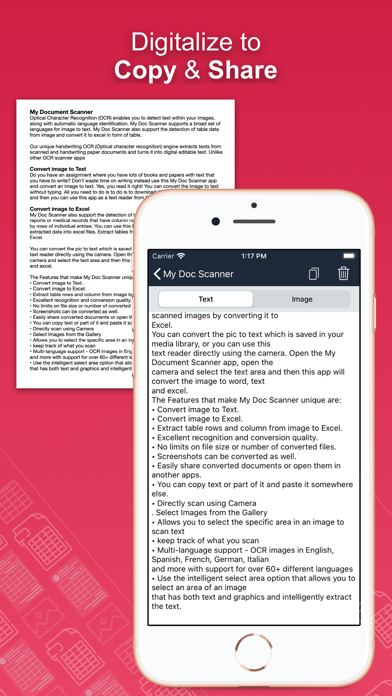



Description by Muhammad Shahid Written by the developer, not by AppBrain. Click to read.
Optical Character Recognition (OCR) enables accurate detection and extraction of text from images, with built-in support for automatic language identification. The Doc: Image to Excel Converter app goes beyond traditional OCR by offering advanced features like handwriting recognition and intelligent table extraction from scanned documents, forms, and images.
Effortlessly convert images into editable text, spreadsheets (CSV or Excel), or PDFs. Perfect for digitizing books, notes, financial statements, receipts, and more.
Key Features:
• Convert Image to Text
Tired of manually typing notes from books or printed pages? Just snap a photo or choose an image, and the app will accurately convert it to text without typing.
• Convert Image to Excel, Spreadsheet, and PDF
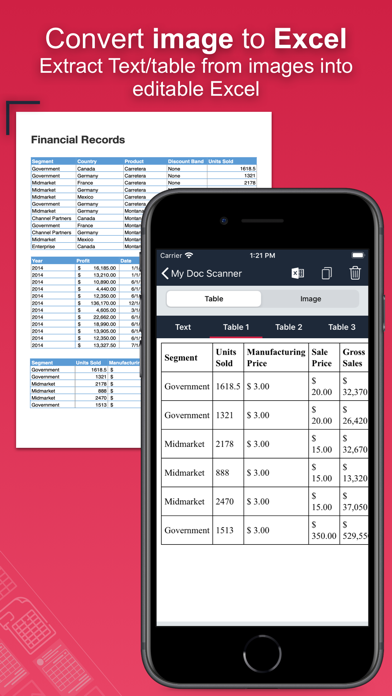
Extract both text and structured table data from documents. Ideal for financial reports, medical forms, invoices, and more. Convert scanned images into .xlsx, .csv, or .pdf formats instantly.
• Batch Scan Support
Scan and convert multiple images at once for handling large volumes of documents efficiently.
• Tabular Data Extraction
Extract rows and columns from images and load them directly into Excel. Supports intelligent table detection for accurate conversion.
• Multi-language OCR (60+ languages)
Supports text recognition in English, Spanish, French, German, Italian, and many more.
• Translate Extracted Data
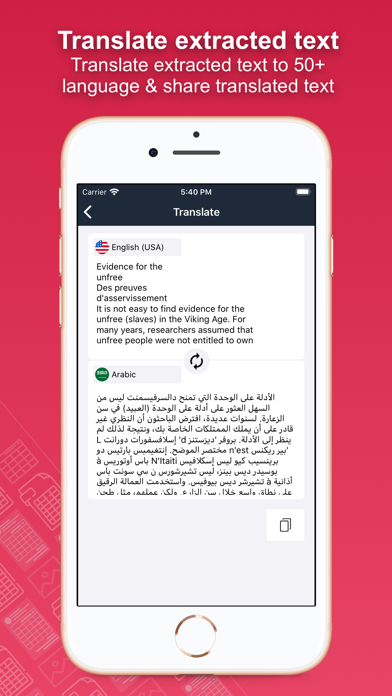
Translate extracted tables or text into 50+ languages for seamless international use.
• Secure Your Documents
Protect your scans using a passcode or biometric authentication.
• Smart Area Selection
Focus only on the part of the image containing text, even if it includes graphics.
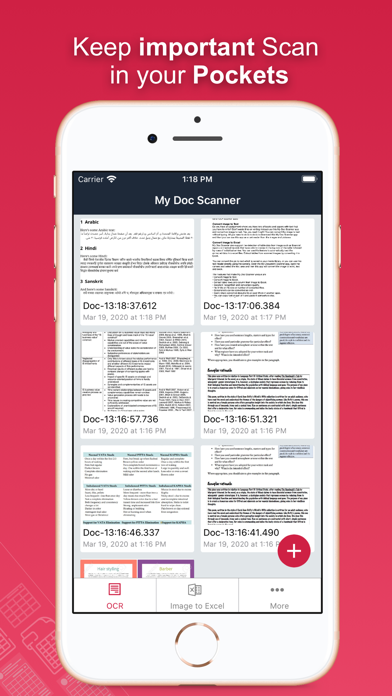
• Scan History and Clipboard Actions
Keep track of all scanned documents. Easily copy text, open URLs, make calls, send emails, or paste content anywhere.
• Handwriting Recognition
Convert handwritten notes and scanned paper documents into digital, editable text.
• Capture or Import Images
Use your camera to scan in real-time or import from your gallery. Supports text extraction from screenshots as well.
Why Choose Document Scanner OCR++?
• Highly accurate text and table recognition
• No limits on file size or number of conversions
• Instant conversion of bank e-statements, receipts, and more
• Output files ready to use in Word, Excel, or PDF
• Clean and user-friendly interface
• Fast, lightweight, and powerful
Stop wasting time typing manually. Download the Doc: Image to Excel Converter app today and instantly convert your images into editable, shareable, and searchable content.
Safety and technology
Found in the app by AppBrain- Price
- Free
- App size
- 36.0 MB
- Content rating
- Everyone
Technologies used by Doc : Image to Excel Converter
Releases
Updates seen on the App Store- Version
- 1.62
- Launched
- March 2020
No changelog data
Alternatives
Similar apps and more from Muhammad ShahidAlternatives to Doc : Image to Excel Converter







More from Muhammad Shahid
![PDF Text Scanner [OCR] : Lens icon](https://is1-ssl.mzstatic.com/image/thumb/Purple211/v4/b7/f8/7e/b7f87e12-fc5b-3dc9-d649-b0ae1983bdcd/AppIcon-1x_U007emarketing-0-8-0-85-220-0.png/100x100bb.jpg)
Rankings
App Store top chartsApp Store Rankings for Doc : Image to Excel Converter
About the app and developer
About Doc : Image to Excel Converter
Doc : Image to Excel Converter is a productivity app developed by Muhammad Shahid.
What is the rating of Doc : Image to Excel Converter?
Doc : Image to Excel Converter is rated 3.05 out of 5 stars, based on 21 ratings.
Is Doc : Image to Excel Converter free?
Doc : Image to Excel Converter is free. The app size is 36.03 MB. The latest version available is 1.62. The last update was on August 4, 2026.
What are the requirements for Doc : Image to Excel Converter?
The app has a content rating of Everyone. The app has been available on the App Store since March 2020.
Developer information for Muhammad Shahid
Address: