

PDF Text Scanner [OCR] : Lens
PDF Text Scanner [OCR] : Lens is made and published by Muhammad Shahid. AppBrain is an independent app data site and isn't affiliated with Muhammad Shahid. The app name, icon, screenshots and description belong to Muhammad Shahid and are shown as published on the App Store.
AppBrain's verdict
Established- Rating on App Store
- 1.00
- 1 ratings
- Last updated
- October 6, 2025
- Size
- 31.5 MB
It doesn't have enough ratings yet to judge what users think.
User feedback
Ratings and reviews on the App StoreComments on PDF Text Scanner [OCR] : Lens for iOS
We don't have enough comments to show example comments. Please check back later.
Store listing
By Muhammad Shahid, from the App Store

Description by Muhammad Shahid Written by the developer, not by AppBrain. Click to read.
Turn your phone into a smart text scanner with 99%+ accuracy.
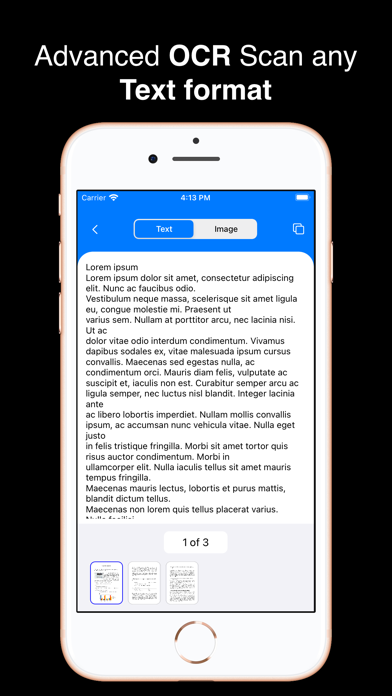
PDF & Photo Text Scanner uses advanced Optical Character Recognition (OCR) technology to instantly detect and extract text from images and PDFs—no matter how many pages—while automatically identifying the language.
Why Use This App?
In daily office tasks, academic assignments, or personal use, we often need to convert printed or handwritten documents into digital text. AsyncByte brings you the ultimate solution: a powerful and intuitive OCR scanner app for iOS.
Whether you're working with PDFs, printed papers, or photos from your gallery or camera, this app saves you the hassle of manual typing. It extracts text with high accuracy and even detects phone numbers, emails, and URLs for quick actions.
Key Features:
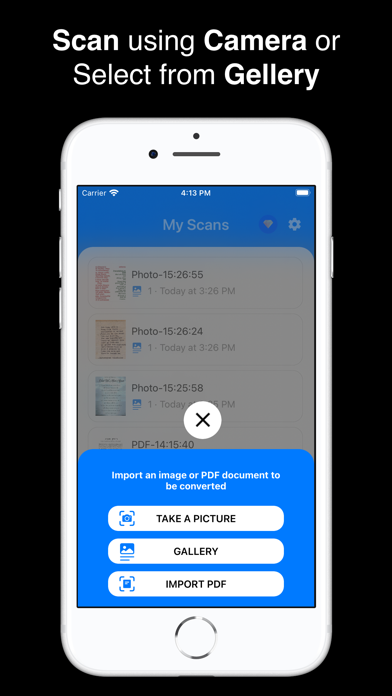
• Scan PDFs and Images: Extract text from both image-based and text-based PDFs—no page limit!
• Scan with Camera: Capture and convert text in real-time.
• Select Specific Area: Use the Intelligent Area Selection to extract only the desired text.
• Copy to Clipboard: Easily copy scanned text for use in messages, emails, and more.
• Scan History: Keep track of everything you've scanned.
• Smart Text Recognition: Perform actions directly from scanned content:
- Open URLs
- Make phone calls
- Add events to calendar
- Track shipments
- Check flight numbers
• Multi-language Support: Recognize over 60 languages including English, Spanish, French, German, Italian, and many more.
• Handwriting Recognition: Detect both printed and handwritten text.
• Text-to-Speech: Let the app read aloud any scanned text using built-in speech engine.
Use Cases:
• Digitize classroom notes, assignments, or printed books
• Extract contact details from business cards
• Quickly convert scanned receipts, forms, or flyers
• Translate foreign-language signs or menus
• Convert handwritten notes into editable text
How It Works:
1, Open the app and choose between Camera, Photo Library, or PDF Import
2, Select the text area (optional with Intelligent Area Tool)
3, Extract, read aloud, or copy the text
4, Take actions directly from recognized elements like links or phone numbers
Premium Subscription Details:
• PDF & Image to Text OCR Premium includes:
• Unlimited scanning of images and PDFs
• Ad-free experience
Subscription Terms:
• Payment will be charged to your iTunes account upon confirmation.
• Subscription auto-renews unless canceled at least 24 hours before the end of the current period.
• Your account will be charged for renewal within 24 hours prior to the end of the current period.
• Manage your subscription and turn off auto-renew anytime in your iTunes account settings.
• Any unused portion of a free trial will be forfeited upon purchase.
Support & Legal:
Email: info@asyncbyte.com
Privacy Policy: https://www.asyncbyte.com/privacy.html
Terms of Use: https://www.asyncbyte.com/terms-and-conditions.html
Safety and technology
Found in the app by AppBrain- Price
- Free
- App size
- 31.5 MB
- Content rating
- Everyone
Technologies used by PDF Text Scanner [OCR] : Lens
Releases
Updates seen on the App Store- Version
- 1.31
- Launched
- November 2020
No changelog data
Alternatives
Similar apps and more from Muhammad ShahidAlternatives to PDF Text Scanner [OCR] : Lens






More from Muhammad Shahid

Rankings
App Store top chartsApp Store Rankings for PDF Text Scanner [OCR] : Lens
About the app and developer
About PDF Text Scanner [OCR] : Lens
PDF Text Scanner [OCR] : Lens is a productivity app developed by Muhammad Shahid.
What is the rating of PDF Text Scanner [OCR] : Lens?
PDF Text Scanner [OCR] : Lens is rated 1.00 out of 5 stars, based on one rating ratings.
Is PDF Text Scanner [OCR] : Lens free?
PDF Text Scanner [OCR] : Lens is free. The app size is 31.46 MB. The latest version available is 1.31. The last update was on October 6, 2025.
What are the requirements for PDF Text Scanner [OCR] : Lens?
The app has a content rating of Everyone. The app has been available on the App Store since November 2020.
Developer information for Muhammad Shahid
Address:
Frequently asked questions about PDF Text Scanner [OCR] : Lens
Is PDF Text Scanner [OCR] : Lens free?
Yes. PDF Text Scanner [OCR] : Lens is free on the App Store.
Is PDF Text Scanner [OCR] : Lens still available?
Yes. PDF Text Scanner [OCR] : Lens is on the App Store, and the last update we saw was on October 6, 2025.
How large is PDF Text Scanner [OCR] : Lens?
PDF Text Scanner [OCR] : Lens is 31.46 MB.
Is PDF Text Scanner [OCR] : Lens suitable for children?
App Store rates the content of PDF Text Scanner [OCR] : Lens as suitable for everyone.
How do people rate PDF Text Scanner [OCR] : Lens?
PDF Text Scanner [OCR] : Lens has one rating of 1.00 stars on the App Store.
Who made PDF Text Scanner [OCR] : Lens?
PDF Text Scanner [OCR] : Lens was developed by Muhammad Shahid. It is listed in the productivity category on the App Store.
What are the best alternatives to PDF Text Scanner [OCR] : Lens?
People looking at PDF Text Scanner [OCR] : Lens also look at these productivity apps: xTract - OCR scanner & reader, Text Scanner OCR App: OCR Scan, Almighty Scanner-Picture2Text, My Text Scanner : OCR Lens, Document Scanner & Translate.