AppBrain
AppBrain
  • Apps
  • Apps being viewed right now Trending apps today Most popular apps All-time most installed apps Top rated apps iPhone and iPad apps
  • Intelligence ▾
    Intelligence overview → Track any Android app or your whole market
    Track & analyze
    Keyword Tracker & OptimizerTrack & improve Play rankings App Performance ReportOne-off PDF for any app StatisticsFree Android & Play market stats
    Promote your app
    Featured Apps App Links
  • Intelligence
  • Pricing
  • Dashboard
  • Sign up
  • Log in
App Store Apps > Utilities > Doc Scan - PDF Photo Scanner
Doc Scan - PDF Photo Scanner icon

Doc Scan - PDF Photo Scanner

by 培 李 · Utilities · Free
On the App Store since July 2020 · Data updated 2026-10-30

Doc Scan - PDF Photo Scanner is made and published by 培 李. AppBrain is an independent app data site and isn't affiliated with 培 李. The app name, icon, screenshots and description belong to 培 李 and are shown as published on the App Store.

AppBrain's verdict

Established
Rating on App Store
4.24
21 ratings
Last updated
October 26, 2026

It doesn't have enough ratings yet to judge what users think.

Official page on the App Store

Rankings

App Store top charts

App Store Rankings for Doc Scan - PDF Photo Scanner

This app is not ranked

Competitors

Similar apps and more from 培 李

Alternatives to Doc Scan - PDF Photo Scanner

Image to PDF & Photo Converter icon Image to PDF & Photo Converter
KoruApps
4.6
Free
116 ratings
Text Extract(文字提取)-PDF Scanner icon Text Extract(文字提取)-PDF Scanner
净 陈
4.4
Free
41 ratings
Photo PDF: Converter & Printer icon Photo PDF: Converter & Printer
Fitness Labs
4.4
Free
214 ratings
Scanner+ Scan PDF Documents icon Scanner+ Scan PDF Documents
sulubeyn
4.6
Free
155 ratings
Transcriber - speech to text icon Transcriber - speech to text
Lukashevych Oleksandr
0.0
Free
OCR Scanner - Scan PDF & Image icon OCR Scanner - Scan PDF & Image
Inverse.AI
4.6
Free
107 ratings
DocScan - A Powerful Scanner! icon DocScan - A Powerful Scanner!
Mihail Salari
4.8
Free
16 ratings
Jpeg Png Webp Converter icon Jpeg Png Webp Converter
IgKnight Technologies Ltd
1.6
Free
8 ratings

More from 培 李

Voice to Text AI Transcriber icon Voice to Text AI Transcriber
培 李
4.3
Free
259 ratings
Translator - Offline & Camera icon Translator - Offline & Camera
培 李
4.7
Free
83 ratings
21 Questions - Fun Party Game icon 21 Questions - Fun Party Game
培 李
4.6
Free
50 ratings
Zip & Unzip rar file extractor icon Zip & Unzip rar file extractor
培 李
4.2
Free
26 ratings
Voice Recorder: Dictaphone icon Voice Recorder: Dictaphone
培 李
3.6
Free
7 ratings
真人打牌记牌 - 六人牌局也够用,点一下就知道剩几张 icon 真人打牌记牌 - 六人牌局也够用,点一下就知道剩几张
培 李
4.2
Free
5 ratings
Business Card - Scanner & OCR icon Business Card - Scanner & OCR
培 李
4.2
Free
4 ratings
Kinly: Genogram Maker & GEDCOM icon Kinly: Genogram Maker & GEDCOM
培 李
4.5
Free
2 ratings

Releases

Updates seen on the App Store
Version
5.6
Launched
July 2020

No changelog data

User feedback

Ratings and reviews on the App Store

Comments on Doc Scan - PDF Photo Scanner for iOS

We don't have enough comments to show example comments. Please check back later.

Technology

Found in the app by AppBrain
Price
Free
App size
14.1 MB
Content rating
Everyone

Technologies used by Doc Scan - PDF Photo Scanner

About the app and developer

About Doc Scan - PDF Photo Scanner

Doc Scan - PDF Photo Scanner is an utilities app developed by 培 李.

User Ratings

Doc Scan - PDF Photo Scanner is rated 4.24 out of 5 stars. The rating is based on 21 ratings.

App Information

Doc Scan - PDF Photo Scanner is freely available from the App Store. The app size is 14.07 MB. The latest version available is 5.6. The last update was on October 26, 2026.

Technical Requirements

The app has a content rating of Everyone. The app has been available on the App Store since July 2020.

Developer information for 培 李

培 李

Address:

Share Doc Scan - PDF Photo Scanner

Store listing

By 培 李, from the App Store
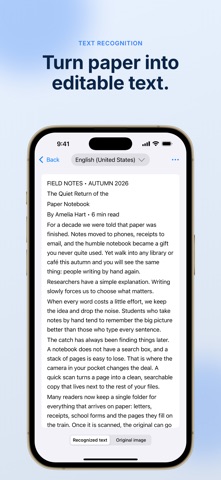
Doc Scan - PDF Photo Scanner Screenshot 1 of 6
Doc Scan - PDF Photo Scanner Screenshot 2 of 6
Doc Scan - PDF Photo Scanner Screenshot 3 of 6
Doc Scan - PDF Photo Scanner Screenshot 4 of 6
Doc Scan - PDF Photo Scanner Screenshot 5 of 6
Doc Scan - PDF Photo Scanner Screenshot 6 of 6
Screenshots by 培 李, from the the App Store listing
Description by 培 李 Written by the developer, not by AppBrain. Click to read.
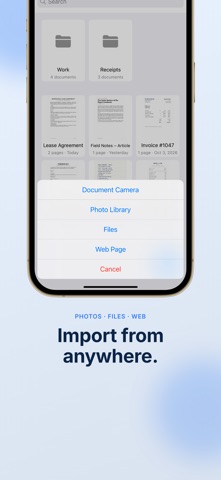
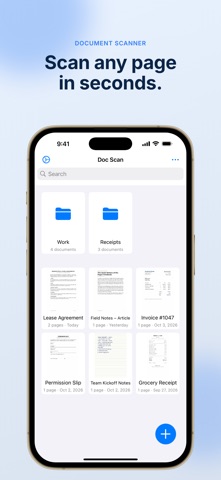
Turn any paper into a clean, searchable PDF or JPG in seconds — no bulky scanner needed, just your phone's camera.

Point your camera at a document and Doc Scan automatically detects it and captures the shot. Crop your scan and choose from color, grayscale, black & white, or photo mode to get the cleanest result every time.

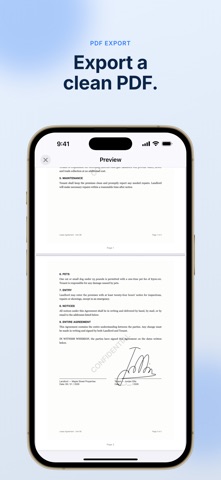
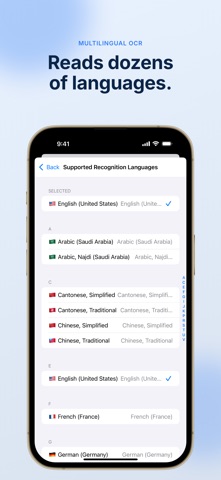
Once your scan is ready, use built-in OCR to extract accurate text from receipts, bills, passports, contracts, and any other document. Add your own signature to sign documents on the spot — no printing required.

Export and share your finished scans as PDFs or JPGs, completely free. Every document is automatically backed up to iCloud, so nothing is lost even if you delete the app, and everything syncs across all your Apple devices.

Why people choose Doc Scan:
• Scan receipts, bills, passports, contracts, and any paper document
• Auto document detection with one-tap cropping
• Color, grayscale, black & white, and photo filters
• Accurate text recognition (OCR)
• Add a signature to sign documents digitally
• Export and share as PDF or JPG, free
• Automatic iCloud backup and sync across all your devices
• App lock to keep your documents private

Stop carrying paper. Download Doc Scan and start scanning in seconds.
Official page on the App Store
Today's trending apps Price drops on Google Play Top new apps Apps other people are watching Popular Utilities Apps
Image to PDF & Photo Converter icon Image to PDF & Photo Converter
Text Extract(文字提取)-PDF Scanner icon Text Extract(文字提取)-PDF Scanner
Photo PDF: Converter & Printer icon Photo PDF: Converter & Printer
Scanner+ Scan PDF Documents icon Scanner+ Scan PDF Documents
Transcriber - speech to text icon Transcriber - speech to text
OCR Scanner - Scan PDF & Image icon OCR Scanner - Scan PDF & Image
DocScan - A Powerful Scanner! icon DocScan - A Powerful Scanner!
Jpeg Png Webp Converter icon Jpeg Png Webp Converter
Overview Alternatives Reviews Rankings Technology
AppBrain Intelligence premium content

Subscribe now to get full and unlimited access to AppBrain Intelligence. You'll have access to:

  • App Intelligence dashboard (performance timeline, competitor comparison, country rankings, insight cards)
  • Detailed ranking data per app
  • Full timeline per developer
  • Device market shares data per country
  • Unlimited keyword tracking
1 Month

$75/mo
(billed every month)

SAVE 0%
Subscribe
3 Months

$65/mo
($195 billed every 3 months)

SAVE 13%
Subscribe
1 Year

$57.50/mo
($690 billed every year)

SAVE 23%
Subscribe
Each subscription will automatically renew 3 days before the expiration date for the same time period. Subscriptions can be cancelled at any time before the renewal.

AppBrain is an app data site, we track rankings, ratings, installs for all apps and games on Google Play and the App Store. AppBrain doesn't host app files or APKs, all install links go directly to the official store. All trademarks are owned by their respective owners.

More apps

  • Top Android apps being viewed
  • Intuit QuickBooks for Business
  • CrestWall - 4K Wallpapers
  • This War of Mine stats

App statistics

  • Android statistics
  • Google Play Developer stats
  • Trending Android Apps
  • Trending iOS apps
  • Top popular Apps
  • Buy the best Android phone
  • Buy & sell app businesses

About AppBrain

  • Contact
  • Privacy
  • Documentation
  • DMCA takedowns
  • Blog
  • Free webpage for your Android app
© 2010-2026 - AppBrain