Doc Scanner- PDF & OCR Scanner is a productivity app developed by Pratik Kadam.
User Ratings
The app has no ratings yet.
App Information
Doc Scanner- PDF & OCR Scanner is freely available from the App Store. The app size is 3.14 MB. The latest version available is 3.1. The last update was on November 8, 2026.
Technical Requirements
The app has a content rating of Everyone. The app has been available on the App Store since August 2023.
Doc Scanner- PDF & OCR Scanner is made and published by
Pratik Kadam.
AppBrain is an independent app data site and isn't affiliated with Pratik Kadam.
The app name, icon, screenshots and description belong to Pratik Kadam and are shown as published on the App Store.
Description by Pratik Kadam(from the App Store)
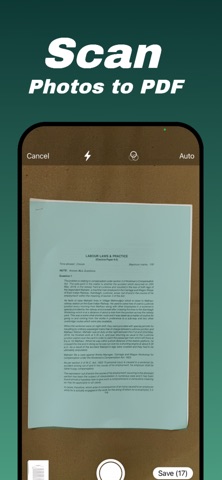
DocScanner - PDF Scanner, converter & maker. Convert image to pdf. Document Scanner and PDF Maker is an all-in-one PDFscan app that provides you with more advanced scan options. Scan, Print & Share any document to PDF. Doc Scanner is the easiest & simple app to use, which will turn your iPhone & iPad into a portable mobile scanner.
Scanner PDF supports image processing and can transform, rotate, sharpen your images, for best document quality. You can Scan any documents, passport, ID cards, photos, contracts, tax forms, tickets, and books into clear PDFs and pictures.
SCAN DOCUMENTS - Scan any document automatically or manually and save it as a PDF file or image. - Try various Camera Modes to scan specific types of documents. - Import documents right from Photos for further editing and sharing. - With this PDF scanner, scan anything you need, receipts, contracts, paper notes, fax papers, books, and store your scans as multipage PDF or JPG files.
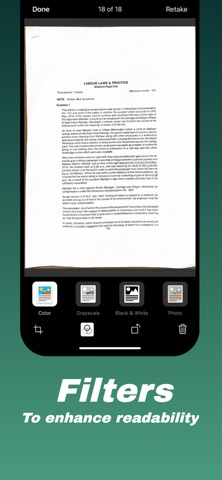
KEY FEATURES - Easily scan multiple pages into one document. - Sign your scans manually or add a signature from an image - Add text over the forms or autofill documents - Protect your confidential scans by locking PDF & Documents with Password. - Document sharing as PDF, JPG through email, or uploading to Dropbox, Google Drive, Box, OneDrive, Evernote, iCloud Drive - Professional filter options, including Color, Black & White, Photo, and Grayscale; - Add markup or annotation to document - Print your PDF & Documents easily.
PDF Converter –PDF Converter: This PDF scanner enables you to create PDF from a website, and convert documents in multiple formats to PDF. –Supported file formats: PDF, JPG, PNG, JPEG - You can also called app as Photos to PDF Maker app.
Personalize Document Editor & File Manager - Edit, replace, share, rename and delete your PDF or Documents as per you want. - Create and organize your folders. - Save PDF or Documents in your local file manager.
# Subscription Details # • Monthly and annual subscriptions are available. • Payment will be charged to your iTunes account at confirmation of purchase. • Your subscription will automatically renew unless auto-renew is disabled at least 24 hours before the end of the current subscription period. • Automatic renewals will be charged at the same price you were originally charged for the subscription. • Subscriptions can be managed by going to Account Settings on the App Store after purchase.
Privacy policy: https://technicaldeveloperapps.blogspot.com/2023/07/this-page-is-used-to-inform-visitors.html Terms of Use: https://technicaldeveloperapps.blogspot.com/2023/08/doc-scanner-terms-of-use.html
Each subscription will automatically renew 3 days before the expiration date for
the same time period. Subscriptions can be cancelled at any time before the renewal.