

PDF Combiner - Merge & Split
PDF Combiner - Merge & Split is made and published by Evgeniy Konev. AppBrain is an independent app data site and isn't affiliated with Evgeniy Konev. The app name, icon, screenshots and description belong to Evgeniy Konev and are shown as published on the App Store.
AppBrain's verdict
EstablishedLoved by users- Rating on App Store
- 4.78
- 293 ratings
- Last updated
- October 22, 2026
- Size
- 19.5 MB
Users love it: 4.8 stars from 293 ratings.
User feedback
Ratings and reviews on the App StoreComments on PDF Combiner - Merge & Split for iOS
We don't have enough comments to show example comments. Please check back later.
Store listing
By Evgeniy Konev, from the App Store




Description by Evgeniy Konev Written by the developer, not by AppBrain. Click to read.
The app gives you a simple way to organize, edit, convert, and prepare PDF documents without relying on complicated software or web-based tools. It is designed for users who need a dependable PDF workflow for work, study, and personal files.
Most tools work offline and process documents directly on your device. This helps you work with important files while keeping them under your control, especially when online PDF services are restricted. The only tool that requires an internet connection is Office to PDF, used for converting Word, Excel, and PowerPoint files to PDF.
Base PDF tools:
• Merge PDF. Combine multiple PDF documents and images into one PDF file.
• Images to PDF. Create PDF documents from photos, scans, and image files.
• Extract PDF Pages. Save selected pages from a PDF as a new document.
• Edit PDF Pages. Reorder, rotate, or delete pages in a PDF document.
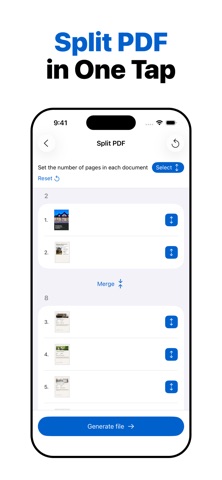
• Split PDF. Break one PDF document into smaller PDF files.
• Scan Documents. Capture documents with your camera and save them as high-quality PDF files.
• Protect PDF. Add or remove password protection from a PDF document. Removing protection requires the correct password.
• Add Page Numbers to PDF. Place page numbers where you need them in a document.
• Align PDF Page Width. Align page width across a PDF document for a more consistent layout.
• Text Recognition OCR. Recognize text in scanned documents and images.
• Sign PDF. Add a signature to a PDF document.
• Compress and Resize Photos. Reduce image file size and adjust image dimensions.
Some tools are available in the Pro version:
• Compress PDF. Reduce PDF file size for easier sharing and storage.
• Office to PDF. Convert Word, Excel, and PowerPoint files to PDF. This tool requires an internet connection.
• Photo Templates for PDF. Turn photos into styled PDF documents using templates.
• PDF to Images. Export selected PDF pages or a full PDF document as image files.
• Add Watermark to PDF. Add text or image watermarks to PDF documents.
Privacy Policy
https://docs.google.com/document/d/1Ey7ZxLODDc1tQ1_N08LCTCwsi2jnHXEbMZugFv_AiUk/edit?usp=sharing
Terms of Use
https://docs.google.com/document/d/1BjWeGxiOgNmTs-eCTKq5Y0LfgDBe_sVHDS1h22ZsZ9w/edit?usp=sharing
Safety and technology
Found in the app by AppBrain- Price
- Free
- App size
- 19.5 MB
- Content rating
- Everyone
Technologies used by PDF Combiner - Merge & Split
Releases
Updates seen on the App Store- Version
- 5.2.0
- Launched
- June 2020
No changelog data
Alternatives
Similar apps and more from Evgeniy KonevAlternatives to PDF Combiner - Merge & Split




 PDFMaker: JPG to PDF converter


More from Evgeniy Konev




Rankings
App Store top chartsApp Store Rankings for PDF Combiner - Merge & Split
About the app and developer
About PDF Combiner - Merge & Split
PDF Combiner - Merge & Split is a productivity app developed by Evgeniy Konev.
User Ratings
PDF Combiner - Merge & Split is rated 4.78 out of 5 stars. The rating is based on 290 ratings.
App Information
PDF Combiner - Merge & Split is freely available from the App Store. The app size is 19.54 MB. The latest version available is 5.2.0. The last update was on October 22, 2026.
Technical Requirements
The app has a content rating of Everyone. The app has been available on the App Store since June 2020.
Developer information for Evgeniy Konev
Address:
Frequently asked questions about PDF Combiner - Merge & Split
Is PDF Combiner - Merge & Split free?
Yes. PDF Combiner - Merge & Split is free on the App Store.
Is PDF Combiner - Merge & Split still available?
Yes. PDF Combiner - Merge & Split is on the App Store, and the last update we saw was on October 22, 2026.
How large is PDF Combiner - Merge & Split?
PDF Combiner - Merge & Split is 19.54 MB.
Is PDF Combiner - Merge & Split suitable for children?
App Store rates the content of PDF Combiner - Merge & Split as suitable for everyone.
How do people rate PDF Combiner - Merge & Split?
PDF Combiner - Merge & Split scores 4.78 out of 5 stars, from 293 ratings on the App Store.
Who made PDF Combiner - Merge & Split?
PDF Combiner - Merge & Split was developed by Evgeniy Konev. It is listed in the productivity category on the App Store.
What are the best alternatives to PDF Combiner - Merge & Split?
People looking at PDF Combiner - Merge & Split also look at these productivity apps: PDF Merge X: PDF Merger, PDF Merge + Scan & Split Pages, PDF Splitter + PDF Merge, PDF Merge - PDF Files Merger, PDF Splice.