

DocScan AI is made and published by AppConsult. AppBrain is an independent app data site and isn't affiliated with AppConsult. The app name, icon, screenshots and description belong to AppConsult and are shown as published on the App Store.
AppBrain's verdict
- Rating on App Store
- 5.00
- 1 ratings
- Last updated
- June 17, 2026
It doesn't have enough ratings yet to judge what users think.
Rankings
App Store top chartsApp Store Rankings for DocScan AI
Competitors
Similar apps and more from AppConsultAlternatives to DocScan AI


More from AppConsult


Releases
Updates seen on the App Store- Version
- 1.3.0
- Launched
- March 2026
No changelog data
User feedback
Ratings and reviews on the App StoreComments on DocScan AI for iOS
We don't have enough comments to show example comments. Please check back later.
Technology
Found in the app by AppBrain- Price
- Free
- App size
- 17.0 MB
- Content rating
- Everyone
Technologies used by DocScan AI
About the app and developer
About DocScan AI
DocScan AI is a productivity app developed by AppConsult.
User Ratings
DocScan AI is rated 5.00 out of 5 stars. The rating is based on one rating ratings.
App Information
DocScan AI is freely available from the App Store. The app size is 17.00 MB. The latest version available is 1.3.0. The last update was on June 17, 2026.
Technical Requirements
The app has a content rating of Everyone. The app has been available on the App Store since March 2026.
Developer information for AppConsult
Address:
Frequently asked questions about DocScan AI
Is DocScan AI free?
Yes. DocScan AI is free on the App Store.
Is DocScan AI still available?
Yes. DocScan AI is on the App Store, and the last update we saw was on June 17, 2026.
How large is DocScan AI?
DocScan AI is 17.00 MB.
Is DocScan AI suitable for children?
App Store rates the content of DocScan AI as suitable for everyone.
How do people rate DocScan AI?
DocScan AI has one rating of 5.00 stars on the App Store.
Who made DocScan AI?
DocScan AI was developed by AppConsult. It is listed in the productivity category on the App Store.
What are the best alternatives to DocScan AI?
People looking at DocScan AI also look at these productivity apps: Genie: AI Chat, Image & PDF, Habit Ace - Routine Tracker, LensDoc: AI Document Cleaner, Schedule Planner - To Do List, Pocket AI — No Internet.
Store listing
By AppConsult, from the App Store


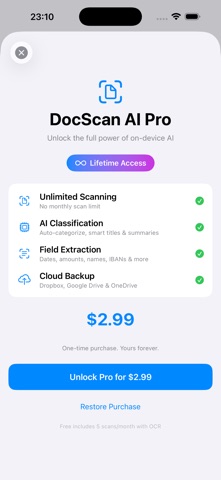
Description by AppConsult Written by the developer, not by AppBrain. Click to read.
SCAN SMART
• Automatic edge detection and perspective correction
• Multi-page document capture in a single session
• Batch scanning — scan multiple documents back-to-back (Pro)
• Five image filters: Original, Enhanced, Grayscale, B&W, High Contrast
AI-POWERED ORGANIZATION
• Automatic document classification into 9 categories: Invoice, Receipt, Contract, Letter, Form, Report, ID, Business Card, and Document
• AI-suggested titles, summaries, and key insights (Pro)
• Smart field extraction: dates, amounts, VAT numbers, IBANs, company names, phone numbers, emails, and more (Pro)
• Confidence scores so you always know how accurate the AI is
• AI classification and field extraction require iOS 26 and an Apple Intelligence-compatible iPhone — all other features work on iOS 17 and later
POWERFUL OCR
• Full-text recognition powered by Apple Vision — works offline
• Automatic language detection
• Searchable PDF export with invisible text layer
• Find any word across all your documents instantly
ORGANIZE YOUR WAY
• Custom folders with icons and colors
• Tags with color coding — assign multiple per document
• Favorites for quick access
• Category-based browsing
• Full-text search across titles, OCR text, and extracted fields
EXPORT & SHARE
• PDF (OCR-searchable), JPEG, PNG, or plain text
• System share sheet: AirDrop, Mail, Messages, and more
• Bulk export — combine or export individually
CLOUD BACKUP (Pro)
• Back up to Dropbox, Google Drive, and OneDrive
• Auto-upload new scans to your own cloud accounts
• Organized folder structure by category
• Retry logic and sync status per document
SYNC ACROSS DEVICES
• iCloud sync between iPhone and Mac (optional)
• Companion macOS app for desktop document management
• Edit on Mac, see changes on iPhone — and vice versa
PRIVACY FIRST
• 100% on-device AI — documents never leave your phone
• No analytics, no tracking, no third-party data collection
• Camera used only for scanning — nothing else
• Cloud backup is opt-in to YOUR accounts only
• No account required to use the app
FREE TIER
• 5 scans per month with full OCR
• Folders, favorites, search, and export included
PRO (Lifetime Purchase)
• Unlimited scanning
• AI classification, summaries, and field extraction
• Cloud backup and auto-upload
• Batch scanning
• One purchase, yours forever — no subscription
DocScan AI is built with SwiftUI and Apple's latest frameworks. It requires no internet connection to scan, classify, and organize your documents.