

Document Converter
Document Converter is made and published by RootRise Technologies Pvt. Ltd. AppBrain is an independent app data site and isn't affiliated with RootRise Technologies Pvt. Ltd. The app name, icon, screenshots and description belong to RootRise Technologies Pvt. Ltd. and are shown as published on the App Store.
AppBrain's verdict
- Last updated
- January 17, 2026
- Size
- 124.0 MB
User feedback
Ratings and reviews on the App StoreComments on Document Converter for iOS
We don't have enough comments to show example comments. Please check back later.
Store listing
By RootRise Technologies Pvt. Ltd., from the App Store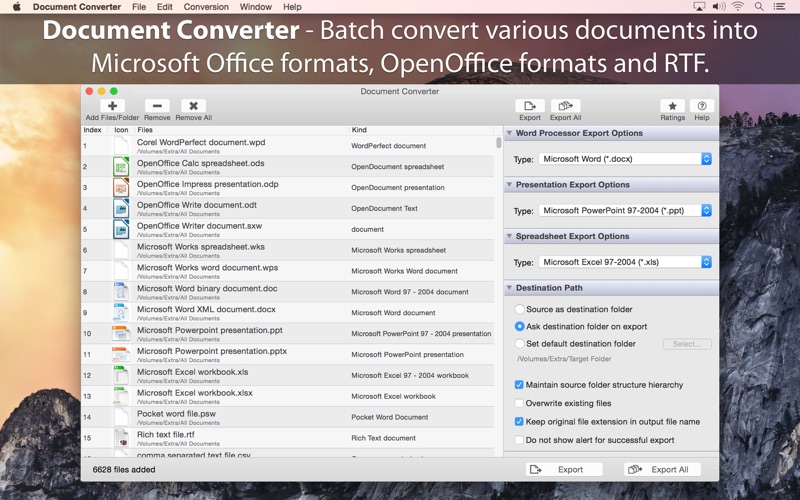
Description by RootRise Technologies Pvt. Ltd. Written by the developer, not by AppBrain. Click to read.
Do you receive old or unsupported documents as email attachments on you mac? Are you switched from Windows to Mac and found plenty of files not opening on your Mac? Do you have lots of old format files and wants to migrate all to newer formats? The easiest way to circumvent these problems is to convert all such files to either Microsoft Office documents (.doc, .docx, .ppt, .pptx, xls, xlsx), OpenOffice documents (.odt, .odp, .ods) or RTF files using Document Converter.
FEATURES
• Converts following word processor document formats into Microsoft Word document (.doc, .docx), OpenOffice document (.odt) and RTF.
- Microsoft Word Document (.doc, .docx)
- Microsoft Works Word (.wps)
- OpenOffice Write Document (.odt, .ott, .fodt, .sxw, .stw, .sxg)
- Plain text files (.txt, .text, .log, .xml, to name a few)
- Source code files (.m, .mm, .c, .cpp, .h, .java, to name a few)
- Script code text files (.sh, csh, .py, .php, to name a few)
- Rich Text Format (.rtf)
- WordPerfect 1-11 (.wpd, .wp)
- Lotus Word document
- ClarisWorks/AppleWorks document (.cwk)
- AbiWord document
- Hangul 97 word processor document
- HanMac Word-K/J
- LightWayText for Mac 4.5
- WriteNow document and more
• Converts following presentation formats into Microsoft PowerPoint presentation (.ppt, .pptx) and OpenOffice Impress presentation (.odp)
- Microsoft PowerPoint Presentation (.ppt, .pptx)
- OpenOffice Impress Presentation (.odp, .otp, . fodp, .sdd, .sti, .sxi) and more
• Converts following spreadsheet formats into Microsoft Excel workbook (.xls, .xlsx) and OpenOffice Calc worksheet (.odt).
- Microsoft Excel Workbook (.xls, .xlsx)
- OpenOffice Calc Spreadsheet (.ods, .ots, .sxc, .stc, .uos)
- Lotus 1-2-3 Worksheet file (.wk1, .wk2, .123)
- Microsoft Works Spreadsheet (.wks)
- Quattro Pro 6
- OpenOffice Formula file (.odf)
- ClarisWorks/AppleWorks spreadsheet and database document (.cwk)
- Comma Separated Values text file (.csv) and more
• Retains complete layout, images and graphics into converted target format.
• Very flexible options to add files into conversion list. Simply Drag & Drop into list or Right click Open With in Finder or Drop on "Document Converter" application to add files for export beside direct Add File/Folder buttons.
• An advance option to maintain source directory hierarchy at destination with converted files in respective folders. While conversion Document Converter automatically creates intermediate directories of source file path in target folder with converted formats.
• Source as destination folder to output documents beside original document in same folder on your computer.
• Options to keep original file creation and modification date in converted files.
Note: The “Document Converter" is a standalone application running natively to convert documents into targeted format securely right on your computer, you don’t need internet connection or to install any third party application or plugin to convert a document.
Safety and technology
Found in the app by AppBrain- Price
- $14.99
- App size
- 124.0 MB
- Content rating
- Everyone
Technologies used by Document Converter
Releases
Updates seen on the App Store- Version
- 4.0
- Launched
- February 2015
No changelog data
Alternatives
Similar apps and more from RootRise Technologies Pvt. Ltd.More from RootRise Technologies Pvt. Ltd.


Rankings
App Store top chartsApp Store Rankings for Document Converter
About the app and developer
About Document Converter
Document Converter is a business app developed by RootRise Technologies Pvt. Ltd.
User Ratings
The app has no ratings yet.
App Information
Document Converter costs $14.99. The app size is 123.98 MB. The latest version available is 4.0. The last update was on January 17, 2026.
Technical Requirements
The app has a content rating of Everyone. The app has been available on the App Store since February 2015.
Developer information for RootRise Technologies Pvt. Ltd.
RootRise Technologies Pvt. Ltd.
Address:
Frequently asked questions about Document Converter
Is Document Converter free?
No. Document Converter costs $14.99 on the App Store.
Is Document Converter still available?
Yes. Document Converter is on the App Store, and the last update we saw was on January 17, 2026.
How large is Document Converter?
Document Converter is 123.98 MB.
Is Document Converter suitable for children?
App Store rates the content of Document Converter as suitable for everyone.
Who made Document Converter?
Document Converter was developed by RootRise Technologies Pvt. Ltd. It is listed in the business category on the App Store.