

DOCX to PDF Converter +
DOCX to PDF Converter + is made and published by Angela Bates. AppBrain is an independent app data site and isn't affiliated with Angela Bates. The app name, icon, screenshots and description belong to Angela Bates and are shown as published on the App Store.
AppBrain's verdict
- Last updated
- July 16, 2026
- Size
- 35.4 MB
User feedback
Ratings and reviews on the App StoreComments on DOCX to PDF Converter + for iOS
We don't have enough comments to show example comments. Please check back later.
Store listing
By Angela Bates, from the App Store


Description by Angela Bates Written by the developer, not by AppBrain. Click to read.
CAPTURE AND IMPORT
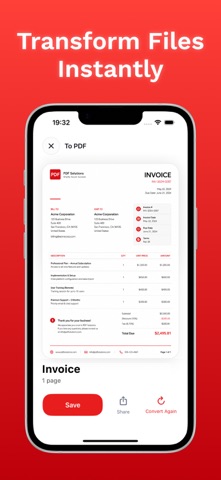
Start from the camera, Gallery, or local storage, then build a PDF from one file or several pages. Camera scan adds auto edge detection and multi–scan capture for back–to–back pages.
EDIT BEFORE CONVERSION
• Reorder pages with drag and drop
• Remove pages before creating the PDF
• Name the file before conversion
• Keep imported files saved for later use
PDF EXPORT AND SIGNING
From PDF export lets you pick pages and choose an output format before conversion. Merge PDF combines two or more PDFs into one file, and Sign PDF places a chosen or created signature on a page before saving.
DOCUMENT LIBRARY
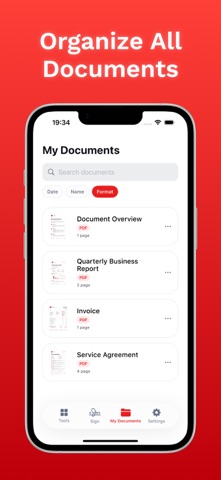
Saved and created files stay inside My Documents for later access. Share, save, and convert again actions are available on result screens.
PLANS
Free Access
– Convert camera scans, gallery imports, and local files to PDF
– Manage created files in My Documents
– Open app preferences in Settings
PDF Export Premium & Trial Subscriptions
– Export PDFs to JPG, PNG, DOCX, HTML, PPTX, and RTF
– Pick pages before conversion from PDF
Merge Sign Pro & Trial Subscriptions
– Merge two or more PDFs into one file
– Add a signature and place it on a PDF page
Convert, export, merge, and sign documents without leaving your phone.
Privacy Policy: https://docs.google.com/document/d/1j2Zu1Sb6xiJjAscQlGykjwy6tBVHZh5gSZ6liiLQ_G8/edit?usp=sharing
Term of Use: https://docs.google.com/document/d/17pcYvBZws-C-VafGZJXxFDidVjz72IPNFOPr6jxvyTY/edit?usp=sharing
Safety and technology
Found in the app by AppBrain- Price
- Free
- App size
- 35.4 MB
- Content rating
- Everyone
Technologies used by DOCX to PDF Converter +
Releases
Updates seen on the App Store- Version
- 1.0.0
- Launched
- July 2026
No changelog data
Alternatives
Similar apps and more from Angela BatesAlternatives to DOCX to PDF Converter +




More from Angela Bates


Rankings
App Store top chartsApp Store Rankings for DOCX to PDF Converter +
About the app and developer
About DOCX to PDF Converter +
DOCX to PDF Converter + is a productivity app developed by Angela Bates.
What is the rating of DOCX to PDF Converter +?
DOCX to PDF Converter + has no ratings yet.
Is DOCX to PDF Converter + free?
DOCX to PDF Converter + is free. The app size is 35.44 MB. The latest version available is 1.0.0. The last update was on July 16, 2026.
What are the requirements for DOCX to PDF Converter +?
The app has a content rating of Everyone. The app has been available on the App Store since July 2026.
Developer information for Angela Bates
Address:
Frequently asked questions about DOCX to PDF Converter +
Is DOCX to PDF Converter + free?
Yes. DOCX to PDF Converter + is free on the App Store.
Is DOCX to PDF Converter + still available?
Yes. DOCX to PDF Converter + is on the App Store, and the last update we saw was on July 16, 2026.
How large is DOCX to PDF Converter +?
DOCX to PDF Converter + is 35.44 MB.
Is DOCX to PDF Converter + suitable for children?
App Store rates the content of DOCX to PDF Converter + as suitable for everyone.
Who made DOCX to PDF Converter +?
DOCX to PDF Converter + was developed by Angela Bates. It is listed in the productivity category on the App Store.
What are the best alternatives to DOCX to PDF Converter +?
People looking at DOCX to PDF Converter + also look at these productivity apps: JPG To PDF: Converter Scanner, Habitime - Daily Habit Tracker, All Document Reader PDF Reader, Convert DOC/DOCX to PDF, Diamond Diary Notes With Lock.