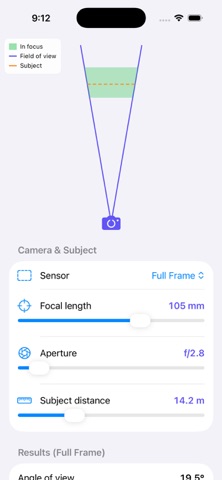
DoF Visualizer is a photo & video app developed by Greg Boratyn.
User Ratings
The app has no ratings yet.
App Information
DoF Visualizer costs $0.99. The app size is 1.95 MB. The latest version available is 2.1. The last update was on June 14, 2026.
Technical Requirements
The app has a content rating of Everyone. The app has been available on the App Store since May 2026.
Description by Greg Boratyn(from the App Store)
DoF Visualizer — Ten Visual Tools for Photographers
Stop guessing what your gear will do. DoF Visualizer turns the math behind photography into clear, interactive diagrams you can read at a glance. Drag a slider and watch the focus zone shift, the bokeh balls grow, the star trails appear. Plan the shot before you press the shutter.
Built for photographers who care about why their images look the way they do — from portrait shooters chasing creamy backgrounds, to landscape photographers planning silky water, to astrophotographers timing their exposures, to macro shooters stacking focus on a single flower.
TEN TOOLS IN ONE APP
• Depth of Field — See exactly what's sharp. Live cone visualization with near focus, far focus, and hyperfocal distance for any lens, aperture, and sensor.
• Hyperfocal Distance — Maximize depth of field for landscapes. Watch the in-focus band slide and stretch as the aperture changes, with an animate-aperture demo that shows the effect at a glance.
• Bokeh — Preview background blur before you shoot. Adjust focal length, aperture, subject distance and background distance to see how big those bokeh balls will actually be.
• Diffraction — Watch the Airy disk grow across your sensor's pixel grid. Find the aperture where diffraction starts robbing detail on your specific megapixel count.
• Focus Stacking — Plan macro stacks. Tell it your subject depth and it returns the number of shots and the focus step in millimeters, with every slice's depth of field visualized.
• Crop Compare — One focal length, four sensors. See concentric framing rectangles for Micro 4/3, APS-C, Full Frame, and Medium Format, with equivalent focal lengths labeled.
• Nodal Rail — Estimate the no-parallax-point offset for stitched panoramas. Save calibrated values per lens and recall them with a tap.
• ND Filter — Long-exposure planner. Pick your base shutter and target exposure, get the exact stops needed and the nearest standard ND filter.
• Astro — Maximum exposure for sharp stars, using the modern NPF rule (more accurate than the 500 rule for high-megapixel sensors). Stars stay as dots — or sprout trails when you push past the limit.
• Sun — Sunrise, sunset, solar noon, day length, golden hour, and civil twilight at your GPS location. Computed locally, no internet required. The on-screen arc even rises and falls with the season.
DESIGNED FOR THE WAY PHOTOGRAPHERS THINK
• Real lenses, real focal lengths — 8 mm through 1200 mm, the focal lengths actual lenses are built for.
• All four common formats — Micro 4/3, APS-C, Full Frame, and Medium Format, with the correct circle of confusion and sensor dimensions.
• Interactive visualizations — Every slider updates a live diagram. No number-crunching, no spreadsheets, no guessing.
• Works anywhere — All calculations run on-device. No accounts, no ads, no subscriptions, no network required (location is used only by the Sun tool, and only with your permission).
• Clean and fast — Native SwiftUI. Open the app, tap a tool, start planning.
WHO IT'S FOR
• Portrait photographers picking the right aperture for soft backgrounds. • Landscape photographers timing long exposures and dialing in hyperfocal distance. • Astrophotographers calculating their max shutter speed and timing the blue hour. • Macro photographers planning focus-stacking sequences. • Videographers and panorama shooters working with nodal rails. • Anyone shooting at golden hour and needing the times for tonight's location. • Students learning the optics behind their gear. • Anyone shopping for a new lens, sensor, or filter and wanting to see what it'll actually do.
Take the guesswork out of every shot. See the physics, then make the photo.
Each subscription will automatically renew 3 days before the expiration date for
the same time period. Subscriptions can be cancelled at any time before the renewal.