

Image Slicer
Image Slicer is made and published by Greg Boratyn. AppBrain is an independent app data site and isn't affiliated with Greg Boratyn. The app name, icon, screenshots and description belong to Greg Boratyn and are shown as published on the App Store.
AppBrain's verdict
- Last updated
- September 30, 2026
Rankings
App Store top chartsApp Store Rankings for Image Slicer
Competitors
Similar apps and more from Greg BoratynMore from Greg Boratyn





Releases
Updates seen on the App Store- Version
- 1.0
- Launched
- September 2026
No changelog data
User feedback
Ratings and reviews on the App StoreComments on Image Slicer for iOS
We don't have enough comments to show example comments. Please check back later.
Technology
Found in the app by AppBrain- Price
- $0.99
- App size
- 533.0 KB
- Content rating
- Everyone
Technologies used by Image Slicer
About the app and developer
About Image Slicer
Image Slicer is an utilities app developed by Greg Boratyn.
User Ratings
The app has no ratings yet.
App Information
Image Slicer costs $0.99. The app size is 533.00 kB. The latest version available is 1.0. The last update was on September 30, 2026.
Technical Requirements
The app has a content rating of Everyone. The app has been available on the App Store since September 2026.
Developer information for Greg Boratyn
Address:
Store listing
By Greg Boratyn, from the App Store


Description by Greg Boratyn Written by the developer, not by AppBrain. Click to read.
HOW IT WORKS
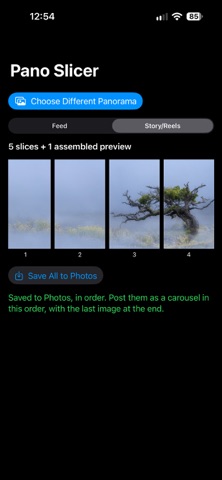
• Pick a panorama from your photo library
• Choose your target: Feed (4:5) for a carousel post, or Story/Reels (9:16) for full-screen stories
• Image Slicer scales your pano to fill the full height of the frame, then slices it into consecutive images, so panning across the slides reconstructs the whole photo with nothing trimmed off the top or bottom
WHY IT'S DIFFERENT
Most panoramas get center-cropped when Instagram forces them into 4:5 or 9:16 — you lose the sky, the ground, or both. Image Slicer scales instead of cropping, so every pixel of your original photo makes it into the final post.
FEATURES
• Two export formats: Feed (4:5) and Story/Reels (9:16)
• Automatic, edge-to-edge slicing — nothing cropped
• One-tap export, numbered in posting order
• On-device only — your photos are never uploaded or shared anywhere
Perfect for landscape photographers, real estate panoramas, drone shots, or any wide photo you want show.