







AppBrain's verdict
- Last updated
- August 31, 2026
- Size
- 216.6 MB
User feedback
Ratings and reviews on the App StoreComments on DoomScroll: Screen Time Limit for iOS
We don't have enough comments to show example comments. Please check back later.
Store listing
By Neeta Joshi, from the App StoreDescription by Neeta Joshi Written by the developer, not by AppBrain. Click to read.
DoomScroll Blocker stops the cycle - not by locking you out, but by making you pause at the right moment. Then it gives you something better to do: breathe, meditate, or start a focus session.
BLOCK THE DOOM SCROLL
- Pick the apps you doom scroll most - Instagram, TikTok, YouTube, X, Reddit, anything
- Set a daily time limit (15 seconds to 30 minutes)
- You can choose to set a physical activity like flipping the phone or walk 30 steps or choose no activity.
- If no activity is selected then we will send a notification when you hit your limit and a full-screen shield appears
- Choose to walk away (rescue) or continue (bypass) - your stats track both honestly
- On your block screen instead choose the notification which will take you to breathe, meditate, or enter deep-study mode.
- If you had selected a physical activity you need to select the physical activity to unlock the app or you can choose to walk away.
- If you choose to 'Start Activity' we will send you a notification clicking on which you will have to perform the selected activity.
- Every rescue adds to your Time Saved counter. Every bypass is recorded too. No judgment - just awareness.
BREATHE & MEDITATE
- 5 breathing patterns including 4-7-8, Box Breathing, and Physiological Sigh
- Guided meditation with ambient sounds and nature audio
- Import your own meditation music
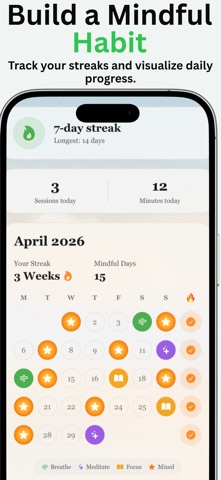
- Build a daily mindfulness streak - morning reminders keep you on track
DEEP FOCUS SESSIONS
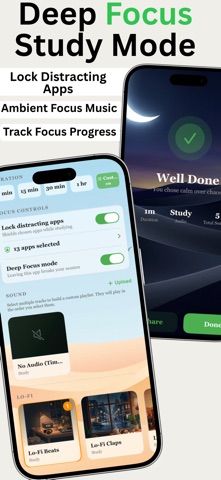
- Study timer with ambient focus music
- custom time setting
- Track your focus hours, sessions, and streaks over time
- Perfect for study sessions, deep work, or reading time
- block your apps while studying
PROTECT YOUR SLEEP
- Focus Shield schedules a hard block during bedtime - no bypass option
- Apps are completely inaccessible during the window you set
- Challenge word prevents accidental disabling
- End the 2 AM doom scroll for good
Rituals
- Create custom rituals like morning breathing or evening meditation.
- Set your desired music and time of the day
- select reminders (you can select multiple reminders)
TRACK YOUR PROGRESS
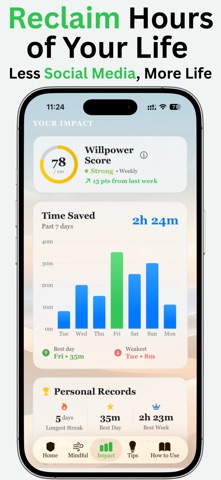
- Willpower Score: a weekly rating out of 100 based on rescues vs. bypasses
- Time Saved counter: see the hours you've reclaimed from social media
- Monthly report card (A+ to F) with composite scoring across willpower, mindfulness, and focus
- Hourly heatmap reveals your peak scrolling hours
- Per-app breakdown showing exactly which apps steal your time
- Personal records: longest streak, best day, best week
Share your mindful activities
- Now introducing sharable cards with your progress
- Upload a photo and see your stats imprinted on the image.
WIDGETS & NOTIFICATIONS
- Lock screen and home screen widgets
- Mindful streak widget to stay accountable
- Daily summary, weekly recap, and morning mindful reminders
- Streak milestone celebrations
FREE vs PRO
Free: Block 1 app, 2 breathing patterns, basic meditation, 10-15 min study sessions, widgets, tips, per-app insights, heatmap, monthly reports, Willpower Score, 1 ritual and 1 reminder
Pro: Unlimited apps + categories, 5 breathing patterns, all meditation sounds, extended durations, Focus Shield, audio import, deep study sessions, block apps during study, unlimited rituals and reminders
Built with Apple's Screen Time APIs (FamilyControls, ManagedSettings, DeviceActivity) for reliable, privacy-first app blocking. All data stays on your device. No accounts. No tracking.
Start your 3-day free trial and see how much time you can take back.
Terms of Use: https://pale-dime-1f2.notion.site/Support-Terms-of-Use-3174df1c2b7c807fb030d0cac314b85f
Privacy Policy: https://pale-dime-1f2.notion.site/Privacy-Policy-3264df1c2b7c80caa575fa64b65cdfe1
Safety and technology
Found in the app by AppBrain- Price
- Free
- App size
- 216.6 MB
- Content rating
- Everyone
Technologies used by DoomScroll: Screen Time Limit
Releases
Updates seen on the App Store- Version
- 1.9
- Launched
- March 2026
No changelog data
Alternatives
Similar apps and more from Neeta JoshiAlternatives to DoomScroll: Screen Time Limit





More from Neeta Joshi

Rankings
App Store top chartsApp Store Rankings for DoomScroll: Screen Time Limit
About the app and developer
About DoomScroll: Screen Time Limit
DoomScroll: Screen Time Limit is a productivity app developed by Neeta Joshi.
User Ratings
The app has no ratings yet.
App Information
DoomScroll: Screen Time Limit is freely available from the App Store. The app size is 216.63 MB. The latest version available is 1.9. The last update was on August 31, 2026.
Technical Requirements
The app has a content rating of Everyone. The app has been available on the App Store since March 2026.
DoomScroll: Screen Time Limit is made and published by Neeta Joshi. AppBrain is an independent app data site and isn't affiliated with Neeta Joshi. The app name, icon, screenshots and description belong to Neeta Joshi and are shown as published on the App Store.
Developer information for Neeta Joshi
Address: