

DotBGE: File Encryption is made and published by 刚 熊. AppBrain is an independent app data site and isn't affiliated with 刚 熊. The app name, icon, screenshots and description belong to 刚 熊 and are shown as published on the App Store.
AppBrain's verdict
- Rating on App Store
- 5.00
- 1 ratings
- Last updated
- October 18, 2026
- Size
- 10.4 MB
It doesn't have enough ratings yet to judge what users think.
User feedback
Ratings and reviews on the App StoreComments on DotBGE: File Encryption for iOS
We don't have enough comments to show example comments. Please check back later.
Store listing
By 刚 熊, from the App Store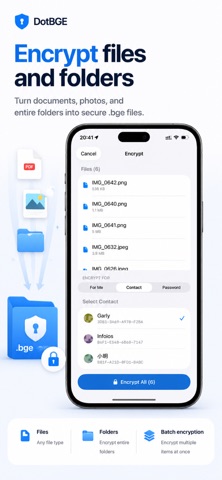




Description by 刚 熊 Written by the developer, not by AppBrain. Click to read.
Built on the open .bge format, DotBGE uses RSA-4096 and AES-256-GCM encryption to protect documents, photos, PDFs, media, archives, and folders. Share encrypted files with people you trust using identity cards, or lock files with a password only you know.
ENCRYPT FOR A FRIEND
Encrypt a file so only a specific person's identity can unlock it. Add trusted contacts, then encrypt in a few taps. No passwords to exchange and no shared secret to leak.
ENCRYPT TEXT MESSAGES
Type or paste text, encrypt it for yourself, a trusted contact, or a password, then share it as a .bge message file through any chat app. The recipient opens it in DotBGE to read and copy the decrypted message.
IDENTITY CARDS, NOT RAW KEYS
Share your identity card with a QR code or .bgekey file so others can encrypt files for you. No copy-pasting long public keys.
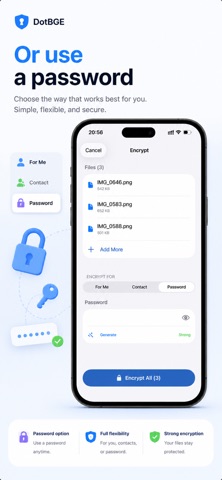
PASSWORD MODE
No contact yet? Encrypt with a passphrase instead. Anyone with the password can decrypt, which is useful for one-time sharing.
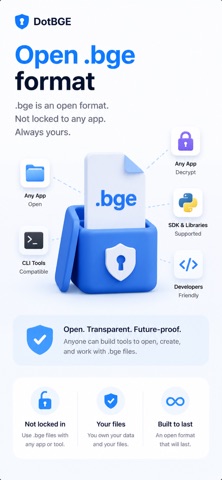
OPEN .bge FILES FROM ANYWHERE
Open encrypted files from Files, Mail, or any app that offers document handoff. DotBGE routes .bge files into a private decrypt-and-preview flow.
OPEN .bge FORMAT
Your encrypted files use a documented, self-describing container. They are portable and not locked to any account or service.
FACE ID VAULT
Keep encrypted files in a local vault protected by Face ID or Touch ID. Organize files into collections with names, colors, and icons; a file can belong to several collections without being duplicated. Optional iCloud sync keeps your encrypted vault and collections available across your own devices.
PREVIEW AFTER DECRYPTING
View photos, PDFs, text, audio, and video inside the app after decrypting without writing decrypted copies to disk.
ENCRYPT FROM ANYWHERE
Encrypt from Photos, Files, or other apps through the share sheet. Single-file encryption, preview, and decryption are always free.
FOLDER ENCRYPTION WITH PRO
Create one encrypted package or encrypt files separately. Choose where to save and whether to keep originals, and optionally hide file and folder names. Encrypt all files, only photos or videos, or selected file extensions; other files stay unencrypted. Save Quick Tasks for repeated runs. Existing encrypted outputs are skipped, even if the source files have changed.
DOTBGE PRO
Unlock batch encryption, folder encryption, an unlimited vault, and multiple identities. A monthly option is available for short-term projects. Decryption, preview, and single-file encryption stay free.
Perfect for:
• Sending sensitive documents to a specific person
• Keeping private files encrypted before sharing or storing them
• Professionals handling confidential files on the go
• People who want their own keys, on their own device
Encrypt your files. Keep your keys.
Terms of Use (EULA): https://www.apple.com/legal/internet-services/itunes/dev/stdfla/
Privacy Policy: https://dotbge.app/privacy
Safety and technology
Found in the app by AppBrain- Price
- Free
- App size
- 10.4 MB
- Content rating
- Everyone
Technologies used by DotBGE: File Encryption
Releases
Updates seen on the App Store- Version
- 1.2.0
- Launched
- May 2026
No changelog data
Alternatives
Similar apps and more from 刚 熊Alternatives to DotBGE: File Encryption





More from 刚 熊


Rankings
App Store top chartsApp Store Rankings for DotBGE: File Encryption
About the app and developer
About DotBGE: File Encryption
DotBGE: File Encryption is an utilities app developed by 刚 熊.
User Ratings
DotBGE: File Encryption is rated 5.00 out of 5 stars. The rating is based on one rating ratings.
App Information
DotBGE: File Encryption is freely available from the App Store. The app size is 10.41 MB. The latest version available is 1.2.0. The last update was on October 18, 2026.
Technical Requirements
The app has a content rating of Everyone. The app has been available on the App Store since May 2026.
Developer information for 刚 熊
Address:
Frequently asked questions about DotBGE: File Encryption
Is DotBGE: File Encryption free?
Yes. DotBGE: File Encryption is free on the App Store.
Is DotBGE: File Encryption still available?
Yes. DotBGE: File Encryption is on the App Store, and the last update we saw was on October 18, 2026.
How large is DotBGE: File Encryption?
DotBGE: File Encryption is 10.41 MB.
Is DotBGE: File Encryption suitable for children?
App Store rates the content of DotBGE: File Encryption as suitable for everyone.
How do people rate DotBGE: File Encryption?
DotBGE: File Encryption has one rating of 5.00 stars on the App Store.
Who made DotBGE: File Encryption?
DotBGE: File Encryption was developed by 刚 熊. It is listed in the utilities category on the App Store.
What are the best alternatives to DotBGE: File Encryption?
People looking at DotBGE: File Encryption also look at these utilities apps: PDF Scanner:Scan for Documents, AI & Automation for Shortcuts, Pass - Password Store, AuthPass – Password Manager, Mapper for Safari.