



AppBrain's verdict
- Last updated
- October 19, 2026
- Size
- 6.47 MB
User feedback
Ratings and reviews on the App StoreComments on DotCounter for iOS
We don't have enough comments to show example comments. Please check back later.
Store listing
By Chisato Nakagawa, from the App StoreDescription by Chisato Nakagawa Written by the developer, not by AppBrain. Click to read.
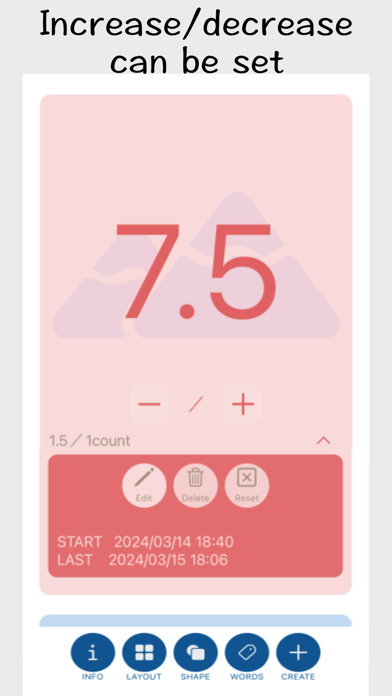
For example, you can count in increments of any number—such as 2, 4, 6, 8—or use decimals like 0.5, 1.0, 1.5, and so on.
■ COUNTER SETTINGS
– COUNTER NAME
Set a custom name for each counter.
– INCREASE / DECREASE PER COUNT
You can set this to either a decimal or an integer.
Each tap will increase or decrease the total by this amount.
Example: If set to “0.5”, the count will go 0.5 → 1.0 → 1.5 → 2.0 → 2.5 → 3.0...
– INITIAL VALUE
Set the starting value for the counter.
If left blank, counting begins from 0.
– TARGET VALUE
Set a target value for the counter.
You can also combine this with an initial value to count down toward 0.
– UNIT
Set a unit to display below the count value.
– NOTE
Add notes or details about the counter.
– SEARCH TAG
If you have multiple counters, you can filter and display specific ones using tags.
– COLORS AND SHAPES
Choose a theme color and background shape for each counter.
This app is free to use, so advertisements will be displayed.
If you have feature requests or feedback, please feel free to leave a review on the App Store.
■Premium
Unlock Premium with a one‑time purchase:
• Home Screen widget for your favorite counter
• Ad‑free experience
• Customizable button colors
■terms
https://www.apple.com/legal/internet-services/itunes/us/terms.html
■privacypolicy
https://megamim.online/multicustomcounter-privacypolicy-en/
Safety and technology
Found in the app by AppBrain- Price
- Free
- App size
- 6.47 MB
- Content rating
- Medium
Technologies used by DotCounter
Releases
Updates seen on the App Store- Version
- 2.0.2
- Launched
- March 2024
No changelog data
Alternatives
Similar apps and more from Chisato NakagawaAlternatives to DotCounter





Rankings
App Store top chartsApp Store Rankings for DotCounter
About the app and developer
About DotCounter
DotCounter is an utilities app developed by Chisato Nakagawa.
User Ratings
The app has no ratings yet.
App Information
DotCounter is freely available from the App Store. The app size is 6.47 MB. The latest version available is 2.0.2. The last update was on October 19, 2026.
Technical Requirements
The app has a content rating of Medium Maturity. The app has been available on the App Store since March 2024.
DotCounter is made and published by Chisato Nakagawa. AppBrain is an independent app data site and isn't affiliated with Chisato Nakagawa. The app name, icon, screenshots and description belong to Chisato Nakagawa and are shown as published on the App Store.
Developer information for Chisato Nakagawa
Address:
Frequently asked questions about DotCounter
Is DotCounter free?
Yes. DotCounter is free on the App Store.
Is DotCounter still available?
Yes. DotCounter is on the App Store, and the last update we saw was on October 19, 2026.
How large is DotCounter?
DotCounter is 6.47 MB.
Is DotCounter suitable for children?
App Store gives DotCounter a medium maturity rating, so it is not meant for young children.
Who made DotCounter?
DotCounter was developed by Chisato Nakagawa. It is listed in the utilities category on the App Store.
What are the best alternatives to DotCounter?
People looking at DotCounter also look at these utilities apps: Fluid Ounces and Milliliters, One Timer - One Tap Timer, メモる電卓 計算した理由を物忘れてしまうヒトのための電卓, MultiCounterList Counter, FriendlyCalculator.