

Draw Easy: Learn How To Draw
Draw Easy: Learn How To Draw is made and published by Volio Tech Back End. AppBrain is an independent app data site and isn't affiliated with Volio Tech Back End. The app name, icon, screenshots and description belong to Volio Tech Back End and are shown as published on the App Store.
AppBrain's verdict
- Rating on App Store
- 4.65
- 92 ratings
- Last updated
- September 24, 2026
It doesn't have enough ratings yet to judge what users think.
Rankings
App Store top chartsApp Store Rankings for Draw Easy: Learn How To Draw
Competitors
Similar apps and more from Volio Tech Back EndMore from Volio Tech Back End


Releases
Updates seen on the App Store- Version
- 1.0.9
- Launched
- May 2025
No changelog data
User feedback
Ratings and reviews on the App StoreComments on Draw Easy: Learn How To Draw for iOS
We don't have enough comments to show example comments. Please check back later.
Technology
Found in the app by AppBrain- Price
- Free
- App size
- 165.5 MB
- Content rating
- Everyone
Technologies used by Draw Easy: Learn How To Draw
About the app and developer
About Draw Easy: Learn How To Draw
Draw Easy: Learn How To Draw is an education app developed by Volio Tech Back End.
User Ratings
Draw Easy: Learn How To Draw is rated 4.65 out of 5 stars. The rating is based on 92 ratings.
App Information
Draw Easy: Learn How To Draw is freely available from the App Store. The app size is 165.50 MB. The latest version available is 1.0.9. The last update was on September 24, 2026.
Technical Requirements
The app has a content rating of Everyone. The app has been available on the App Store since May 2025.
Developer information for Volio Tech Back End
Address:
Frequently asked questions about Draw Easy: Learn How To Draw
Is Draw Easy: Learn How To Draw free?
Yes. Draw Easy: Learn How To Draw is free on the App Store.
Is Draw Easy: Learn How To Draw still available?
Yes. Draw Easy: Learn How To Draw is on the App Store, and the last update we saw was on September 24, 2026.
How large is Draw Easy: Learn How To Draw?
Draw Easy: Learn How To Draw is 165.50 MB.
Is Draw Easy: Learn How To Draw suitable for children?
App Store rates the content of Draw Easy: Learn How To Draw as suitable for everyone.
How do people rate Draw Easy: Learn How To Draw?
Draw Easy: Learn How To Draw scores 4.65 out of 5 stars, from 92 ratings on the App Store.
Who made Draw Easy: Learn How To Draw?
Draw Easy: Learn How To Draw was developed by Volio Tech Back End. It is listed in the education category on the App Store.
Store listing
By Volio Tech Back End, from the App Store


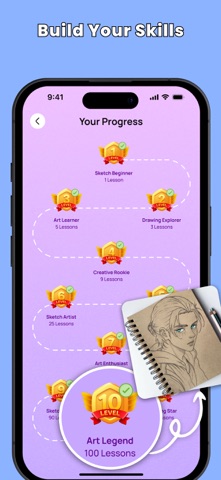
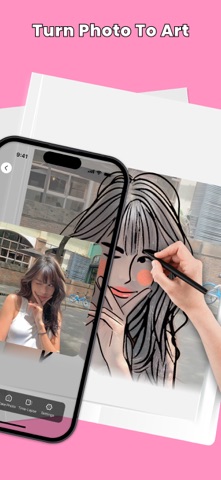
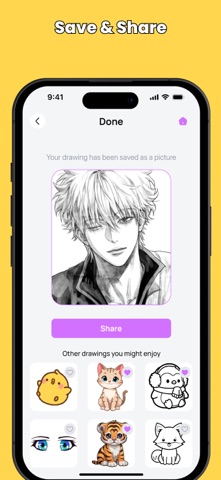
Description by Volio Tech Back End Written by the developer, not by AppBrain. Click to read.
Learn to draw with confidence - even if you're a total beginner.
Draw Easy helps you master drawing step by step with three powerful ways to create. Upload your own photo or choose from a wide variety of templates, and transform them into interactive guides. Whether you're learning solo, drawing with friends, or using AR to trace on paper - your artistic journey starts here.
Three ways to draw
Draw Lesson - Follow structured, step-by-step tutorials that teach you sketching, shading, and drawing fundamentals from the ground up
Draw Together - Create alongside friends and other artists in real-time, sharing inspiration and growing your skills together
AR Drawing - Point your phone at your paper and trace outlines directly onto real surfaces using live AR guidance as your creative canvas
Features
Import Any Image - Turn your photos into easy-to-follow drawing guides
Fun Categories - Explore cute animals, celebrities, food, landscapes, and much more
Tiered Templates - Progress from Beginner to Advanced levels at your own pace
Flexible Controls - Zoom, pause, and adjust your guides whenever you need
Designed for Beginners - Created for young and new artists to build skills gradually
How it works
1. Open the app and choose your drawing mode: Draw Lesson, Draw Together, or AR Drawing
2. Select a template or upload your own image
3. Start creating - follow lessons, collaborate with friends, or use AR to trace on paper
4. Pause, zoom, and adjust as needed - then draw with confidence
Start your creative journey today. Download Draw Easy and begin drawing - one line at a time.
Privacy Policy: https://volio.store/privacypolicy
Terms of Use: https://volio.store/termsofuse