AppBrain
AppBrain
  • Apps
  • Apps being viewed right now Trending apps today Most popular apps All-time most installed apps Top rated apps iPhone and iPad apps
  • Intelligence ▾
    Intelligence overview → Track any Android app or your whole market
    Track & analyze
    Keyword Tracker & OptimizerTrack & improve Play rankings App Performance ReportOne-off PDF for any app StatisticsFree Android & Play market stats
    Promote your app
    Featured Apps App Links
  • Intelligence
  • Pricing
  • Dashboard
  • Sign up
  • Log in
App Store Apps > Productivity > Draw on PDF - Pen, shapes,text
Draw on PDF - Pen, shapes,text icon

Draw on PDF - Pen, shapes,text

1.0.2
Kalpesh Pirojiya
0.00
0 reviews
Free

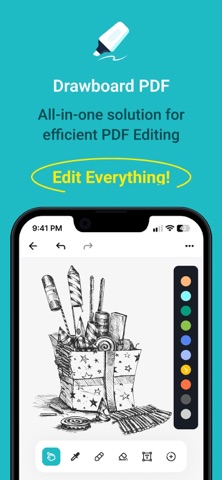
Draw on PDF - Pen, shapes,text Screenshot 1 of 6
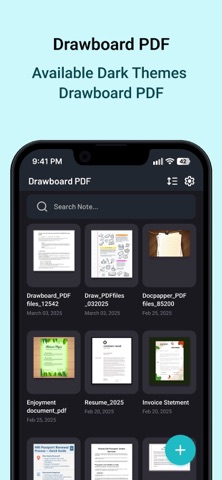
Draw on PDF - Pen, shapes,text Screenshot 2 of 6
Draw on PDF - Pen, shapes,text Screenshot 3 of 6
Draw on PDF - Pen, shapes,text Screenshot 4 of 6
Draw on PDF - Pen, shapes,text Screenshot 5 of 6
Draw on PDF - Pen, shapes,text Screenshot 6 of 6
Screenshots by Kalpesh Pirojiya, from the the App Store listing
View on the App Store

AppBrain's verdict

Last updated
January 6, 2026
Size
39.6 MB
Official page on the App Store

User feedback

Ratings and reviews on the App Store

Comments on Draw on PDF - Pen, shapes,text for iOS

We don't have enough comments to show example comments. Please check back later.

Store listing

By Kalpesh Pirojiya, from the App Store
Description by Kalpesh Pirojiya Written by the developer, not by AppBrain. Click to read.
Create, draw, and annotate your PDFs effortlessly. Draword brings you a clean and powerful workspace to write, highlight, and design directly on PDF pages — perfect for studying, sketching, or working on the go.

App Features:

Create & Manage Documents:
* Start a new document in seconds or open folders to access saved PDFs.
* Choose from blank pages or import images to start your work.
* Set page size (A4, Letter, custom), page count, and background color exactly how you want it.

Draw, Highlight & Annotate:
* Use intuitive tools like Pen, Highlighter, Eraser, and Laser Pointer.
* Control color, thickness, and opacity for precise edits.
* Ideal for note-taking, sketching diagrams, or marking up documents.

Add Shapes & Review Tools:
* Create lines, arrows, rectangles, ellipses, polygons, and more.
* Mark your notes with underline, strikethrough, squiggle, or text clear for quick reviews.
* Combine freeform drawing and shapes for a professional look.

Add & Edit Text:
* Insert text boxes anywhere on your document.
* Easily move text.
* Customize font color and alignment to match your document style.

Customize Your Tools:
* Choose from multiple color palettes and brush sizes.
* Effortlessly switch tools with the modern floating toolbar.
* Undo or redo actions instantly — creativity without limits.

Manage Your PDFs:
* Organize and preview all your PDFs with thumbnails and creation dates.
* Reopen recent projects quickly for continuous editing.
* Designed with simplicity and performance in mind.

Subscription Details:

- Payment will be charged to iTunes Account at confirmation of purchase
- Subscription automatically renews unless auto-renew is turned off 24 hours before the end of the current period
- Account will be charged for renewal within 24 hours prior to the end of the current period
- No cancellation of the current subscription is allowed during the active subscription period
- Any unused portion of a free trial, if offered, will be forfeited upon purchase

Privacy Policy = https://www.privacypolicycenter.com/view_custom.php?v=QkxzOGNxR0V4RTNlS25MK09pZXdaQT09&n=Privacy-Policy
Terms Of Use = https://www.privacypolicycenter.com/view_custom.php?v=Z3ZYS1dzNmtwY2owUFQzeWt3d1Azdz09&n=Terms-Of-Use
EULA: https://www.privacypolicycenter.com/view_custom.php?v=cXZFRlZ1dkpueTMxZ3c2YmQxNzF5QT09&n=End-User-License-Agreement-(EULA)-of-Draw-on-PDF---Pen,-shapes,-text

Safety and technology

Found in the app by AppBrain
Price
Free
App size
39.6 MB
Content rating
High

Technologies used by Draw on PDF - Pen, shapes,text

Releases

Updates seen on the App Store
Version
1.0.2
Launched
November 2025

No changelog data

Alternatives

Similar apps and more from Kalpesh Pirojiya

Alternatives to Draw on PDF - Pen, shapes,text

Emoji Art Maker icon Emoji Art Maker
SWAINFO SOLUTIONS
1.0
Free
1 ratings
EPUB to PDF Converter - eBook icon EPUB to PDF Converter - eBook
Asad Ahsan
4.3
Free
3 ratings
15-Min Book Summaries icon 15-Min Book Summaries
Smit Pipaliya
0.0
Free
Mail ++ icon Mail ++
Jksol Infotech LLP
4.0
Free
3 ratings
Epub to Pdf Converter* icon Epub to Pdf Converter*
Nanjibhai Gorasiya
3.3
Free
3 ratings
Kaizen - Tasks & Calendar icon Kaizen - Tasks & Calendar
Lennard Zieten
1.5
Free
2 ratings
AI Signature Maker x Generator icon AI Signature Maker x Generator
Punamben Shah
3.6
Free
15 ratings
Study notes & PDF - Oneboard icon Study notes & PDF - Oneboard
Rica Harz
3.0
Free
2 ratings

More from Kalpesh Pirojiya

Doc Scanner – PDF Scan & OCR icon Doc Scanner – PDF Scan & OCR
Kalpesh Pirojiya
5.0
Free
2 ratings
Voice & Text Translator icon Voice & Text Translator
Kalpesh Pirojiya
5.0
Free
1 ratings
StepUp: Health Tracker icon StepUp: Health Tracker
Kalpesh Pirojiya
5.0
Free
1 ratings
Calories Tracker AI icon Calories Tracker AI
Kalpesh Pirojiya
0.0
Free
ExpenseFlow: Budget Planner icon ExpenseFlow: Budget Planner
Kalpesh Pirojiya
0.0
Free
HabitFlow: Daily Habit Tracker icon HabitFlow: Daily Habit Tracker
Kalpesh Pirojiya
0.0
Free
Grid Maker - Photo Split icon Grid Maker - Photo Split
Kalpesh Pirojiya
0.0
Free
Photo Collage Maker & Stickers icon Photo Collage Maker & Stickers
Kalpesh Pirojiya
0.0
Free

Rankings

App Store top charts

App Store Rankings for Draw on PDF - Pen, shapes,text

This app is not ranked

About the app and developer

About Draw on PDF - Pen, shapes,text

Draw on PDF - Pen, shapes,text is a productivity app developed by Kalpesh Pirojiya.

User Ratings

The app has no ratings yet.

App Information

Draw on PDF - Pen, shapes,text is freely available from the App Store. The app size is 39.59 MB. The latest version available is 1.0.2. The last update was on January 6, 2026.

Technical Requirements

The app has a content rating of High Maturity. The app has been available on the App Store since November 2025.

Draw on PDF - Pen, shapes,text is made and published by Kalpesh Pirojiya. AppBrain is an independent app data site and isn't affiliated with Kalpesh Pirojiya. The app name, icon, screenshots and description belong to Kalpesh Pirojiya and are shown as published on the App Store.

Developer information for Kalpesh Pirojiya

Kalpesh Pirojiya

Address:

Share Draw on PDF - Pen, shapes,text

Today's trending apps Apps other people are watching Popular Productivity Apps Top new apps Price drops on Google Play
Emoji Art Maker icon Emoji Art Maker
EPUB to PDF Converter - eBook icon EPUB to PDF Converter - eBook
15-Min Book Summaries icon 15-Min Book Summaries
Mail ++ icon Mail ++
Epub to Pdf Converter* icon Epub to Pdf Converter*
Kaizen - Tasks & Calendar icon Kaizen - Tasks & Calendar
AI Signature Maker x Generator icon AI Signature Maker x Generator
Study notes & PDF - Oneboard icon Study notes & PDF - Oneboard
Overview Alternatives Reviews Rankings Technology
AppBrain Intelligence premium content

Subscribe now to get full and unlimited access to AppBrain Intelligence. You'll have access to:

  • App Intelligence dashboard (performance timeline, competitor comparison, country rankings, insight cards)
  • Detailed ranking data per app
  • Full timeline per developer
  • Device market shares data per country
  • Unlimited keyword tracking
1 Month

$75/mo
(billed every month)

SAVE 0%
Subscribe
3 Months

$65/mo
($195 billed every 3 months)

SAVE 13%
Subscribe
1 Year

$57.50/mo
($690 billed every year)

SAVE 23%
Subscribe
Each subscription will automatically renew 3 days before the expiration date for the same time period. Subscriptions can be cancelled at any time before the renewal.

AppBrain is an app data site, we track rankings, ratings, installs for all apps and games on Google Play and the App Store. AppBrain doesn't host app files or APKs, all install links go directly to the official store. All trademarks are owned by their respective owners.

More apps

  • Top Android apps being viewed
  • Movie Box LLC
  • Lifelight Connect
  • View Mobile Device Manager Plus

App statistics

  • Android statistics
  • Google Play Developer stats
  • Trending Android Apps
  • Trending iOS apps
  • Top popular Apps
  • Buy the best Android phone
  • Buy & sell app businesses

About AppBrain

  • Contact
  • Privacy
  • Documentation
  • DMCA takedowns
  • Blog
  • Top Free Games Apps for your iPhone or iPad
© 2010-2026 - AppBrain