

Doc Scanner – PDF Scan & OCR
Doc Scanner – PDF Scan & OCR is made and published by Kalpesh Pirojiya. AppBrain is an independent app data site and isn't affiliated with Kalpesh Pirojiya. The app name, icon, screenshots and description belong to Kalpesh Pirojiya and are shown as published on the App Store.
AppBrain's verdict
- Rating on App Store
- 5.00
- 2 ratings
- Last updated
- October 3, 2026
- Size
- 87.7 MB
It doesn't have enough ratings yet to judge what users think.
User feedback
Ratings and reviews on the App StoreComments on Doc Scanner – PDF Scan & OCR for iOS
We don't have enough comments to show example comments. Please check back later.
Store listing
By Kalpesh Pirojiya, from the App Store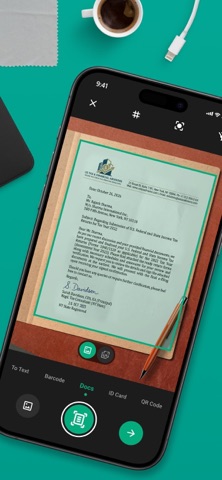


Description by Kalpesh Pirojiya Written by the developer, not by AppBrain. Click to read.
Perfect for students, professionals, and businesses who need fast and reliable document scanning.
App Features:
Document Scanner
Capture documents quickly using the built-in smart scanner.
• Automatic edge detection.
• Auto crop and perspective correction.
• High-quality PDF output.
• Scan multiple pages in seconds.
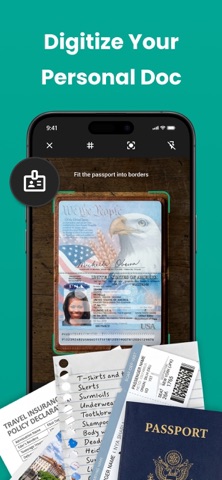
Edit and manage your scanned documents easily.
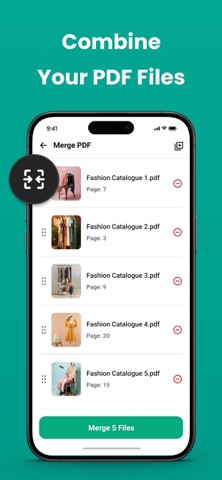
• Merge multiple PDFs into one file.
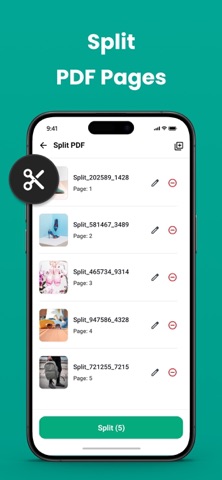
• Split PDF into separate pages.
• Rearrange pages.
• Delete unwanted pages.
• Rename and organise documents.
Batch Image to PDF Conversion
Convert multiple photos into a single PDF.
• Import images from gallery.
• Reorder pages.
• Convert instantly to PDF.
• Export high quality documents.
Document Editing
Improve the quality of scanned documents.
• Crop and rotate pages.
• Apply document filters.
• Adjust brightness and contrast.
• Clean background for better readability.
QR code & BarCode Scan
Scan QR codes and barcodes quickly using the built-in smart scanner.
• Instantly scan QR codes and barcodes.
• Supports multiple barcode formats.
• Open links directly from scanned QR codes.
• Copy or share scanned results easily.
• Fast and reliable recognition.
Sign & Annotate Documents
Add notes or signatures to your documents.
• Draw signature.
• Highlight important text.
• Add color annotations.
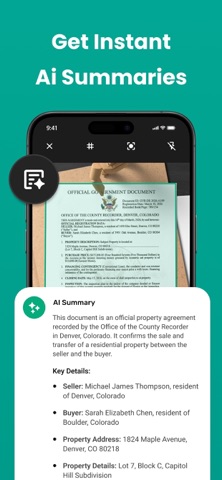
Document AI Summary
Use AI to quickly understand long documents.
• Automatically summarise text.
• Extract key points.
• Save time reading large documents.
Easy Sharing & Export
Share documents anywhere.
• Export as PDF or image.
• Send via email.
• Share to apps and cloud services.
File Organiser
Keep all your files organised.
• View all scanned documents.
• Sort files easily.
• Rename and manage folders.
• Delete or organise files anytime.
Flexible PDF Quality Options
Choose your preferred export quality.
• Small file size.
• Balanced quality.
• High resolution PDF.
Subscription Details
- Payment will be charged to iTunes Account at confirmation of purchase.
- Subscription automatically renews unless auto-renew is turned off 24 hours before the end of the current period.
- Account will be charged for renewal within 24 hours prior to the end of the current period.
- No cancellation of the current subscription is allowed during the active subscription period.
- Any unused portion of a free trial, if offered, will be forfeited upon purchase.
Privacy Policy: https://privacypolicycenter.com/new/view/id6759896516
Terms OF Use: https://privacypolicycenter.com/new/terms/id6759896516
EULA: https://privacypolicycenter.com/new/eula/id6759896516
Safety and technology
Found in the app by AppBrain- Price
- Free
- App size
- 87.7 MB
- Content rating
- High
Technologies used by Doc Scanner – PDF Scan & OCR
Releases
Updates seen on the App Store- Version
- 1.1
- Launched
- March 2026
No changelog data
Alternatives
Similar apps and more from Kalpesh PirojiyaAlternatives to Doc Scanner – PDF Scan & OCR


More from Kalpesh Pirojiya


Rankings
App Store top chartsApp Store Rankings for Doc Scanner – PDF Scan & OCR
About the app and developer
About Doc Scanner – PDF Scan & OCR
Doc Scanner – PDF Scan & OCR is a productivity app developed by Kalpesh Pirojiya.
What is the rating of Doc Scanner – PDF Scan & OCR?
Doc Scanner – PDF Scan & OCR is rated 5.00 out of 5 stars, based on 2 ratings.
Is Doc Scanner – PDF Scan & OCR free?
Doc Scanner – PDF Scan & OCR is free. The app size is 87.70 MB. The latest version available is 1.1. The last update was on October 3, 2026.
What are the requirements for Doc Scanner – PDF Scan & OCR?
The app has a content rating of High Maturity. The app has been available on the App Store since March 2026.
Developer information for Kalpesh Pirojiya
Address:
Frequently asked questions about Doc Scanner – PDF Scan & OCR
Is Doc Scanner – PDF Scan & OCR free?
Yes. Doc Scanner – PDF Scan & OCR is free on the App Store.
Is Doc Scanner – PDF Scan & OCR still available?
Yes. Doc Scanner – PDF Scan & OCR is on the App Store, and the last update we saw was on October 3, 2026.
How large is Doc Scanner – PDF Scan & OCR?
Doc Scanner – PDF Scan & OCR is 87.70 MB.
Is Doc Scanner – PDF Scan & OCR suitable for children?
App Store gives Doc Scanner – PDF Scan & OCR a high maturity rating. It is meant for adults.
How do people rate Doc Scanner – PDF Scan & OCR?
Doc Scanner – PDF Scan & OCR scores 5.00 out of 5 stars, from 2 ratings on the App Store.
Who made Doc Scanner – PDF Scan & OCR?
Doc Scanner – PDF Scan & OCR was developed by Kalpesh Pirojiya. It is listed in the productivity category on the App Store.
What are the best alternatives to Doc Scanner – PDF Scan & OCR?
People looking at Doc Scanner – PDF Scan & OCR also look at these productivity apps: Notes Notepad, CamScanner - PDF Reader App, Daily Tasks: To-Do List, AIRemember - Smart Memory, Cloud Storage: 100 GB No Cost.