

Drawing from Life
Drawing from Life is made and published by fnx.io. AppBrain is an independent app data site and isn't affiliated with fnx.io. The app name, icon, screenshots and description belong to fnx.io and are shown as published on the App Store.
AppBrain's verdict
- Last updated
- June 17, 2026
- Size
- 76.5 MB
User feedback
Ratings and reviews on the App StoreComments on Drawing from Life for iOS
We don't have enough comments to show example comments. Please check back later.
Store listing
By fnx.io, from the App Store



Description by fnx.io Written by the developer, not by AppBrain. Click to read.
Drawing from life is one of the hardest skills an artist can learn. The problem isn't your hand — it's your brain. When you look at a face, your mind doesn't see shapes, angles and values. It sees "a nose" and fills in what it thinks a nose should look like. You draw a symbol instead of what's actually there. Every art teacher will tell you the same thing: you need to learn to see. Really see. Not what you know, but what is. That's where tools come in. A mirror flips the image and breaks your brain's assumptions. Squinting blurs the details so you notice the big shapes. A pencil held at arm's length measures proportions your eye misjudges. Drawing from Life puts all of these classic techniques — and more — right on your screen.
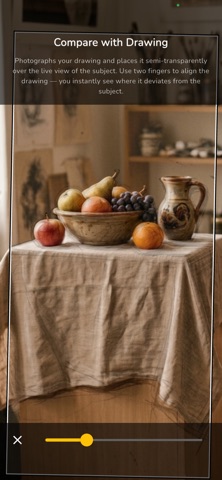
Compare your drawing with the subject. Snap a photo of your work, then overlay it on the live camera view of your subject. Pinch and rotate to align the two. With adjustable transparency you instantly see where your drawing deviates from reality.
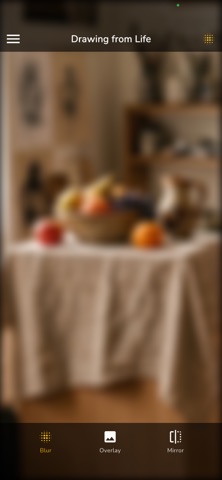
Blur. Softens the image and suppresses detail. It forces you to see only the large shapes, volumes and overall composition — exactly what you should be putting down first.
Mirror. Flips the entire image horizontally. An old artist's trick — in the flipped view, errors in proportion and symmetry jump out immediately.
Black and white. Strips away color so you can focus on tonal values — the distribution of light and shadow that forms the foundation of every drawing.
Contrast. Increases the difference between lights and darks. Helps you see exactly where the light falls and where the shadow begins, especially useful in flat or subtle lighting.
Posterize. Simplifies the image into a few tonal zones. Instead of smooth gradients you see clearly separated areas of light and shadow — great for understanding the big shapes and the light pattern of the scene.
Invert. Flips lights and darks to show a negative image. The unfamiliar view helps reveal value errors that are invisible in the normal image.
Edge detection. Highlights outlines and edges in the scene. Helps you see the main lines that form the skeleton of your drawing.
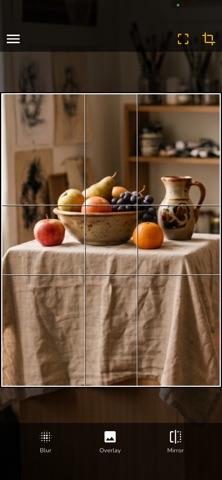
Grid. Displays a regular grid over the image. The classic method of transferring proportions — draw the same grid on your paper and copy square by square.
Composition overlay. Displays a composition scheme over the image — rule of thirds, golden ratio, diagonals or dynamic symmetry. Helps you evaluate whether the arrangement of elements follows established principles of composition.
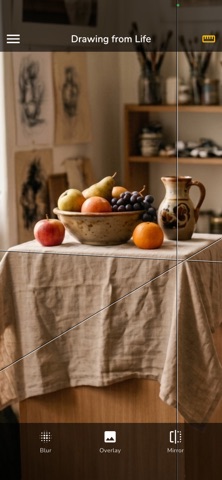
Guide lines. Places infinite straight lines over the image. Position and rotate them with two fingers, add as many as you need. They help you check verticals, horizontals and diagonal axes across your subject.
Face axes. Automatically detects a face and draws guide axes through the eyes, nose and mouth. Helps you place facial features correctly when drawing portraits.
The basic tools — compare, blur and mirror — are free. Unlock all features with a single one-time purchase.
Safety and technology
Found in the app by AppBrain- Price
- Free
- App size
- 76.5 MB
- Content rating
- Medium
Technologies used by Drawing from Life
Releases
Updates seen on the App Store- Version
- 0.9.2
- Launched
- April 2026
No changelog data
Alternatives
Similar apps and more from fnx.io


Rankings
App Store top chartsApp Store Rankings for Drawing from Life
About the app and developer
About Drawing from Life
Drawing from Life is a graphics & design app developed by fnx.io.
User Ratings
The app has no ratings yet.
App Information
Drawing from Life is freely available from the App Store. The app size is 76.53 MB. The latest version available is 0.9.2. The last update was on June 17, 2026.
Technical Requirements
The app has a content rating of Medium Maturity. The app has been available on the App Store since April 2026.
Developer information for fnx.io
Address: