




AppBrain's verdict
- Rating on App Store
- 4.00
- 5 ratings
- Last updated
- November 9, 2026
- Size
- 535.8 MB
It doesn't have enough ratings yet to judge what users think.
User feedback
Ratings and reviews on the App StoreComments on Drawing: Sketch Pad & Paint for iOS
We don't have enough comments to show example comments. Please check back later.
Store listing
By Kairoos Solutions SL, from the App StoreDescription by Kairoos Solutions SL Written by the developer, not by AppBrain. Click to read.
FOUR WAYS TO CREATE
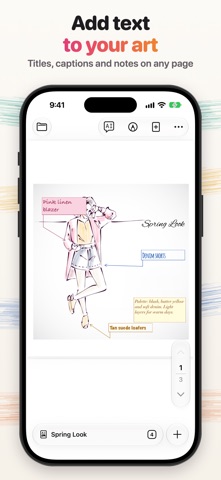
+ PDF Drawing: draw, write and mark up any PDF or one of 200+ paper templates.
+ Watercolor: wet paint that spreads, blooms and dries on textured paper.
+ Sketch: dry media on real paper grain, from graphite to soft pastel.
+ Oils & Acrylics: thick paint with brush marks, ridges and impasto.
DRAW YOUR WAY
+ Apple Pencil with pressure and tilt, and palm rejection so you can rest your hand on the screen.
+ Other styluses and your finger work too, in every editor.
WATERCOLOR
+ Paint wet-on-wet, glaze over dry washes, and tilt the paper to let the paint run.
+ Mix artist pigments such as French Ultramarine and Payne's Gray, and pick colors straight from your painting.
+ Lay a smooth wash with Fill, and add texture with masking fluid and salt.
+ Switch to ink wash on rice paper, or to opaque gouache.
+ Write titles and captions with the brush itself.
SKETCH
+ Graphite, charcoal, white charcoal, conté, soft pastel, colored pencil and fineliner.
+ Blend with a stump, lift with a kneaded or hard eraser, mask areas and fix your drawing.
+ Toned, Ingres and sanded papers, or a paper color of your own.
+ Draw from a reference photo with grid, value and mirror guides.
OILS & ACRYLICS
+ Flat, filbert, round and rigger brushes, a palette knife, blender, rag, scraper and tape.
+ Mix on a palette, then lay thick impasto or thin glazes.
+ Paint with slow-drying oils or fast-drying acrylics.
LEARN AS YOU PAINT
+ Lessons show each technique, then let you try it yourself.
+ Paint-along projects and sample paintings to explore.
+ New tools join your tool bar as you learn them, so the screen stays simple.
+ Export a time-lapse of your sketches and oil paintings.
DRAW AND WRITE ON PDFs
+ Pens, pencils, markers, fountain pen, crayon and more, with a ruler, shapes and a lasso.
+ Highlight text, add text boxes, images and stickers, and rearrange pages.
+ Scan paper documents straight into your library.
+ Share your work as a PDF or an image.
AI WHEN YOU WANT IT
+ Chat with the AI assistant, turn a photo into a watercolor plan, or get feedback on a sketch compared with your reference.
+ AI features can be hidden in Settings.
ORGANIZED AND SAFE
+ Unlimited notebooks, folders and subfolders with custom covers.
+ Passcodes for the whole app or for individual folders.
+ Automatic backups keep your work safe.
Privacy Policy
http://www.noteswriter.com/Kairoos_Privacy_Policy.html
EULA
https://www.apple.com/legal/internet-services/itunes/dev/stdeula/
Safety and technology
Found in the app by AppBrain- Price
- Free
- App size
- 535.8 MB
- Content rating
- Everyone
Technologies used by Drawing: Sketch Pad & Paint
Releases
Updates seen on the App Store- Version
- 2.0.1
- Launched
- January 2024
No changelog data
Alternatives
Similar apps and more from Kairoos Solutions SLAlternatives to Drawing: Sketch Pad & Paint


More from Kairoos Solutions SL


Rankings
App Store top chartsApp Store Rankings for Drawing: Sketch Pad & Paint
About the app and developer
About Drawing: Sketch Pad & Paint
Drawing: Sketch Pad & Paint is a productivity app developed by Kairoos Solutions SL.
User Ratings
Drawing: Sketch Pad & Paint is rated 4.00 out of 5 stars. The rating is based on 5 ratings.
App Information
Drawing: Sketch Pad & Paint is freely available from the App Store. The app size is 535.82 MB. The latest version available is 2.0.1. The last update was on November 9, 2026.
Technical Requirements
The app has a content rating of Everyone. The app has been available on the App Store since January 2024.
Drawing: Sketch Pad & Paint is made and published by Kairoos Solutions SL. AppBrain is an independent app data site and isn't affiliated with Kairoos Solutions SL. The app name, icon, screenshots and description belong to Kairoos Solutions SL and are shown as published on the App Store.
Developer information for Kairoos Solutions SL
Address:
Frequently asked questions about Drawing: Sketch Pad & Paint
Is Drawing: Sketch Pad & Paint free?
Yes. Drawing: Sketch Pad & Paint is free on the App Store.
Is Drawing: Sketch Pad & Paint still available?
Yes. Drawing: Sketch Pad & Paint is on the App Store, and the last update we saw was on November 9, 2026.
How large is Drawing: Sketch Pad & Paint?
Drawing: Sketch Pad & Paint is 535.82 MB.
Is Drawing: Sketch Pad & Paint suitable for children?
App Store rates the content of Drawing: Sketch Pad & Paint as suitable for everyone.
How do people rate Drawing: Sketch Pad & Paint?
Drawing: Sketch Pad & Paint scores 4.00 out of 5 stars, from 5 ratings on the App Store.
Who made Drawing: Sketch Pad & Paint?
Drawing: Sketch Pad & Paint was developed by Kairoos Solutions SL. It is listed in the productivity category on the App Store.
What are the best alternatives to Drawing: Sketch Pad & Paint?
People looking at Drawing: Sketch Pad & Paint also look at these productivity apps: AnimCreate, Holo.Pen Lite: Virtual Tablet, Pocket Paint - Easy GenAI, Holo.Draw Lite, Ai Art Image Enhancer.