

DrillCheck Metal Detector
DrillCheck Metal Detector is made and published by cAsAxMoRe. AppBrain is an independent app data site and isn't affiliated with cAsAxMoRe. The app name, icon, screenshots and description belong to cAsAxMoRe and are shown as published on the App Store.
AppBrain's verdict
- Rating on App Store
- 5.00
- 1 ratings
- Last updated
- October 2, 2026
It doesn't have enough ratings yet to judge what users think.
Rankings
App Store top chartsApp Store Rankings for DrillCheck Metal Detector
Competitors
Similar apps and more from cAsAxMoReMore from cAsAxMoRe


Releases
Updates seen on the App Store- Version
- 2.1
- Launched
- May 2026
No changelog data
User feedback
Ratings and reviews on the App StoreComments on DrillCheck Metal Detector for iOS
We don't have enough comments to show example comments. Please check back later.
Technology
Found in the app by AppBrain- Price
- Free
- App size
- 5.04 MB
- Content rating
- Everyone
Technologies used by DrillCheck Metal Detector
About the app and developer
About DrillCheck Metal Detector
DrillCheck Metal Detector is an utilities app developed by cAsAxMoRe.
User Ratings
DrillCheck Metal Detector is rated 5.00 out of 5 stars. The rating is based on one rating ratings.
App Information
DrillCheck Metal Detector is freely available from the App Store. The app size is 5.04 MB. The latest version available is 2.1. The last update was on October 2, 2026.
Technical Requirements
The app has a content rating of Everyone. The app has been available on the App Store since May 2026.
Developer information for cAsAxMoRe
Address:
Frequently asked questions about DrillCheck Metal Detector
Is DrillCheck Metal Detector free?
Yes. DrillCheck Metal Detector is free on the App Store.
Is DrillCheck Metal Detector still available?
Yes. DrillCheck Metal Detector is on the App Store, and the last update we saw was on October 2, 2026.
How large is DrillCheck Metal Detector?
DrillCheck Metal Detector is 5.04 MB.
Is DrillCheck Metal Detector suitable for children?
App Store rates the content of DrillCheck Metal Detector as suitable for everyone.
How do people rate DrillCheck Metal Detector?
DrillCheck Metal Detector has one rating of 5.00 stars on the App Store.
Who made DrillCheck Metal Detector?
DrillCheck Metal Detector was developed by cAsAxMoRe. It is listed in the utilities category on the App Store.
Store listing
By cAsAxMoRe, from the App Store


Description by cAsAxMoRe Written by the developer, not by AppBrain. Click to read.
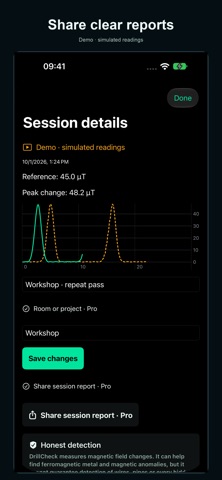
It uses the magnetometer in a compatible iPhone or iPad. Establish a reference while holding the device still, sweep slowly, then compare your first and second passes. Changes may provide clues about nearby ferromagnetic screws, nails or other fasteners.
SCAN, COMPARE AND SAVE
• Guided calibration with a stable reference.
• Magnetic field, change from the reference and peak reading.
• Two curves to compare passes over time.
• One start/stop switch and a separate peak reset.
• Save up to 5 scans with notes in the free version.
• Introduction, guide and a clearly labelled simulated demo.
CHOOSE YOUR PRO TOOLS
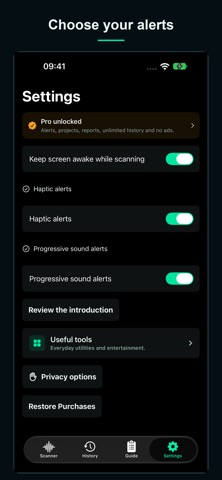
Pro unlocks haptic alerts, progressive sound, extended gain, room or project organization, shareable reports and unlimited saved scans. A one-time purchase also removes all advertising.
You can also unlock each utility separately for 30 minutes by watching a rewarded ad. Each option has its own explanation and remaining-time counter. Advertising remains during these temporary unlocks. Saved records remain after access expires.
Scans are stored on your device. Gain adjusts alert thresholds; it does not improve the sensor’s physical accuracy or detection range.
IMPORTANT
DrillCheck measures magnetic field changes. It does not identify materials or measure depth. Curves show time, not position. It does not directly detect wood or guarantee detection of electrical wiring, copper or plastic pipes, or every hidden object. It never confirms that drilling is safe; carry out appropriate checks before drilling.
Measurement requires an available magnetometer. On devices without a sensor, explore the controls with the demo, which does not measure your surroundings.