

DriveFlash is made and published by MING HWA LEE. AppBrain is an independent app data site and isn't affiliated with MING HWA LEE. The app name, icon, screenshots and description belong to MING HWA LEE and are shown as published on the App Store.
AppBrain's verdict
- Last updated
- May 18, 2026
Rankings
App Store top chartsApp Store Rankings for DriveFlash
This app is not ranked
Competitors
Similar apps and more from MING HWA LEEAlternatives to DriveFlash


Releases
Updates seen on the App Store- Version
- 1.2
- Launched
- April 2026
No changelog data
User feedback
Ratings and reviews on the App StoreComments on DriveFlash for iOS
We don't have enough comments to show example comments. Please check back later.
Technology
Found in the app by AppBrain- Price
- Free
- App size
- 16.2 MB
- Content rating
- Everyone
Technologies used by DriveFlash
About the app and developer
About DriveFlash
DriveFlash is a productivity app developed by MING HWA LEE.
What is the rating of DriveFlash?
DriveFlash has no ratings yet.
Is DriveFlash free?
DriveFlash is free. The app size is 16.20 MB. The latest version available is 1.2. The last update was on May 18, 2026.
What are the requirements for DriveFlash?
The app has a content rating of Everyone. The app has been available on the App Store since April 2026.
Developer information for MING HWA LEE
Address:
Store listing
By MING HWA LEE, from the App Store


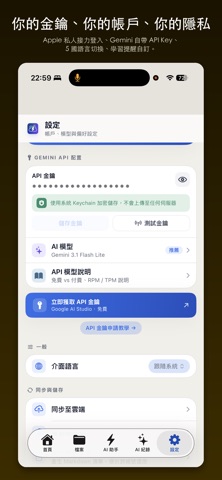
Screenshots by MING HWA LEE, from the the App Store listing
Description by MING HWA LEE Written by the developer, not by AppBrain. Click to read.
【Your Cloud Drive Now Answers You.】
DriveFlash is an AI-powered personal knowledge management assistant. Transform your scattered cloud drive documents into an intelligent knowledge base you can chat with and query anytime.
Two Login Options, Your Choice
Sign in with Apple: Your knowledge stays in iCloud Drive, completely private
Google Sign-in: Your knowledge stays in Google Drive, synced across platforms
Both methods offer identical functionality—use either one to access all AI features.
Ask Your Documents Directly
RAG Smart Q&A (vector search + Gemini AI) with three-layer intelligent retrieval (Wiki index → vector similarity → keyword matching). AI answers come with clickable source document links and related topic suggestions.
Convert Multiple Content Sources to Notes in One Click
YouTube videos, Podcasts, web articles, PDFs (including scans), eBooks (EPUB/DOCX), photos (OCR), audio files—9 built-in analysis modes + custom modes:
Detailed summary, study notes, meeting minutes, academic seminar
User manuals, knowledge extraction, eBook quick-read
Convert to Markdown, transcript organization
Custom analysis mode (add your own prompts to process source content)
Auto-Generate Knowledge Reports
AI daily/weekly/monthly reports automatically organize and review your newly added content and knowledge direction.
Meeting Todos → Reminders
Automatically extract action items from meeting notes and add them to iOS Reminders app in one click, with bidirectional deep links for seamless navigation.
Learning Verification + Course System
Quiz: Daily/weekly/monthly tests auto-generated from your knowledge base
Lesson: AI-generated short course cards to refresh your memory
Learning reminders to help you maintain momentum
AI Assistant
Built-in "Prompt Architect" with one-click professional templates
Custom prompts: add, edit, delete personalized templates
Multi-file attachment support with content persisting across conversations
Privacy First
No proprietary servers: data flows directly between your device and cloud
API keys encrypted in Keychain, never uploaded to any server
【Key Features】
RAG smart Q&A + source attribution
AI daily/weekly/monthly reports
Cloud drive folder browsing
Full-text search + vector search
9 built-in analysis modes (detailed summary / study notes / convert to Markdown / meeting minutes / academic seminar / user manual / knowledge extraction / eBook quick-read / transcript organization)
EPUB / DOCX eBook parsing
YouTube / Podcast subtitle extraction and analysis
Learning verification Quiz + Lesson cards
Meeting todos → iOS Reminders integration
5 languages (Traditional Chinese / Simplified Chinese / English / Japanese / Korean)
Completely free, with optional developer support
【Prerequisites】
Apple ID or Google Account (one or the other)
Gemini API key (free signup at aistudio.google.com)
【Minimum System Requirements】
iPhone: iOS 26.2 or later
iPad: iPadOS 26.2 or later
(Required to access iOS 26 exclusive APIs like Apple SpeechAnalyzer and NLContextualEmbedding)
DriveFlash is an AI-powered personal knowledge management assistant. Transform your scattered cloud drive documents into an intelligent knowledge base you can chat with and query anytime.
Two Login Options, Your Choice
Sign in with Apple: Your knowledge stays in iCloud Drive, completely private
Google Sign-in: Your knowledge stays in Google Drive, synced across platforms
Both methods offer identical functionality—use either one to access all AI features.
Ask Your Documents Directly
RAG Smart Q&A (vector search + Gemini AI) with three-layer intelligent retrieval (Wiki index → vector similarity → keyword matching). AI answers come with clickable source document links and related topic suggestions.
Convert Multiple Content Sources to Notes in One Click
YouTube videos, Podcasts, web articles, PDFs (including scans), eBooks (EPUB/DOCX), photos (OCR), audio files—9 built-in analysis modes + custom modes:
Detailed summary, study notes, meeting minutes, academic seminar
User manuals, knowledge extraction, eBook quick-read
Convert to Markdown, transcript organization
Custom analysis mode (add your own prompts to process source content)
Auto-Generate Knowledge Reports
AI daily/weekly/monthly reports automatically organize and review your newly added content and knowledge direction.
Meeting Todos → Reminders
Automatically extract action items from meeting notes and add them to iOS Reminders app in one click, with bidirectional deep links for seamless navigation.
Learning Verification + Course System
Quiz: Daily/weekly/monthly tests auto-generated from your knowledge base
Lesson: AI-generated short course cards to refresh your memory
Learning reminders to help you maintain momentum
AI Assistant
Built-in "Prompt Architect" with one-click professional templates
Custom prompts: add, edit, delete personalized templates
Multi-file attachment support with content persisting across conversations
Privacy First
No proprietary servers: data flows directly between your device and cloud
API keys encrypted in Keychain, never uploaded to any server
【Key Features】
RAG smart Q&A + source attribution
AI daily/weekly/monthly reports
Cloud drive folder browsing
Full-text search + vector search
9 built-in analysis modes (detailed summary / study notes / convert to Markdown / meeting minutes / academic seminar / user manual / knowledge extraction / eBook quick-read / transcript organization)
EPUB / DOCX eBook parsing
YouTube / Podcast subtitle extraction and analysis
Learning verification Quiz + Lesson cards
Meeting todos → iOS Reminders integration
5 languages (Traditional Chinese / Simplified Chinese / English / Japanese / Korean)
Completely free, with optional developer support
【Prerequisites】
Apple ID or Google Account (one or the other)
Gemini API key (free signup at aistudio.google.com)
【Minimum System Requirements】
iPhone: iOS 26.2 or later
iPad: iPadOS 26.2 or later
(Required to access iOS 26 exclusive APIs like Apple SpeechAnalyzer and NLContextualEmbedding)