AppBrain
AppBrain
  • Apps
  • Apps being viewed right now Trending apps today Most popular apps All-time most installed apps Top rated apps iPhone and iPad apps
  • Intelligence ▾
    Intelligence overview → Track any Android app or your whole market
    Track & analyze
    Keyword Tracker & OptimizerTrack & improve Play rankings App Performance ReportOne-off PDF for any app StatisticsFree Android & Play market stats
    Promote your app
    Featured Apps App Links
  • Intelligence
  • Pricing
  • Dashboard
  • Sign up
  • Log in
App Store Apps > Productivity > DunCrux: Smart Task Manager
App profile & analytics · Productivity · Data updated 2026-10-28
DunCrux: Smart Task Manager icon

DunCrux: Smart Task Manager

by Michael Jones · Free · Version 1.0.114
Availability On the App Store since September 2026 ↗
Rating on App Store
5.00/5
2 ratings
Rating
5.00
2 reviews
Best rank
–
not in the top lists
Last updated
October 24, 2026
1.0.114
AppBrain's verdict New

DunCrux: Smart Task Manager came out 46 days ago. It doesn't have enough ratings yet to judge what users think.

DunCrux: Smart Task Manager is made and published by Michael Jones. AppBrain is an independent app data site and isn't affiliated with Michael Jones. The app name, icon, screenshots and description belong to Michael Jones and are shown as published on the App Store.

About DunCrux: Smart Task Manager

DunCrux: Smart Task Manager is a productivity app developed by Michael Jones.

What is the rating of DunCrux: Smart Task Manager?

DunCrux: Smart Task Manager is rated 5.00 out of 5 stars, based on 2 ratings.

Is DunCrux: Smart Task Manager free?

DunCrux: Smart Task Manager is free. The app size is 61.76 MB. The latest version available is 1.0.114. The last update was on October 24, 2026.

What are the requirements for DunCrux: Smart Task Manager?

The app has a content rating of Everyone. The app has been available on the App Store since September 2026.

Description by Michael Jones (from the App Store)
DunCrux is a task manager that helps you focus on what matters most.

Instead of making you maintain a rigid priority list, DunCrux organizes tasks using keywords. Each keyword has an “elevation” that represents its importance. Tasks with higher-priority keywords rise toward the top automatically.

-- Priorities That Adapt --

Move a task up or down to show DunCrux what matters to you. Its keyword priorities adjust over time, allowing your task list to evolve alongside your goals.

-- Capture And Organize --

• Create tasks quickly
• Add due dates and snooze tasks until later
• Break large tasks into nested subtasks
• Use @keywords in task text or add #tags
• Search and filter your work
• Create saved task views
• Review upcoming and completed tasks

-- Understand Your Workload --

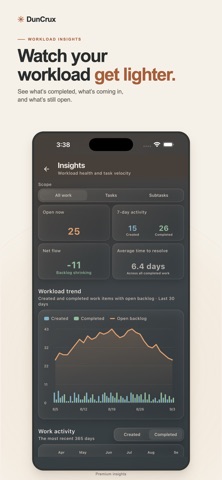
Explore insights into completed tasks, open work, keyword priorities, and activity patterns. See how your workload changes and discover when you are most productive.

-- Local First By Design --

DunCrux’s core task-management features work without an account. Your workspace remains available locally on your device, even when you are offline.

Cloud sync is optional. Sign in when you want to keep your DunCrux workspace synchronized across supported devices. You can also export your data whenever you choose.

Some advanced features require DunCrux Pro. With the free version you have unlimited tasks but are limited to 10 Keywords for tracking priorities. Additionally paying for or subscribing to DunCrux Pro unlocks saved views. Subscribing to DunCrux Pro+Synch will unlock cloud syncing across multiple devices.

Spend less time deciding what to do next—and more time making meaningful progress.

Terms of Service: https://www.apple.com/legal/internet-services/itunes/dev/stdeula/
Show more Show less

Screenshots

DunCrux: Smart Task Manager Screenshot 1 of 5
DunCrux: Smart Task Manager Screenshot 2 of 5
DunCrux: Smart Task Manager Screenshot 3 of 5
DunCrux: Smart Task Manager Screenshot 4 of 5
DunCrux: Smart Task Manager Screenshot 5 of 5
Screenshots by Michael Jones, from the the App Store listing
Official page on the App Store

Alternatives to DunCrux: Smart Task Manager

Note Flow Pro icon Note Flow Pro
Giovanni Emanuele Spina
5.0
Free
2 ratings
Image To Excel Converter: XLSX icon Image To Excel Converter: XLSX
Abdul Rehman
0.0
Free
Principal Task icon Principal Task
Zechariah Schwenk
5.0
Free
1 ratings
Semnia: Screenshot Manager icon Semnia: Screenshot Manager
Eugen Tamasanu
5.0
Free
1 ratings
Lesson Flo icon Lesson Flo
Andre Burch
0.0
Free
Pomodoro RPG: Focus Timer icon Pomodoro RPG: Focus Timer
Pham Tran Thai Bao
0.0
Free
Complete & Conquer icon Complete & Conquer
ANTHOLOGY GROUP LLC
5.0
Free
3 ratings
Chores Tracker - ChoreDivider icon Chores Tracker - ChoreDivider
Peter Esser
5.0
Free
1 ratings

More from Michael Jones

Dont Forget The Spoon - Hiking icon Dont Forget The Spoon - Hiking
Michael Jones
4.5
Free
36 ratings
Vaygo Bingo - Travel Game icon Vaygo Bingo - Travel Game
Michael Jones
5.0
Free
3 ratings
Luggrly - Travel Packing icon Luggrly - Travel Packing
Michael Jones
5.0
Free
2 ratings
Dont Forget The Weather icon Dont Forget The Weather
Michael Jones
5.0
Free
2 ratings
Aridromos - Horse Dice Game icon Aridromos - Horse Dice Game
Michael Jones
5.0
Free
1 ratings

Changelog of DunCrux: Smart Task Manager

No changelog data

Developer information for Michael Jones

Michael Jones

Address:

Share DunCrux: Smart Task Manager

Comments on DunCrux: Smart Task Manager for iOS

We don't have enough comments to show example comments. Please check back later.

App Store Rankings for DunCrux: Smart Task Manager

This app is not ranked

Technologies used by DunCrux: Smart Task Manager

Frequently asked questions about DunCrux: Smart Task Manager

Is DunCrux: Smart Task Manager free?

Yes. DunCrux: Smart Task Manager is free on the App Store.

Is DunCrux: Smart Task Manager still available?

Yes. DunCrux: Smart Task Manager is on the App Store, and the last update we saw was on October 24, 2026.

How large is DunCrux: Smart Task Manager?

DunCrux: Smart Task Manager is 61.76 MB.

Is DunCrux: Smart Task Manager suitable for children?

App Store rates the content of DunCrux: Smart Task Manager as suitable for everyone.

How do people rate DunCrux: Smart Task Manager?

DunCrux: Smart Task Manager scores 5.00 out of 5 stars, from 2 ratings on the App Store.

Who made DunCrux: Smart Task Manager?

DunCrux: Smart Task Manager was developed by Michael Jones. It is listed in the productivity category on the App Store.

What are the best alternatives to DunCrux: Smart Task Manager?

People looking at DunCrux: Smart Task Manager also look at these productivity apps: Note Flow Pro, Image To Excel Converter: XLSX, Principal Task, Semnia: Screenshot Manager, Lesson Flo.

Today's trending apps Price drops on Google Play Apps other people are watching Top new apps Popular Productivity Apps
Note Flow Pro icon Note Flow Pro
Image To Excel Converter: XLSX icon Image To Excel Converter: XLSX
Principal Task icon Principal Task
Semnia: Screenshot Manager icon Semnia: Screenshot Manager
Lesson Flo icon Lesson Flo
Pomodoro RPG: Focus Timer icon Pomodoro RPG: Focus Timer
Complete & Conquer icon Complete & Conquer
Chores Tracker - ChoreDivider icon Chores Tracker - ChoreDivider
Overview Alternatives Reviews Rankings Technology
AppBrain Intelligence premium content

Subscribe now to get full and unlimited access to AppBrain Intelligence. You'll have access to:

  • App Intelligence dashboard (performance timeline, competitor comparison, country rankings, insight cards)
  • Detailed ranking data per app
  • Full timeline per developer
  • Device market shares data per country
  • Unlimited keyword tracking
1 Month

$75/mo
(billed every month)

SAVE 0%
Subscribe
3 Months

$65/mo
($195 billed every 3 months)

SAVE 13%
Subscribe
1 Year

$57.50/mo
($690 billed every year)

SAVE 23%
Subscribe
Each subscription will automatically renew 3 days before the expiration date for the same time period. Subscriptions can be cancelled at any time before the renewal.

AppBrain is an app data site, we track rankings, ratings, installs for all apps and games on Google Play and the App Store. AppBrain doesn't host app files or APKs, all install links go directly to the official store. All trademarks are owned by their respective owners.

More apps

  • Top Android apps being viewed
  • Tank Physics Mobile Vol.1 Android App
  • LooRead Android App
  • juwa 2.0: Casino 777 stats

App statistics

  • Android statistics
  • Google Play Developer stats
  • Trending Android Apps
  • Trending iOS apps
  • Top popular Apps
  • Buy the best Android phone
  • Buy & sell app businesses

About AppBrain

  • Contact
  • Privacy
  • Documentation
  • DMCA takedowns
  • Blog
  • How to improve the earnings of your ad units
© 2010-2026 - AppBrain