DuoCam: Dual Camera
DuoCam: Dual Camera is made and published by damar purba pamungkas. AppBrain is an independent app data site and isn't affiliated with damar purba pamungkas. The app name, icon, screenshots and description belong to damar purba pamungkas and are shown as published on the App Store.
AppBrain's verdict
- Last updated
- July 24, 2026
Rankings
App Store top chartsApp Store Rankings for DuoCam: Dual Camera
Competitors
Similar apps and more from damar purba pamungkasAlternatives to DuoCam: Dual Camera
More from damar purba pamungkas
Releases
Updates seen on the App Store- Version
- 1.0
- Launched
- July 2026
No changelog data
User feedback
Ratings and reviews on the App StoreComments on DuoCam: Dual Camera for iOS
We don't have enough comments to show example comments. Please check back later.
Technology
Found in the app by AppBrain- Price
- Free
- App size
- 15.1 MB
- Content rating
- Everyone
Technologies used by DuoCam: Dual Camera
About the app and developer
About DuoCam: Dual Camera
DuoCam: Dual Camera is a photo & video app developed by damar purba pamungkas.
What is the rating of DuoCam: Dual Camera?
DuoCam: Dual Camera has no ratings yet.
Is DuoCam: Dual Camera free?
DuoCam: Dual Camera is free. The app size is 15.06 MB. The latest version available is 1.0. The last update was on July 24, 2026.
What are the requirements for DuoCam: Dual Camera?
The app has a content rating of Everyone. The app has been available on the App Store since July 2026.
Developer information for damar purba pamungkas
Address:
Frequently asked questions about DuoCam: Dual Camera
Is DuoCam: Dual Camera free?
Yes. DuoCam: Dual Camera is free on the App Store.
Is DuoCam: Dual Camera still available?
Yes. DuoCam: Dual Camera is on the App Store, and the last update we saw was on July 24, 2026.
How large is DuoCam: Dual Camera?
DuoCam: Dual Camera is 15.06 MB.
Is DuoCam: Dual Camera suitable for children?
App Store rates the content of DuoCam: Dual Camera as suitable for everyone.
Who made DuoCam: Dual Camera?
DuoCam: Dual Camera was developed by damar purba pamungkas. It is listed in the photo & video category on the App Store.
What are the best alternatives to DuoCam: Dual Camera?
People looking at DuoCam: Dual Camera also look at these photo & video apps: Duolix - Dual Camera App, DuoCam Magic: Dual Camera, DualShot: Dual Camera Video, DualShot Recorder: MultiCam, TwoCam: Dual Camera Video.
Store listing
By damar purba pamungkas, from the App StoreDescription by damar purba pamungkas Written by the developer, not by AppBrain. Click to read.
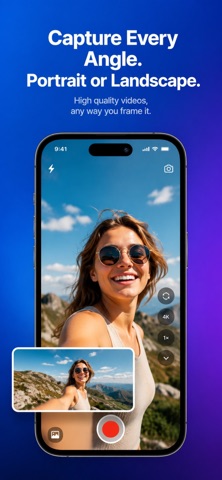
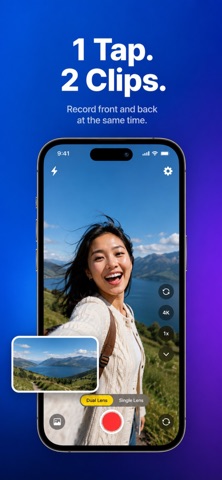
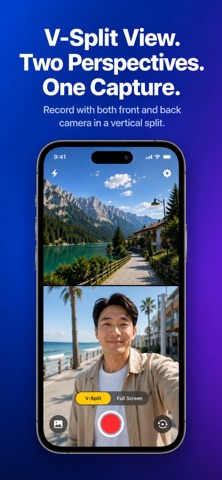
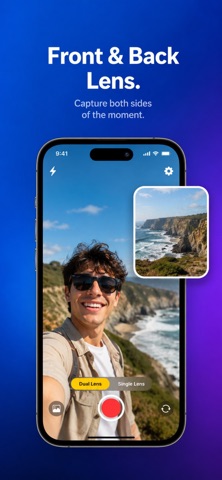
DuoCam: Dual Camera lets you capture video using the front and back cameras at the same time, making it easy to record yourself while capturing everything happening around you.
Whether you're creating travel videos, tutorials, interviews, reaction videos, product demonstrations, or everyday moments, DuoCam helps you record naturally without switching between cameras.
Some features require an active subscription, including simultaneous Front & Back Camera recording (on supported devices), premium recording options, higher video quality, watermark-free exports, and an ad-free experience. Device compatibility may vary depending on your iPhone model.
Designed for creators and professionals, DuoCam combines a clean interface with powerful recording tools to help you capture high-quality videos directly from your iPhone.
Simultaneous Front & Back Camera Recording
Capture both perspectives in one recording.
Use the rear camera to record the scene while the front camera records your reaction in a Picture-in-Picture window.
Perfect for:
• Travel Vlogs
• Food Reviews
• Tutorials
• Interviews
• Reaction Videos
• Walking Tours
• Product Demonstrations
• Daily Content
Picture-in-Picture Recording
Record using both cameras simultaneously with a movable Picture-in-Picture window.
The rear camera remains the main view while the front camera captures your reactions, making every recording more engaging and informative.
Professional Video Recording
Record high-quality videos with support for available device capabilities.
Features include:
• 4K Video Recording*
• 1080p Recording
• Multiple Frame Rates
• MP4 Export
• MOV Export
• High-Quality Video Encoding
*Available on supported devices.
Professional Camera Controls
Create videos with confidence using built-in recording tools.
Features include:
• Front & Back Camera
• Camera Switching
• Flash Control
• Tap to Focus
• Zoom Control
• Exposure Adjustment
• Grid Overlay
• Horizon Level
• Recording Timer
Smart Device Compatibility
DuoCam automatically checks your device's camera capabilities.
If simultaneous front and back camera recording isn't supported, the app seamlessly switches to Single Camera mode, allowing you to continue recording without interruption.
Designed for Creators
Perfect for:
• Content Creators
• YouTubers
• TikTok Creators
• Instagram Creators
• Vloggers
• Teachers
• Journalists
• Small Businesses
• Coaches
• Travelers
Why Choose DuoCam?
• Simultaneous Front & Back Camera Recording
• Picture-in-Picture Video
• Professional Camera Controls
• High-Quality Video Recording
• Clean & Intuitive Interface
• Save Directly to Photos
• Optimized Performance
• Built for Everyday Content Creation
Premium Features
Unlock additional professional recording features:
• Higher recording quality
• Advanced camera controls
• Additional recording options
• Watermark-free export
• Future premium feature updates
Download DuoCam: Dual Camera and capture every story from both perspectives with one powerful recording experience.
Subscription Required
Premium features, including simultaneous Front & Back Camera recording (on supported devices), higher recording quality, advanced recording options, watermark-free exports, and other premium features, require an active subscription. Please review the available subscription plans within the app before accessing premium features.
Privacy Policy : https://iosdevasian.blogspot.com/2026/04/privacy-policy.html
Terms of Use : https://iosdevasian.blogspot.com/2026/04/terms-of-use-end-user-license-agreement.html