

Dusk: Expense Tracker & To-Do
Dusk: Expense Tracker & To-Do is made and published by Nguyen Trang. AppBrain is an independent app data site and isn't affiliated with Nguyen Trang. The app name, icon, screenshots and description belong to Nguyen Trang and are shown as published on the App Store.
AppBrain's verdict
- Last updated
- October 27, 2026
Rankings
App Store top chartsApp Store Rankings for Dusk: Expense Tracker & To-Do
Competitors
Similar apps and more from Nguyen TrangAlternatives to Dusk: Expense Tracker & To-Do


Releases
Updates seen on the App Store- Version
- 1.3.3
- Launched
- September 2026
No changelog data
User feedback
Ratings and reviews on the App StoreComments on Dusk: Expense Tracker & To-Do for iOS
We don't have enough comments to show example comments. Please check back later.
Technology
Found in the app by AppBrain- Price
- Free
- App size
- 42.0 MB
- Content rating
- Everyone
Technologies used by Dusk: Expense Tracker & To-Do
About the app and developer
About Dusk: Expense Tracker & To-Do
Dusk: Expense Tracker & To-Do is a productivity app developed by Nguyen Trang.
User Ratings
The app has no ratings yet.
App Information
Dusk: Expense Tracker & To-Do is freely available from the App Store. The app size is 42.00 MB. The latest version available is 1.3.3. The last update was on October 27, 2026.
Technical Requirements
The app has a content rating of Everyone. The app has been available on the App Store since September 2026.
Developer information for Nguyen Trang
Address:
Frequently asked questions about Dusk: Expense Tracker & To-Do
Is Dusk: Expense Tracker & To-Do free?
Yes. Dusk: Expense Tracker & To-Do is free on the App Store.
Is Dusk: Expense Tracker & To-Do still available?
Yes. Dusk: Expense Tracker & To-Do is on the App Store, and the last update we saw was on October 27, 2026.
How large is Dusk: Expense Tracker & To-Do?
Dusk: Expense Tracker & To-Do is 42.00 MB.
Is Dusk: Expense Tracker & To-Do suitable for children?
App Store rates the content of Dusk: Expense Tracker & To-Do as suitable for everyone.
Who made Dusk: Expense Tracker & To-Do?
Dusk: Expense Tracker & To-Do was developed by Nguyen Trang. It is listed in the productivity category on the App Store.
What are the best alternatives to Dusk: Expense Tracker & To-Do?
People looking at Dusk: Expense Tracker & To-Do also look at these productivity apps: TodaysDoIt: To-Do & Calendar, Tasky Bot, Notia Core | AI秘書アプリ, GetThis - Voice to Tasks, DyslexiAid.
Store listing
By Nguyen Trang, from the App Store




Description by Nguyen Trang Written by the developer, not by AppBrain. Click to read.
Dusk is an expense tracker you talk to. One sentence, spoken or typed, records what you spent. Check it, save it, and see where your money went. Tasks and reminders work the same way.
SAY IT. CHECK IT. SAVE IT.
Hold the mic and speak: a ribbon of light follows your voice and your words appear as you talk. Let go and they wait on screen, so you can tap to fix a word or send them as they are. Prefer typing? Tap the ribbon and write it like a message. Every new expense appears in a confirmation card first, and nothing is saved until you confirm.
THE SENTENCE STAYS WITH THE EXPENSE
An expense you log by talking or typing to Dusk keeps the sentence you said, right on its row. Weeks later, you still know what that $14 lunch was for.
SEE WHERE YOUR MONEY WENT
Daily and monthly totals keep everyday spending in view. Explore your week or your spending categories in a chart, then open a day to see what you recorded.
RECEIPTS AND FILES WITH DUSK PRO
Import expenses from a receipt photo, a PDF or a CSV file, and review the results before anything is saved.
TASKS IN ONE SENTENCE TOO
Add dates, times and recurring schedules. Keep an address, a packing list or other notes inside the task. Tasks with a time can remind you with a notification, or with an alarm on supported devices running iOS 26 or later.
WIDGETS
Check today's tasks and spending in Home Screen and Lock Screen widgets, or start talking to Dusk with one tap.
DETAILS YOU WANT TO KEEP
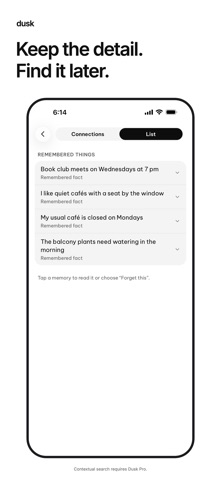
Save personal notes and explore them in a list or a view of their connections. You can review and delete the information Dusk has saved.
CALM BY DESIGN
True black at night, paper white by day, and nothing on screen you don't need. Choose Day, Night or System, and set the assistant text to a size that suits you. The app supports English, Vietnamese, Simplified Chinese and Japanese.
START WITH FREE
Log expenses, manage tasks and use basic account sync across your devices. Works on iPhone and iPad. Sign in with Apple or Google to begin.
GO FURTHER WITH DUSK PRO
• Use conversational AI to log in natural language and ask about saved information.
• Import expenses from receipt photos, PDFs or CSV files.
• Find useful details through contextual memory.
• Tidy up longer notes inside your tasks.
Dusk Pro comes as a monthly or annual subscription, or as a one-time Lifetime purchase, all with the same features. The annual plan is charged upfront for the full year. Lifetime is a single payment, not a subscription, and never renews. Your local price is shown before you confirm a purchase. Subscriptions renew automatically unless canceled at least 24 hours before the current period ends. Manage or cancel your subscription in iPhone Settings → Apple Account → Subscriptions.
GOOD TO KNOW
• Dusk doesn't connect to bank accounts or cards. You log spending yourself, or import it from receipts and files with Pro.
• Dusk records spending only. There is no income tracking, budgets or savings goals.
• AI can make mistakes. Check important details before saving.
• AI features and sync require an internet connection. Voice input and reminders require the relevant device permissions.
Privacy: https://dusk.peakvailon.com/privacy
Terms of Use: https://www.apple.com/legal/internet-services/itunes/dev/stdeula/
Support: https://dusk.peakvailon.com/support