Open DWG and DXF drawings or STEP, IGES, STL, OBJ, 3MF, PLY, USDZ and glTF models. Inspect your CAD files and measurements on your device.
OPEN AND INSPECT
- Import drawings and models directly from Files
- Orbit, pan and zoom a responsive 3D scene
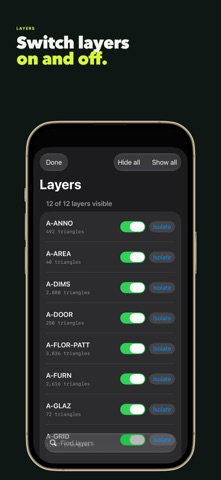
- Browse, hide and isolate objects in multi-part models
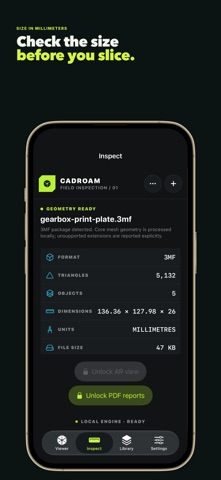
- Review bounds, triangle count and surface area with units, plus enclosed volume for closed meshes
- See drawing text, dimensions, hatches and layer colours, and switch to paper-space layouts
- Switch wireframe, transparency, axes, grid, bounding box and orthographic views
MEASURE AND PLOT
- Measure DWG/DXF drawings free with snaps to endpoints, midpoints, centers and intersections.
- Measure distance with ΔX/ΔY and angle, polyline length, room area and radius/diameter; save measurements in the inspection report.
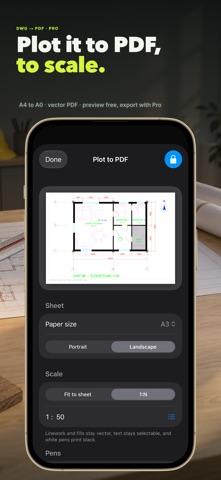
- Plot a vector PDF at 1:N scale on A4–A0 or Letter–ANSI E, with line weights, colors and real text; requires CadRoam Pro.
PRIVATE BY DESIGN
Drawing and model geometry is processed locally. CadRoam does not upload file contents to a developer-operated conversion service, requires no account and includes no third-party advertising, analytics or tracking SDK.
CAMERA AR AND REPORTS
On supported iPhone and iPad devices, CadRoam Pro places compatible geometry on detected surfaces with Apple ARKit. Choose fitted scale or source units, then move, rotate and resize the model. Generate a compact inspection PDF locally, with a picture of the current view, then save, share or print it.
Open and inspect three unique CAD files free. Reopening the same file or using the built-in sample does not consume another free opening. CadRoam Pro unlocks unlimited private opening, camera AR, PDF report export and PDF plots across iPhone, iPad and Mac. Get Pro with an optional monthly or yearly subscription or a one-time lifetime purchase.
CURRENT FORMAT SUPPORT
- DWG R13–R2018+ linework, curves, blocks, text, dimensions, hatches, layer and object colours, and paper-space layouts
- ASCII and binary DXF R12–R2018+ with the same drawing content plus mesh faces
- Binary and ASCII STL
- OBJ with objects, groups and vertex colours
- 3MF print projects with components and colours
- PLY scans with vertex colours
- USDZ and USD scenes, glTF and GLB, with material colours
- Faceted, AP242 tessellated and exact B-Rep STEP
- IGES B-Rep and curved surfaces
In DWG and DXF, text uses a system font instead of the drawing's own fonts and dashed linetypes are drawn solid; ACIS 3D solids, images, tables and external references are not shown, and CadRoam warns when content is omitted. Textures in USDZ, glTF and 3MF files are not shown. STEP and IGES coverage varies across schema editions and exporter-specific records. CadRoam is not a certified metrology system.
Terms of Use: https://cadroam.com/terms/
Privacy Policy: https://cadroam.com/privacy/
Show more
Show less