

E145 Virtual Panel
E145 Virtual Panel is made and published by Jorge Gonzalez Galvan. AppBrain is an independent app data site and isn't affiliated with Jorge Gonzalez Galvan. The app name, icon, screenshots and description belong to Jorge Gonzalez Galvan and are shown as published on the App Store.
AppBrain's verdict
Established- Rating on App Store
- 4.00
- 4 ratings
- Last updated
- June 14, 2026
It doesn't have enough ratings yet to judge what users think.
Rankings
App Store top chartsApp Store Rankings for E145 Virtual Panel
Competitors
Similar apps and more from Jorge Gonzalez GalvanAlternatives to E145 Virtual Panel





More from Jorge Gonzalez Galvan




Releases
Updates seen on the App Store- Version
- 3.0
- Launched
- January 2020
No changelog data
User feedback
Ratings and reviews on the App StoreComments on E145 Virtual Panel for iOS
We don't have enough comments to show example comments. Please check back later.
Technology
Found in the app by AppBrain- Price
- $14.99
- App size
- 170.1 MB
- Content rating
- Everyone
Technologies used by E145 Virtual Panel
About the app and developer
About E145 Virtual Panel
E145 Virtual Panel is an utilities app developed by Jorge Gonzalez Galvan.
What is the rating of E145 Virtual Panel?
E145 Virtual Panel is rated 4.00 out of 5 stars, based on 4 ratings.
Is E145 Virtual Panel free?
E145 Virtual Panel costs $14.99. The app size is 170.06 MB. The latest version available is 3.0. The last update was on June 14, 2026.
What are the requirements for E145 Virtual Panel?
The app has a content rating of Everyone. The app has been available on the App Store since January 2020.
Developer information for Jorge Gonzalez Galvan
Address:
Frequently asked questions about E145 Virtual Panel
Is E145 Virtual Panel free?
No. E145 Virtual Panel costs $14.99 on the App Store.
Is E145 Virtual Panel still available?
Yes. E145 Virtual Panel is on the App Store, and the last update we saw was on June 14, 2026.
How large is E145 Virtual Panel?
E145 Virtual Panel is 170.06 MB.
Is E145 Virtual Panel suitable for children?
App Store rates the content of E145 Virtual Panel as suitable for everyone.
How do people rate E145 Virtual Panel?
E145 Virtual Panel scores 4.00 out of 5 stars, from 4 ratings on the App Store.
Who made E145 Virtual Panel?
E145 Virtual Panel was developed by Jorge Gonzalez Galvan. It is listed in the utilities category on the App Store.
What are the best alternatives to E145 Virtual Panel?
People looking at E145 Virtual Panel also look at these utilities apps: EMB-145 Payload, E145WB, CRJ Virtual Panel, AutoBid, APDL - Airline Pilot Logbook.
Store listing
By Jorge Gonzalez Galvan, from the App Store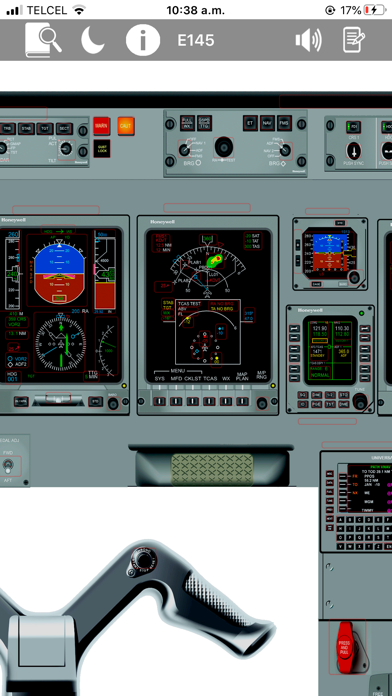




Description by Jorge Gonzalez Galvan Written by the developer, not by AppBrain. Click to read.
**E145 Virtual Panel App includes:**
* More than **900 fully functional buttons** with explanations, images, and references
* Detailed E145 button explanations
* High-fidelity cockpit images
* Pan and zoom capabilities
* E145 limitations with fast search
* E145 definitions with fast search
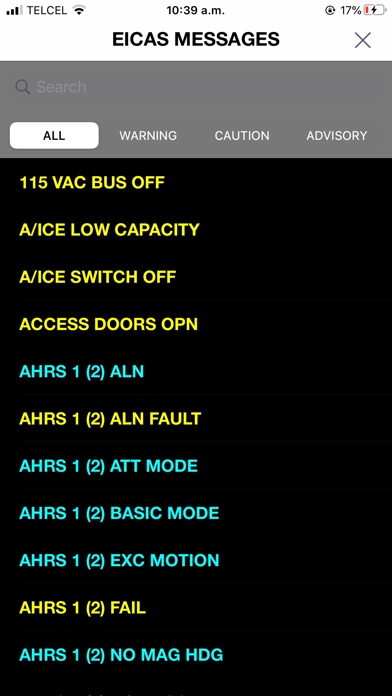
* E145 EICAS messages list with fast search
* FAA abbreviations with fast search
* Jeppesen abbreviations with fast search
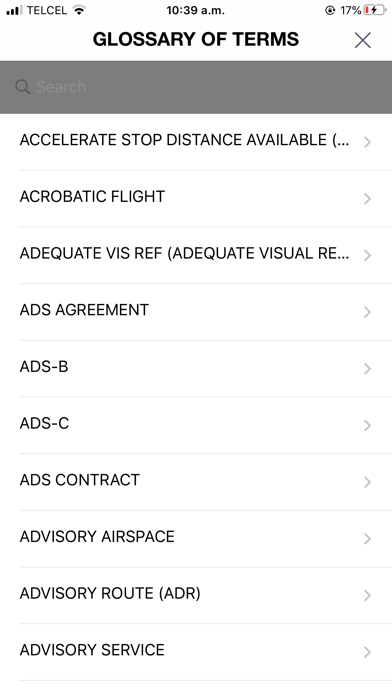
* Aviation glossary with fast search
* Notes feature: save your personal notes and keep them even when your device is off
* Dark mode support
**Version 3.0** now includes more than **80 interactive images** within the E145 panel, providing a more complete and visual way to study aircraft systems, indications, and cockpit functionality.
The following interactive virtual panels and system areas are included:
* Electrical Synoptic
* Hydraulic Synoptic
* ECS Synoptic
* Flight Controls Synoptic
* Fuel Synoptic
* TCAS
* EGPWS
* HSI Modes
* HSI Weather Radar Indications
* MFD Weather Radar
* Airspeed Tape Indications
* Vertical Speed Indications
* AHRS Fail Annunciations
* Aileron Schematic
* Landing Gear
* Air Conditioning
* Electronic Attitude Indicator
* Baggage Detection / Extinguishing
* Tuning Backup Control
* Digital Chronometer
* Engine Fuel Schematic
* Powerplant Schematic
* Mask Stowage Box
* Altitude Tape Indications
* ADI Indications
* Oxygen Mask Functions
* PFD Annunciations
* PFD Miscompares
* EGPWS Display on PFD
* ADI Takeoff
* TCAS Indications on PFD
* Windshear Indications on PFD
* Horizontal Profile Indications
* Full EICAS Functions
* Thrust Lever Buttons
* DVDR
* Flight Attendant Panel
**Note:** Aircraft manufacturers and operators may use slightly different cockpit configurations. The panels, buttons, and switches shown in this app represent a specific E145 configuration.
The **E145 Virtual Panel App** is designed to be a complete study companion for pilots who want to review and understand the E145 cockpit, systems, indications, limitations, and operational references in one place.