Download Android Apps and Games
AppBrain
  • Apps
  • Apps being viewed right now Trending apps today Most popular apps All-time most downloaded apps Top rated apps iPhone and iPad apps
  • Intelligence ▾
    Intelligence overview → Track any Android app or your whole market
    Track & analyze
    Keyword Tracker & OptimizerTrack & improve Play rankings App Performance ReportOne-off PDF for any app StatisticsFree Android & Play market stats
    Promote your app
    Featured Apps App Links
  • Intelligence
  • Pricing
  • Dashboard
  • Sign up
  • Log in
Last updated on: 2026-09-24
App Store Apps > Photo & Video > Eightstop: RAW Photo Editor
Eightstop: RAW Photo Editor icon

Eightstop: RAW Photo Editor

1.1
Alec Attie
0.00
0 reviews
Free

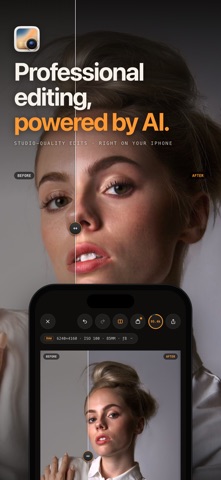
Eightstop: RAW Photo Editor Screenshot 1 of 9
Eightstop: RAW Photo Editor Screenshot 2 of 9
Eightstop: RAW Photo Editor Screenshot 3 of 9
Eightstop: RAW Photo Editor Screenshot 4 of 9
Eightstop: RAW Photo Editor Screenshot 5 of 9
Eightstop: RAW Photo Editor Screenshot 6 of 9
Eightstop: RAW Photo Editor Screenshot 7 of 9
Eightstop: RAW Photo Editor Screenshot 8 of 9
Eightstop: RAW Photo Editor Screenshot 9 of 9
Download from the App Store

About Eightstop: RAW Photo Editor

Eightstop: RAW Photo Editor is a photo & video app developed by Alec Attie.

User Ratings

The app has no ratings yet.

App Information

Eightstop: RAW Photo Editor is FREE to download. The download size is 165.93 MB. The latest version available is 1.1. The last update was on September 17, 2026.

Technical Requirements

The app has a content rating of Everyone. The app has been available on App Store 1 week ago.

Description
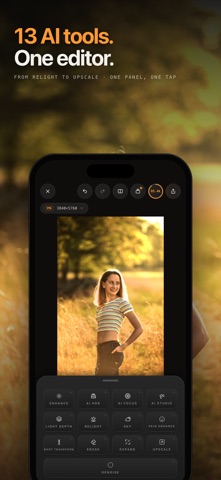
Develop RAW photos, blur backgrounds, remove unwanted objects, and shape light after the shot. Eightstop combines precise photo editing controls with 13 AI tools for portraits, landscapes, and everyday photographs.

RAW DEVELOPMENT AND PRECISE COLOR
Import camera RAW files, including ProRAW, DNG, NEF, CR3, and ARW. Work from the scene-linear RAW image, adjust exposure and white balance, and refine highlights, shadows, curves, and HSL color. Finish with clarity, dehaze, texture, grain, vignette, filters, and presets.

13 AI TOOLS, WITH CONTROL OVER THE RESULT

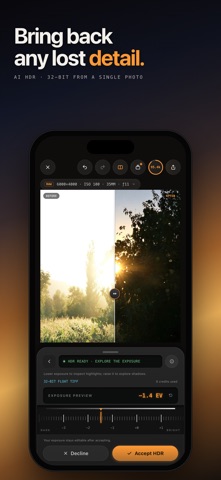
• AI HDR: reconstruct detail in blown highlights and deep shadows from one photo. Reconstructed detail is AI-generated. Review an editable 32-bit HDR result and keep adjusting exposure after accepting it.
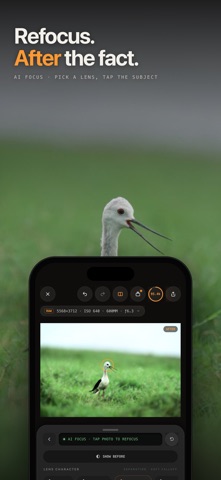
• AI Focus: blur the background or foreground using scene depth. Tap to set the focus plane and adjust aperture, focal length, bokeh, and focus falloff. Refocus the depth effect as you edit.
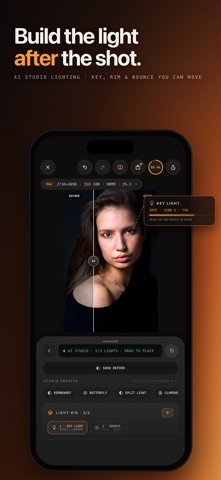
• AI Studio: place up to three virtual lights on your photograph. Choose from nine fixture types and adjust intensity, temperature, size, softness, and direction for editable portrait, product, or landscape lighting.
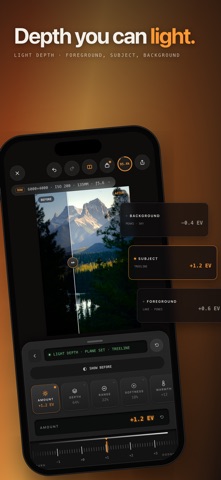
• Light Depth: adjust near and distant parts of the scene separately using depth.
• Enhance: improve light, color, and detail with adaptive corrections you can adjust individually.
• Relight: change the direction and character of light with a cloud-generated edit.
• Sky: replace the sky with a library image or your own, then refine the mask and placement.
• Skin Enhance: smooth skin and adjust tone, shine, and texture with on-device face analysis.
• Body Transform: use on-device person analysis and adjustable body-shaping controls for portrait edits.
• Erase: use the object remover to remove people, unwanted objects, and distractions.
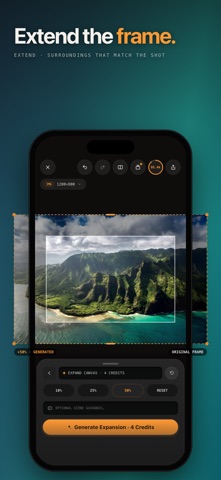
• Expand: extend the photo beyond its original frame, with optional guidance for the generated area.
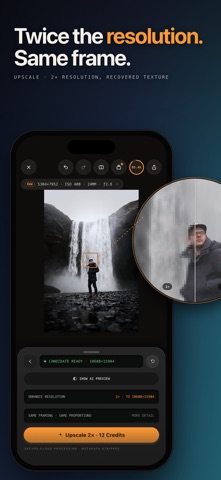
• Upscale: use the image upscaler to double each edge while retaining the framing and proportions.
• Denoise: reduce image noise while preserving the photograph's original dimensions.

SMART MASKS AND LOCAL ADJUSTMENTS
Detect subjects, backgrounds, people, and skies to make selective edits. Brighten a backlit subject, adjust the background, or refine a sky without tracing every outline by hand.

EDIT ON YOUR DEVICE, USE CLOUD TOOLS WHEN NEEDED
RAW development, manual adjustments, masks, Enhance, AI Focus, AI Studio, Light Depth, Sky, and portrait analysis run on your device. Cloud tools send a processed image with its metadata removed, rather than your original RAW file.

Compare edits before keeping them and keep refining the photograph with manual controls. AI-generated detail may differ from the original scene.

AI tools require sign-in and Eightstop Pro. Cloud AI tools also require an internet connection and credits. Eightstop Pro unlocks unlimited full-resolution exports.

Sample photography courtesy of Signature Edits community contributors. All images were edited in Eightstop.

Terms of Use (EULA): https://www.apple.com/legal/internet-services/itunes/dev/stdeula/
Show more Show less

More data about Eightstop: RAW Photo Editor

Price Free to download
Rating No ratings
Ranking Not ranked
Version 1.1
App download size 165.9 MB
Suitable for Everyone

Alternative downloads for the Eightstop: RAW Photo Editor app

Rake Plus: Relight & Refocus icon Rake Plus: Relight & Refocus
Pablo Miranda
0.0
Free
ProVisual: AI Photo & Effects icon ProVisual: AI Photo & Effects
Yuliia Aliekseienko
0.0
Free
Raster AI Studio icon Raster AI Studio
Bertay Eren
0.0
Free
ScubaShot icon ScubaShot
Scott Saxton
0.0
Free
Aestiqa Aesthetic Photo Editor icon Aestiqa Aesthetic Photo Editor
Manoj Dhamat
0.0
Free
Manual DSLR Camera Pro 300x icon Manual DSLR Camera Pro 300x
Aninditawidagda Pandam Sudaryanto
0.0
Free
CinePro - AI Cinema Camera icon CinePro - AI Cinema Camera
matrix3f
0.0
Free
Sunva: AI Digicam Photo Editor icon Sunva: AI Digicam Photo Editor
Lightwell Games
0.0
Free

More from Alec Attie

Musens icon Musens
Alec Attie
3.0
$3.99
9 ratings
Airplanner: Itinerary Planner icon Airplanner: Itinerary Planner
Alec Attie
0.0
Free

Changelog of Eightstop: RAW Photo Editor

No changelog data

Developer information for Alec Attie

Alec Attie

Address:

Share Eightstop: RAW Photo Editor

Comments on Eightstop: RAW Photo Editor for iOS

We don't have enough comments to show example comments. Please check back later.

App Store Rankings for Eightstop: RAW Photo Editor

This app is not ranked

Technologies used by Eightstop: RAW Photo Editor

Frequently asked questions about Eightstop: RAW Photo Editor

Is Eightstop: RAW Photo Editor free?

Yes. Eightstop: RAW Photo Editor is free to download from App Store.

Is Eightstop: RAW Photo Editor still available?

Yes. Eightstop: RAW Photo Editor is on App Store, and the last update we saw was on September 17, 2026.

How large is the Eightstop: RAW Photo Editor download?

Eightstop: RAW Photo Editor is 165.93 MB to download.

Is Eightstop: RAW Photo Editor suitable for children?

App Store rates the content of Eightstop: RAW Photo Editor as suitable for everyone.

Who made Eightstop: RAW Photo Editor?

Eightstop: RAW Photo Editor was developed by Alec Attie. It is listed in the photo & video category on App Store.

What are the best alternatives to Eightstop: RAW Photo Editor?

People looking at Eightstop: RAW Photo Editor also look at these photo & video apps: Rake Plus: Relight & Refocus, ProVisual: AI Photo & Effects, Raster AI Studio, ScubaShot, Aestiqa Aesthetic Photo Editor.

Apps on sale Popular Photo & Video Apps Top new apps Today's trending apps Apps other people are watching
Rake Plus: Relight & Refocus icon Rake Plus: Relight & Refocus
ProVisual: AI Photo & Effects icon ProVisual: AI Photo & Effects
Raster AI Studio icon Raster AI Studio
ScubaShot icon ScubaShot
Aestiqa Aesthetic Photo Editor icon Aestiqa Aesthetic Photo Editor
Manual DSLR Camera Pro 300x icon Manual DSLR Camera Pro 300x
CinePro - AI Cinema Camera icon CinePro - AI Cinema Camera
Sunva: AI Digicam Photo Editor icon Sunva: AI Digicam Photo Editor
Overview Reviews Alternatives Rankings Technology
AppBrain Intelligence premium content

Subscribe now to get full and unlimited access to AppBrain Intelligence. You'll have access to:

  • App Intelligence dashboard (performance timeline, competitor comparison, country rankings, insight cards)
  • Detailed ranking data per app
  • Full timeline per developer
  • Device market shares data per country
  • Unlimited keyword tracking
1 Month

$75/mo
(billed every month)

SAVE 0%
Subscribe
3 Months

$65/mo
($195 billed every 3 months)

SAVE 13%
Subscribe
1 Year

$57.50/mo
($690 billed every year)

SAVE 23%
Subscribe
Each subscription will automatically renew 3 days before the expiration date for the same time period. Subscriptions can be cancelled at any time before the renewal.

AppBrain is a directory focused on discovering great apps and games. We give statistics, rankings and search options that Google Play and the App Store don't have. All trademarks are owned by their respective owners. AppBrain doesn't offer APKs or binaries, and always lets users install the official version from Google Play or the App Store.

More apps

  • Top Android apps being viewed
  • Kflix HD Movies, Watch Movie
  • ReFactory Android App
  • Ant Colony Simulator

App statistics

  • Android statistics
  • Google Play Developer stats
  • Trending Android Apps
  • Trending iOS apps
  • Top popular Apps
  • Buy the best Android phone

About AppBrain

  • Contact
  • Privacy
  • Documentation
  • DMCA takedowns
  • Articles
  • Blog
  • Monetization tips: Understanding your eCPM
© 2010-2026 - AppBrain