

Embedded Helper - Dev Tools
Embedded Helper - Dev Tools is made and published by DONGSOO LEE. AppBrain is an independent app data site and isn't affiliated with DONGSOO LEE. The app name, icon, screenshots and description belong to DONGSOO LEE and are shown as published on the App Store.
AppBrain's verdict
- Last updated
- July 27, 2026
Rankings
App Store top chartsApp Store Rankings for Embedded Helper - Dev Tools
Competitors
Similar apps and more from DONGSOO LEEAlternatives to Embedded Helper - Dev Tools


More from DONGSOO LEE


Releases
Updates seen on the App Store- Version
- 1.0.4
- Launched
- January 2026
No changelog data
User feedback
Ratings and reviews on the App StoreComments on Embedded Helper - Dev Tools for iOS
We don't have enough comments to show example comments. Please check back later.
Technology
Found in the app by AppBrain- Price
- Free
- App size
- 60.2 MB
- Content rating
- Everyone
Technologies used by Embedded Helper - Dev Tools
About the app and developer
About Embedded Helper - Dev Tools
Embedded Helper - Dev Tools is an overall app developed by DONGSOO LEE.
What is the rating of Embedded Helper - Dev Tools?
Embedded Helper - Dev Tools has no ratings yet.
Is Embedded Helper - Dev Tools free?
Embedded Helper - Dev Tools is free. The app size is 60.22 MB. The latest version available is 1.0.4. The last update was on July 27, 2026.
What are the requirements for Embedded Helper - Dev Tools?
The app has a content rating of Everyone. The app has been available on the App Store since January 2026.
Developer information for DONGSOO LEE
Address:
Store listing
By DONGSOO LEE, from the App Store




Description by DONGSOO LEE Written by the developer, not by AppBrain. Click to read.
Access pinout references instantly and generate C code automatically.
[Key Features]
1. Arduino Pinout Reference
- Instantly check pin diagrams for most popular Arduino boards (Uno, Nano, Mega, etc.).
- No need to search the web for pin maps every time.
2. C Code Generator
- JSON to C Struct: Instantly convert JSON data into ready-to-use C structures.
3. Display & Font Tools
- Dot Matrix Editor: Draw icons or fonts on a grid and generate C arrays (Hex/Bin) for your GLCD/OLED drivers.
4. Color Converter
- RGB888 to RGB565: Convert standard color codes to 16-bit formats used in TFT LCDs.
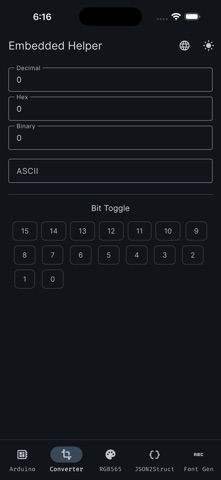
5. Number System Converter
- Real-time conversion between HEX, BIN, and DEC.
- Visualize bit-level data efficiently.