

emu: Retro Game Emulator
emu: Retro Game Emulator is made and published by Code and DESIGN inc. AppBrain is an independent app data site and isn't affiliated with Code and DESIGN inc. The app name, icon, screenshots and description belong to Code and DESIGN inc. and are shown as published on the App Store.
AppBrain's verdict
New- Rating on App Store
- 5.00
- 1 ratings
- Last updated
- October 13, 2026
emu: Retro Game Emulator came out 8 days ago. It doesn't have enough ratings yet to judge what users think.
Rankings
App Store top chartsApp Store Rankings for emu: Retro Game Emulator
Competitors
Similar apps and more from Code and DESIGN inc.Alternatives to emu: Retro Game Emulator


More from Code and DESIGN inc.


Releases
Updates seen on the App Store- Version
- 1.1
- Launched
- October 2026
No changelog data
User feedback
Ratings and reviews on the App StoreComments on emu: Retro Game Emulator for iOS
We don't have enough comments to show example comments. Please check back later.
Technology
Found in the app by AppBrain- Price
- Free
- App size
- 145.3 MB
- Content rating
- Everyone
Technologies used by emu: Retro Game Emulator
About the app and developer
About emu: Retro Game Emulator
emu: Retro Game Emulator is an utilities app developed by Code and DESIGN inc.
User Ratings
emu: Retro Game Emulator is rated 5.00 out of 5 stars. The rating is based on one rating ratings.
App Information
emu: Retro Game Emulator is freely available from the App Store. The app size is 145.31 MB. The latest version available is 1.1. The last update was on October 13, 2026.
Technical Requirements
The app has a content rating of Everyone. The app has been available on the App Store since October 2026.
Developer information for Code and DESIGN inc.
Address:
Store listing
By Code and DESIGN inc., from the App Store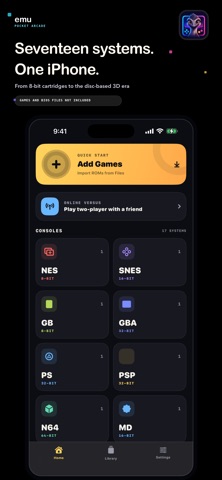


Description by Code and DESIGN inc. Written by the developer, not by AppBrain. Click to read.
GETTING STARTED TAKES THREE STEPS
1. Pick a backup of a game you own from the Files app.
2. The system is identified from the file's contents, so you never choose one.
3. Tap it in your library and play.
Files can stay inside a ZIP or 7z archive, and a CUE and its BIN files can be selected together. If a CUE points at a filename that no longer matches, emu repairs it on import. Large disc images are streamed into place rather than expanded in memory.
ONE LIBRARY FOR EVERYTHING
Search by name, star what you keep coming back to, and resume from the recent row. Import the same game under a different filename, or as both an archive and its extracted copy, and the CRC-and-size fingerprint still leaves you with a single entry.
THE LAYOUT MOVES TO YOUR THUMBS
The on-screen pad is multi-touch, with true diagonals and slide-to-change between buttons. Move the pad up or down, and pull the landscape buttons inward or outward.
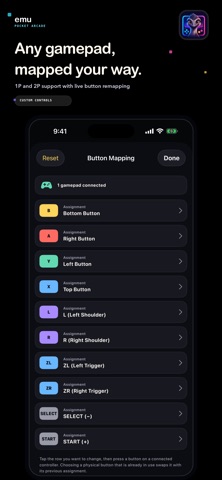
ANY GAMEPAD, MAPPED YOUR WAY
Bluetooth and USB controllers connect on their own. Buttons are matched by position rather than by the vendor's printed labels, so a different controller still plays the same way. Reassign a button by pressing it, keep sticky 1P/2P assignment, and tune the stick dead zone. Touch input stays live alongside the gamepad.
SAVES HAPPEN QUIETLY, MISTAKES ROLL BACK
In-game and memory-card saves are written every 30 seconds, and again when you leave the player. SAVE and LOAD give you a quick state at any moment, and holding REWIND rolls the last seconds back for one more attempt at the jump you just missed.
TWO IPHONES, TWO PLAYERS
One player hosts and a code appears; the other types it in and joins as player 2. The player joining does not need a copy of the game. The two devices connect directly — gameplay never passes through a server, and a relayed route is detected after connecting and torn down. Two-player games for NES, SNES, PlayStation, Sega Saturn, Nintendo 64, Mega Drive, Master System and PC Engine can be hosted.
BRING YOUR OWN GAMES — REQUIREMENTS DIFFER BY SYSTEM
No games and no BIOS files are bundled, and nothing can be obtained from inside the app. Use backups of software you are legally entitled to use.
Runs with just your game file:
NES, SNES, Game Boy / Color, Mega Drive / Genesis, Master System, Game Gear, PC Engine / TurboGrafx-16, WonderSwan / Color, Nintendo 64, GameCube, PlayStation 2, PSP
Also needs a BIOS you dumped from your own console:
PlayStation, Sega Saturn, Game Boy Advance, Neo Geo Pocket / Color
If you are here for Xbox:
It needs three files you supply yourself — an MCPX ROM, a compatible Flash BIOS, and a hard-disk image. An unmodified retail Flash BIOS will not boot. Treat Xbox as experimental and for advanced users.
ABOUT SPEED
GameCube, PlayStation 2, Xbox and Sega Saturn support is experimental. The App Store build runs without a JIT, so how well a game plays depends on the title and your device. Please don't buy on the assumption that a particular game will run smoothly.
FREE TO START
The free version shows one banner and needs an internet connection. That banner only ever promotes the developer's own apps; there is no tracking-based advertising. A one-time in-app purchase hides it on every device signed in to your Apple Account.
iPhone, iOS 17 or later. English and Japanese.
emu is built on open-source emulators including ares, PPSSPP, Mupen64Plus, Dolphin, xemu, Play! and Yaba Sanshiro. Licenses and corresponding source links are under Settings > Licenses.
All trademarks are the property of their respective owners. emu is not affiliated with, endorsed by or sponsored by any hardware manufacturer.