

Encrypted Email - Mailfence
Encrypted Email - Mailfence is made and published by Mailfence. AppBrain is an independent app data site and isn't affiliated with Mailfence. The app name, icon, screenshots and description belong to Mailfence and are shown as published on the App Store.
AppBrain's verdict
- Rating on App Store
- 3.93
- 111 ratings
- Last updated
- May 26, 2026
Users are divided: 3.9 stars from 111 ratings.
Rankings
App Store top chartsApp Store Rankings for Encrypted Email - Mailfence
Competitors
Similar apps and more from Mailfence







Releases
Updates seen on the App Store- Version
- 1.9.4
- Launched
- September 2023
No changelog data
User feedback
Ratings and reviews on the App StoreComments on Encrypted Email - Mailfence for iOS
We don't have enough comments to show example comments. Please check back later.
Technology
Found in the app by AppBrain- Price
- Free
- App size
- 33.9 MB
- Content rating
- Everyone
Technologies used by Encrypted Email - Mailfence
About the app and developer
About Encrypted Email - Mailfence
Encrypted Email - Mailfence is a productivity app developed by Mailfence.
User Ratings
Encrypted Email - Mailfence is rated 3.93 out of 5 stars. The rating is based on 110 ratings.
App Information
Encrypted Email - Mailfence is freely available from the App Store. The app size is 33.89 MB. The latest version available is 1.9.4. The last update was on May 26, 2026.
Technical Requirements
The app has a content rating of Everyone. The app has been available on the App Store since September 2023.
Developer information for Mailfence
Address:
Frequently asked questions about Encrypted Email - Mailfence
Is Encrypted Email - Mailfence free?
Yes. Encrypted Email - Mailfence is free on the App Store.
Is Encrypted Email - Mailfence still available?
Yes. Encrypted Email - Mailfence is on the App Store, and the last update we saw was on May 26, 2026.
How large is Encrypted Email - Mailfence?
Encrypted Email - Mailfence is 33.89 MB.
Is Encrypted Email - Mailfence suitable for children?
App Store rates the content of Encrypted Email - Mailfence as suitable for everyone.
How do people rate Encrypted Email - Mailfence?
Encrypted Email - Mailfence scores 3.93 out of 5 stars, from 111 ratings on the App Store.
Who made Encrypted Email - Mailfence?
Encrypted Email - Mailfence was developed by Mailfence. It is listed in the productivity category on the App Store.
What are the best alternatives to Encrypted Email - Mailfence?
People looking at Encrypted Email - Mailfence also look at these productivity apps: FreeWeb - Website Builder, Tuta Mail: Secure Email, Pilot Checklists, Career Mode Tracker, Saber: Handwritten Notes.
Store listing
By Mailfence, from the App Store




Description by Mailfence Written by the developer, not by AppBrain. Click to read.
Restore Privacy says :
"Mailfence is a fully-featured alternative to Gmail. Whether you are a regular privacy-conscious user or managing a business team, Mailfence can cater to your needs."
The Mailfence app consists of different tools all integrated in an easy to use interface.
Messages:
• Create a @mailfence.com or @mf.me email address
• Send and receive emails
• Send and receive OpenPGP encrypted emails
• Send Password-protected Emails to anyone
• Switch between multiple mailboxes
• Keep your inbox tidy and clean with folders, labels and swipes
• Receive new email notifications
• Your Mailfence email account can also be accessed in POP, IMAP & SMTP via third party email clients
Drive / Cloud Storage:
• Access your private and shared documents
• Manage them with folders and labels
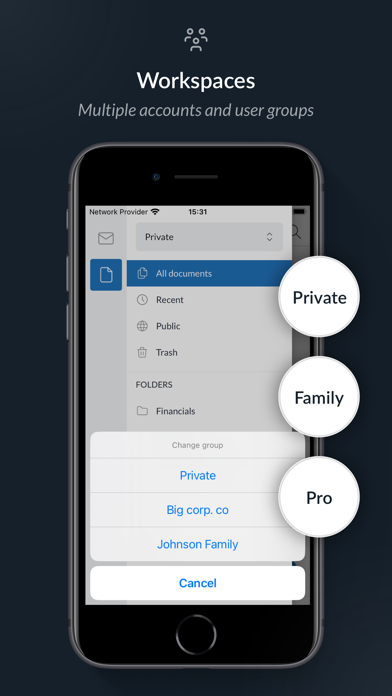
• Share your documents with Mailfence users via workspaces / groups
• Share documents by making them accessible publicly
• Your Mailfence Drive can also be accessed in WebDAV via third party clients
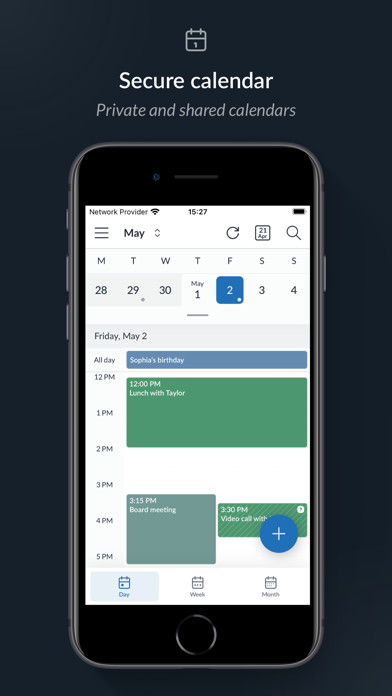
Calendar :
• Access your private and shared calendars
• Create and accept meetings
• Layer different calendars
• Share your Calendar publicly
• Get reminders by email
• Your Calendar can also be accessed through CalDAV or ActiveSync via third party clients
Contacts / Address book :
• Access your private and shared contacts
• Manage your contacts with labels and comments
• Search in your private and shared address books
• Access your mailing lists
• Your Mailfence Contacts can also be accessed through CardDAV or ActiveSync via third party clients
Why use Mailfence?
• No tracking : No ads, no spams, no trackers, no solicitations, no backdoor, free from government surveillance.
• Privacy protection : State of the art security features protect your email privacy at all times.
• An integrated suite of tools : Messages, Documents, Groups.
• Legal protection : Belgian privacy protection law is strong. Only local judges can request information and they must have a court order. It rarely happens.
• Workspaces : Share mailboxes, drives and collaborate in shared workspaces. Advanced sharing rights managed by group administrator.
• Interoperable : User decides whether to encrypt emails or not. Interoperable with any other OpenPGP encrypted email.
• Standard protocols : Interoperability with standard clients : Outlook, Mac Mail, Thunderbird,….
• Individual or teams : Ideal for individual users or professionals.
Mailfence in the press:
• In an article Kim Komando of Fox News wrote about Mailfence, "It's a great option for small business owners and ordinary users alike."
• Lifehacker wrote, "Mailfence is a solid choice with office apps, it's more email- and calendar-focused compared to the comprehensive app suite of Kolab Now."
• The ProPrivacy's Ray Walsh mentions in his article “Mailfence is a solid and easy-to-use email provider that is ideal for beginners."
• Restore privacy's Sven Taylor wrote, “Mailfence has all the features and options that you are likely to need, whether you are looking to manage the mail for an entire organization, or just want great service for personal use”
• Lifewire writes : “Mailfence is a security-centric email service that features end-to-end encryption to ensure nobody but you and your intended recipient can read your messages."
For more information, check :
• site : https://mailfence.com
• support site : https://kb.mailfence.com
• blog: https://blog.mailfence.com