

EngiBOX is made and published by AvMap. AppBrain is an independent app data site and isn't affiliated with AvMap. The app name, icon, screenshots and description belong to AvMap and are shown as published on the App Store.
AppBrain's verdict
- Last updated
- June 25, 2026
- Size
- 2.37 MB
User feedback
Ratings and reviews on the App StoreComments on EngiBOX for iOS
We don't have enough comments to show example comments. Please check back later.
Store listing
By AvMap, from the App Store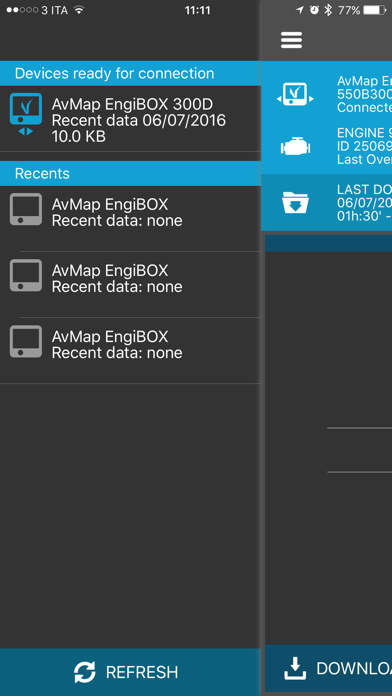
Screenshots by AvMap, from the the App Store listing
Description by AvMap Written by the developer, not by AppBrain. Click to read.
Download the data log of your Rotax aircraft engine from the AvMap EngiBOX engine monitoring system, with your smartphone / tablet via Bluetooth and store it on the EngiBOX Portal.
You can analyze your engine performance graphs, and also share engine logs with your Rotax Service center for an optimal maintenance and support service.
In case of engine performance problems send a notification to your Rotax Service Center to get Instant Support Service.
The engine parameters are recorded with an update rate of five times per second, and are stored in the AvMap EngiBOX internal memory (up to 160 hours). In case of any problem or for regular maintenance you can easily download and store these engine data and share them with your Rotax service Center.
The monitored parameters are: Exhaust Gas Temperature (EGT), Revolutions per Minute (RPM), Manifold Pressure (MAP), Oil Pressure, Oil Temperature / Air Temperature, Cylinder Head Temperature (CHT) / Coolant Temperature (CT).
Main functions:
- Download and store engine parameters data log
- Analyze performance graphs of each log on the EngiBOX Portal
- Enable a Rotax Service Center to see your saved logs
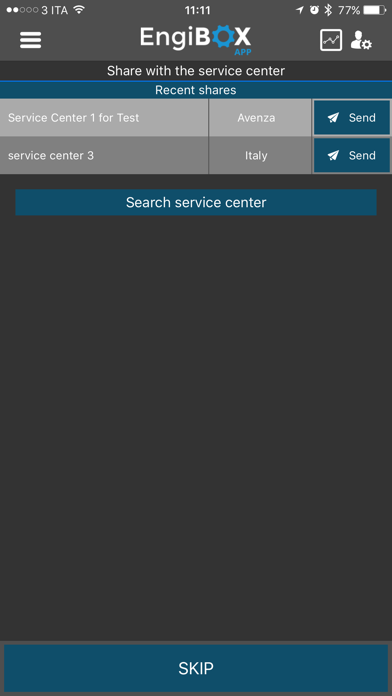
- Share data and send a notification to a Rotax Service to get Instant Support
- Invite a Service Center to join the program
How to use the EngiBOX App:
Connect your smartphone / tablet to your AvMap EngiBOX:
1. Activate the Bluetooth on your Smartphone / tablet
2. Power on the EngiBOX and activate the Bluetooth
3. Launch the EngiBOX App. The app will scan for EngiBOX in the surroundings and the list of found devices will appear in the left column.
4. Select your EngiBOX according to the EngiBOX ID.
5. In case of first use, follow the wizard to register your EngiBOX
Easily download your engine data log:
1. Launch the EngiBOX mobile App.
2. Select your EngiBOX from the left column to connect to it
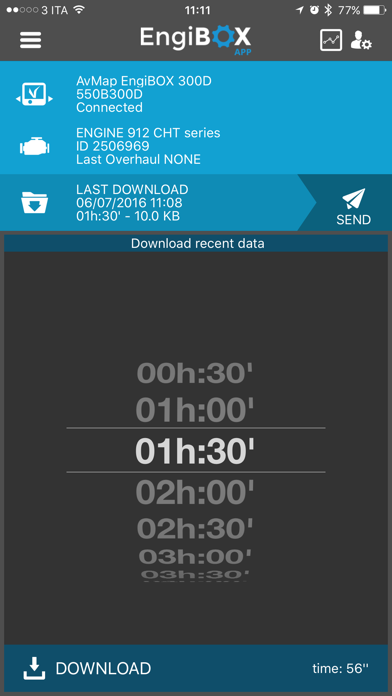
3. The App shows: EngiBOX ID, connection status, Engine model, Engine ID number and date of last overhaul.
4. Login
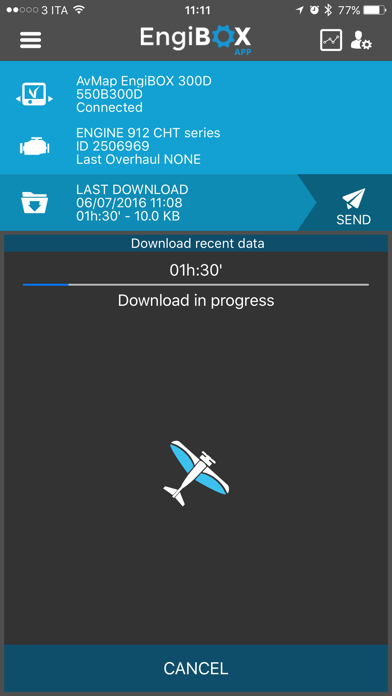
5. Tap DOWNLOAD DATA.
6. Choose how many minutes you want to download: the minimum is the last 30 minutes of activity, the maximum 10,5 hours (see the estimated time for download in the bottom right corner)
7. When the download is complete, press the SEND icon. The service center will be able to see all your engine logs.
8. Once the operation is completed, you can start using the EngiBOX portal http://engibox.avmap.it/ to analyze your data or contact the Service Center to get Instant Support.
Visit avionics.avmap.it/iss for the up-to-date list of companies qualified for Instant Support Service.
You can analyze your engine performance graphs, and also share engine logs with your Rotax Service center for an optimal maintenance and support service.
In case of engine performance problems send a notification to your Rotax Service Center to get Instant Support Service.
The engine parameters are recorded with an update rate of five times per second, and are stored in the AvMap EngiBOX internal memory (up to 160 hours). In case of any problem or for regular maintenance you can easily download and store these engine data and share them with your Rotax service Center.
The monitored parameters are: Exhaust Gas Temperature (EGT), Revolutions per Minute (RPM), Manifold Pressure (MAP), Oil Pressure, Oil Temperature / Air Temperature, Cylinder Head Temperature (CHT) / Coolant Temperature (CT).
Main functions:
- Download and store engine parameters data log
- Analyze performance graphs of each log on the EngiBOX Portal
- Enable a Rotax Service Center to see your saved logs
- Share data and send a notification to a Rotax Service to get Instant Support
- Invite a Service Center to join the program
How to use the EngiBOX App:
Connect your smartphone / tablet to your AvMap EngiBOX:
1. Activate the Bluetooth on your Smartphone / tablet
2. Power on the EngiBOX and activate the Bluetooth
3. Launch the EngiBOX App. The app will scan for EngiBOX in the surroundings and the list of found devices will appear in the left column.
4. Select your EngiBOX according to the EngiBOX ID.
5. In case of first use, follow the wizard to register your EngiBOX
Easily download your engine data log:
1. Launch the EngiBOX mobile App.
2. Select your EngiBOX from the left column to connect to it
3. The App shows: EngiBOX ID, connection status, Engine model, Engine ID number and date of last overhaul.
4. Login
5. Tap DOWNLOAD DATA.
6. Choose how many minutes you want to download: the minimum is the last 30 minutes of activity, the maximum 10,5 hours (see the estimated time for download in the bottom right corner)
7. When the download is complete, press the SEND icon. The service center will be able to see all your engine logs.
8. Once the operation is completed, you can start using the EngiBOX portal http://engibox.avmap.it/ to analyze your data or contact the Service Center to get Instant Support.
Visit avionics.avmap.it/iss for the up-to-date list of companies qualified for Instant Support Service.
Safety and technology
Found in the app by AppBrain- Price
- Free
- App size
- 2.37 MB
- Content rating
- Everyone
Technologies used by EngiBOX
Releases
Updates seen on the App Store- Version
- 1.3.5
- Launched
- June 2015
No changelog data
Alternatives
Similar apps and more from AvMapAlternatives to EngiBOX






More from AvMap


Rankings
App Store top chartsApp Store Rankings for EngiBOX
This app is not ranked
About the app and developer
About EngiBOX
EngiBOX is an utilities app developed by AvMap.
What is the rating of EngiBOX?
EngiBOX has no ratings yet.
Is EngiBOX free?
EngiBOX is free. The app size is 2.37 MB. The latest version available is 1.3.5. The last update was on June 25, 2026.
What are the requirements for EngiBOX?
The app has a content rating of Everyone. The app has been available on the App Store since June 2015.
Developer information for AvMap
Address: