Download Android Apps and Games
AppBrain
  • Apps
  • Apps being viewed right now Trending apps today Most popular apps All-time most downloaded apps Top rated apps
  • Intelligence ▾
    Intelligence overview → Track any Android app or your whole market
    Track & analyze
    Keyword Tracker & OptimizerTrack & improve Play rankings App Performance ReportOne-off PDF for any app StatisticsFree Android & Play market stats
    Promote your app
    Featured Apps App Links
  • Intelligence
  • Pricing
  • Dashboard
  • Sign up
  • Log in
Last updated on: 2026-05-26
App Store Apps > Productivity > Epson Setting Assistant
Epson Setting Assistant icon

Epson Setting Assistant

2.1.1
Seiko Epson Corporation
4.41
424 reviews
Free

Epson Setting Assistant Screenshot 1 of 3
Epson Setting Assistant Screenshot 2 of 3
Epson Setting Assistant Screenshot 3 of 3
Download from the App Store Android version

About Epson Setting Assistant

Epson Setting Assistant is an overall app developed by Seiko Epson Corporation.

Download Statistics

User Ratings

Epson Setting Assistant is rated 4.41 out of 5 stars. The rating is based on 420 ratings.

App Information

Epson Setting Assistant is FREE to download. The APK download size is 93.78 MB. The latest version available is 2.1.1. The last update was on October 31, 2025.

Technical Requirements

The app has a content rating of Everyone. The app has been available on Google Play September 2022.

Description
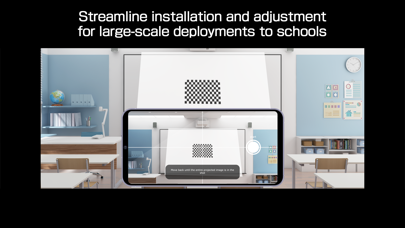
Epson Setting Assistant is an app that automatically corrects the shape of a projected image by using your camera.
By taking a shot of the projected pattern, the app automatically corrects distortion in the projected image and adjusts its shape to match the screen.


[Main Features]

1) Shape correction

The app adjusts the image to a rectangular shape or aligns it with a frame, such as a projector screen.

2) Unevenness correction

The app detects small surface irregularities, such as on a wall, and corrects distortion in the projected image.


[For Home Projector (EH Series) Users: Using the App]

Make sure your iPhone®, iPad®, or iPod® touch and the projector are connected to the same network.

1. Select [Installation] ([Installation] > [Geometry Correction Wizard]) from the projector's menu.

2. Open this app on your iPhone®, iPad®, or iPod® touch and select [Home] as the projector type to automatically connect to the projector.

3. Follow the on-screen instructions to take a shot of the projected pattern using the camera in the app, and the corrections will be completed automatically.


[For Business Projector (EB Series) Users: Using the App]

Make sure the [Wireless LAN Power] setting is set to [On] in the projector‘s [Management] menu.

1. Select [Installation] > [Connect to Setting Assistant] from the projector's menu to project a QR code.

2. Open this app on your iPhone®, iPad®, or iPod® touch, select [Business] as the projector's type, and then scan the QR code to automatically connect to the projector.

3. Follow the on-screen instructions to take a shot of the projected pattern using the camera in the app, and the corrections will be completed automatically.


[Supported Projectors]

Visit https://support.epson.net/projector_appinfo/setting_assistant/en/ for details.
Depending on your projector model, some features may not be available.


[Notes for use]

Depending on your environment, such as a curved projection surface or wallpaper with rough textures or patterns, automatic correction using the app may not be available. In these situations, please correct the image shape from the projector's menu.

Depending on your smartphone/tablet, the Wi-Fi settings may prevent you from temporarily connecting to the projector. Turn your Wi-Fi off and then on again and try again.

For detailed important points, visit https://download2.ebz.epson.net/sec_pubs_visual/apps/setting_assistant/210/EN/index.html.

You can also check these from the [Online support guide] in the menu at the top right of the app.


Images used here are for illustrative purposes only. The actual images may differ.


[App Permissions]
To use the app, the following permissions are required.
[Required] Local Network
For searching and connecting to the projector.
[Required] Camera
For capturing correction patterns or QR codes for connection.

* Optional permissions can be declined, but some features may not work.
Show more Show less

More data about Epson Setting Assistant

Price Free to download
Rating 4.41 based on 420 ratings
Ranking Not ranked
Version 2.1.1
App download size 93.8 MB
Suitable for Everyone

Alternative downloads for the Epson Setting Assistant app

Smart Projector Control icon Smart Projector Control
Panasonic Connect Co., Ltd.
2.8
Free
17 ratings
OvrC icon OvrC
Wirepath Home Systems, LLC
2.4
Free
44 ratings
ViewSonic Projector icon ViewSonic Projector
ViewSonic_International
2.5
Free
13 ratings
vRemote icon vRemote
ViewSonic_International
1.2
Free
26 ratings
Set & Go Connect icon Set & Go Connect
SOMFY SAS
5.0
Free
6 ratings
EpsonEdge icon EpsonEdge
Halight
4.6
Free
43 ratings
Best Buy Remote Management App icon Best Buy Remote Management App
Domotz Inc
4.2
Free
14 ratings
Air Printer App icon Air Printer App
Nilu Technologies
3.9
Free
2.2K ratings

More from Seiko Epson Corporation

Epson Smart Panel icon Epson Smart Panel
Seiko Epson Corporation
4.7
Free
360.3K ratings
Epson iPrint icon Epson iPrint
Seiko Epson Corporation
4.7
Free
258.7K ratings
Epson Creative Print icon Epson Creative Print
Seiko Epson Corporation
4.8
Free
10.6K ratings
Epson iProjection icon Epson iProjection
Seiko Epson Corporation
4.3
Free
3.3K ratings
Epson Print Layout icon Epson Print Layout
Seiko Epson Corporation
4.6
Free
2.3K ratings
Epson Label Editor Mobile icon Epson Label Editor Mobile
Seiko Epson Corporation
4.7
Free
1.3K ratings
Epson FastFoto icon Epson FastFoto
Seiko Epson Corporation
4.8
Free
1.2K ratings
Epson DocumentScan icon Epson DocumentScan
Seiko Epson Corporation
1.8
Free
119 ratings

Changelog of Epson Setting Assistant

No changelog data

Show more Show less

Developer information for Seiko Epson Corporation

Seiko Epson Corporation

N/A

Share Epson Setting Assistant

Comments on Epson Setting Assistant for iOS

We don't have enough comments to show example comments. Please check back later.

App Store Rankings for Epson Setting Assistant

This app is not ranked

Technologies used by Epson Setting Assistant

Top new apps Today's trending apps Apps other people are watching Apps on sale Popular Overall
Smart Projector Control icon Smart Projector Control
OvrC icon OvrC
ViewSonic Projector icon ViewSonic Projector
vRemote icon vRemote
Set & Go Connect icon Set & Go Connect
EpsonEdge icon EpsonEdge
Best Buy Remote Management App icon Best Buy Remote Management App
Air Printer App icon Air Printer App

Back to top
AppBrain Intelligence premium content

Subscribe now to get full and unlimited access to AppBrain Intelligence. You'll have access to:

  • App Intelligence dashboard (performance timeline, competitor comparison, country rankings, insight cards)
  • Detailed ranking data per app
  • Full timeline per developer
  • Device market shares data per country
1 Month

$75/mo
(billed every month)

SAVE 0%
Subscribe
3 Months

$65/mo
($195 billed every 3 months)

SAVE 13%
Subscribe
1 Year

$57.50/mo
($690 billed every year)

SAVE 23%
Subscribe
Each subscription will automatically renew 3 days before the expiration date for the same time period. Subscriptions can be cancelled at any time before the renewal.

AppBrain is a directory focused on discovering great apps and games. We give statistics, rankings and search options that Google Play and the App Store don't have. All trademarks are owned by their respective owners. AppBrain doesn't offer APKs or binaries, and always lets users install the official version from Google Play or the App Store.

More apps

  • Top Android apps being viewed
  • EdgeProp Analytics (Singapore)
  • View Whistle
  • Garry's mod hello neighbor 2

Android Statistics

  • Android statistics
  • Google Play Developer stats
  • Trending Android Apps
  • Top popular Apps
  • Buy the best Android phone

About AppBrain

  • Contact
  • Privacy
  • Documentation
  • DMCA takedowns
  • Articles
  • Blog
  • Android App Marketing: Learn how to better market your Android app
© 2010-2026 - AppBrain