

eSign PDF: Sign & Fill
eSign PDF: Sign & Fill is made and published by QUANTUMPARADOX STUDIO PRIVATE LIMITED. AppBrain is an independent app data site and isn't affiliated with QUANTUMPARADOX STUDIO PRIVATE LIMITED. The app name, icon, screenshots and description belong to QUANTUMPARADOX STUDIO PRIVATE LIMITED and are shown as published on the App Store.
AppBrain's verdict
- Rating on App Store
- 5.00
- 1 ratings
- Last updated
- October 5, 2026
- Size
- 23.0 MB
It doesn't have enough ratings yet to judge what users think.
User feedback
Ratings and reviews on the App StoreComments on eSign PDF: Sign & Fill for iOS
We don't have enough comments to show example comments. Please check back later.
Store listing
By QUANTUMPARADOX STUDIO PRIVATE LIMITED, from the App Store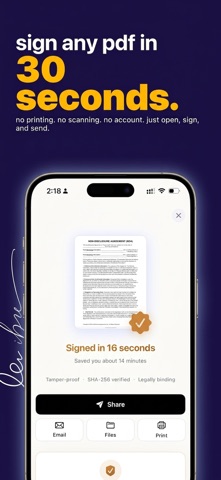

Description by QUANTUMPARADOX STUDIO PRIVATE LIMITED Written by the developer, not by AppBrain. Click to read.
AI auto-detects form fields so you can tap and type. Draw your signature, type it, or import from a photo. Everything stays on your device.
WHY ESIGN PDF
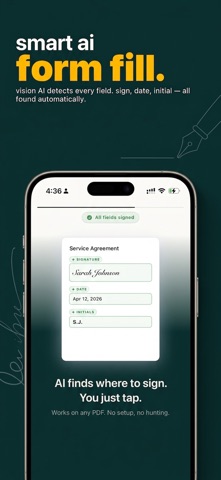
AI AUTO-FILLS PDF FORMS
Tap a PDF and watch fillable fields appear. Text boxes, checkboxes, signature lines, dates — detected with on-device Vision AI. No server uploads.
SIGN IT YOUR WAY
• Draw with Apple Pencil or finger — multi-stroke, palm rejection
• Type your name in handwriting-style fonts
• Import a signature from a photo — background auto-removed
• Save multiple signatures and reuse them
FILL ANY FORM
• Tap a field to type. Dates can auto-fill today
• Checkboxes, initials, stamps, text boxes, drawings
• Place anywhere, resize freely
PRIVACY THAT’S ACTUALLY PRIVATE
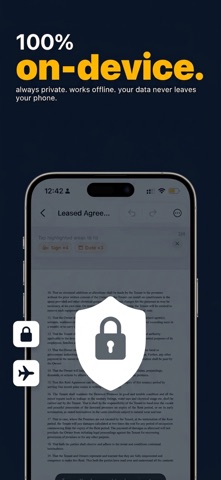
• 100% on-device processing — no server uploads
• No account required
• Works completely offline
• Optional iCloud backup (your Apple account, your keys)
TAMPER-PROOF EXPORT
Export a flattened PDF so signatures become permanent. Tamper-evident verification included.
PRICING
• Weekly: $4.99/week
• Yearly: $29.99/year
• Lifetime: $59.99 one-time
Try your first export free. Unlock full access with Weekly, Yearly, or Lifetime. Prices may vary by region; see the purchase screen for your storefront.
Payment is charged to your Apple ID. Subscriptions renew automatically unless cancelled at least 24 hours before the end of the period. Manage or cancel in Settings → Apple ID → Subscriptions.
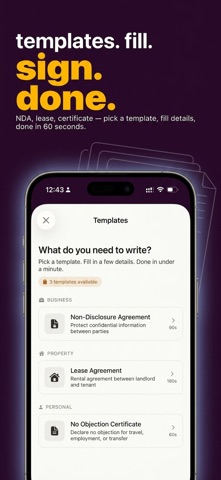
Perfect for freelancers, renters, and anyone who signs leases, contracts, NDAs, invoices, job applications, or school forms.
Questions? Email touch@apptodesign.com — a human will reply.
Terms of Use: https://www.apptodesign.com/esign-pdf/terms/
Privacy Policy: https://www.apptodesign.com/esign-pdf/privacy/
Safety and technology
Found in the app by AppBrain- Price
- Free
- App size
- 23.0 MB
- Content rating
- Everyone
Technologies used by eSign PDF: Sign & Fill
Releases
Updates seen on the App Store- Version
- 2.2.6
- Launched
- March 2026
No changelog data
Alternatives
Similar apps and more from QUANTUMPARADOX STUDIO PRIVATE LIMITEDAlternatives to eSign PDF: Sign & Fill


More from QUANTUMPARADOX STUDIO PRIVATE LIMITED


Rankings
App Store top chartsApp Store Rankings for eSign PDF: Sign & Fill
About the app and developer
About eSign PDF: Sign & Fill
eSign PDF: Sign & Fill is a business app developed by QUANTUMPARADOX STUDIO PRIVATE LIMITED.
User Ratings
eSign PDF: Sign & Fill is rated 5.00 out of 5 stars. The rating is based on one rating ratings.
App Information
eSign PDF: Sign & Fill is freely available from the App Store. The app size is 23.02 MB. The latest version available is 2.2.6. The last update was on October 5, 2026.
Technical Requirements
The app has a content rating of Everyone. The app has been available on the App Store since March 2026.
Developer information for QUANTUMPARADOX STUDIO PRIVATE LIMITED
Frequently asked questions about eSign PDF: Sign & Fill
Is eSign PDF: Sign & Fill free?
Yes. eSign PDF: Sign & Fill is free on the App Store.
Is eSign PDF: Sign & Fill still available?
Yes. eSign PDF: Sign & Fill is on the App Store, and the last update we saw was on October 5, 2026.
How large is eSign PDF: Sign & Fill?
eSign PDF: Sign & Fill is 23.02 MB.
Is eSign PDF: Sign & Fill suitable for children?
App Store rates the content of eSign PDF: Sign & Fill as suitable for everyone.
How do people rate eSign PDF: Sign & Fill?
eSign PDF: Sign & Fill has one rating of 5.00 stars on the App Store.
Who made eSign PDF: Sign & Fill?
eSign PDF: Sign & Fill was developed by QUANTUMPARADOX STUDIO PRIVATE LIMITED. It is listed in the business category on the App Store.
What are the best alternatives to eSign PDF: Sign & Fill?
People looking at eSign PDF: Sign & Fill also look at these business apps: Carryover: Capture to Delivery, Sign Documents - E Signature, Child Expenses, Kubmix Corp, Sign App: E-Signature Maker.