

Everdisk: Share Photos & Files
Everdisk: Share Photos & Files is made and published by EVERAPPZ SL. AppBrain is an independent app data site and isn't affiliated with EVERAPPZ SL. The app name, icon, screenshots and description belong to EVERAPPZ SL and are shown as published on the App Store.
AppBrain's verdict
New- Rating on App Store
- 5.00
- 1 ratings
- Last updated
- September 19, 2026
- Size
- 51.5 MB
Everdisk: Share Photos & Files came out 76 days ago. It doesn't have enough ratings yet to judge what users think.
User feedback
Ratings and reviews on the App StoreComments on Everdisk: Share Photos & Files for iOS
We don't have enough comments to show example comments. Please check back later.
Store listing
By EVERAPPZ SL, from the App Store



Description by EVERAPPZ SL Written by the developer, not by AppBrain. Click to read.
The app runs five servers at the same time, so every device connects the way it likes: smart TVs, computers, web browsers and file apps.
WATCH ON YOUR TV
Stream photos, videos and music straight to smart TVs and media players over DLNA. Your library shows up on the TV by itself, with preview thumbnails, so you can enjoy it on the big screen.
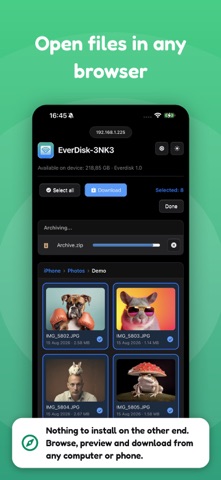
OPEN IN ANY WEB BROWSER
Share a simple link and the other person just opens it in a browser. They can browse your files in a grid or list, view photos in a full screen gallery, play music in the built in player, and download anything.
USE IT AS A NETWORK DRIVE
Connect from Finder on a Mac, from Windows or from Linux over WebDAV, and your device appears like a normal network disk. Drag and drop both ways: copy files from your computer to your device, or pull them back.
SHOW UP IN FINDER OVER SMB
Turn on the SMB server and your device appears in Finder under Network, right beside your other computers. Open it and work with your files like any mounted disk. Turn on encryption to keep the connection private and safe on unknown or public WiFi.
NO WIFI? USE THE CABLE
Connect your device to a Mac with the same USB cable you use to charge it. Files move faster than WiFi, and it keeps working on a plane, in a hotel, or any locked network where WiFi is blocked.
CONNECT TO OTHER DEVICES
Find and connect to DLNA, WebDAV, FTP, SFTP and SMB servers on your network. Browse their folders, stream audio and video, download files, and create folders, upload, rename, move or delete when allowed.
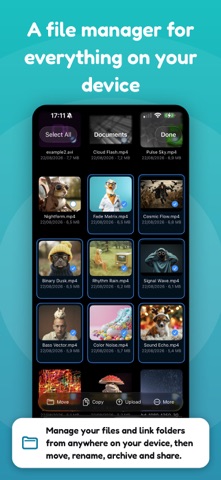
MANAGE FILES ON YOUR DEVICE
A built in file manager for everything on your device. Browse in list or grid, create folders, rename, move, copy, zip and unzip, and delete. Connect folders from anywhere and work with them right in the app.
SCAN DOCUMENTS TO PDF
Scan paper documents with your camera. The app finds the edges automatically, straightens every page, and saves them as a clean PDF, ready to share or store.
EDIT AND ANNOTATE PDFS
Open a PDF and mark it up in a few taps. Add notes, highlights and drawings, fill in the blanks, and save your changes straight back to the file.
PLAY IT IN THE APP
Enjoy audio in a mini player with a queue, shuffle, repeat and lock screen controls, and watch videos full screen. Your Photos and Music libraries play right here.
SHARE YOUR WHOLE LIBRARY
Turn on your full photo and music library and every album and track becomes available over the network. Keep them in original quality, or convert to a more compatible format when you need it.
SEND FILES BACK
It works both ways. Upload photos, documents and whole folders from any computer straight into your device.
PRIVATE AND SAFE
Everything stays on your local network and never touches the internet. Protect access with a login and password, and block any device with one tap.
EASY TO SHARE
Just tap Start and share your files five ways at once: DLNA for TVs and media players, HTTP for any web browser, WebDAV and SMB for Finder, Windows and Linux, and FTP for file apps.
WHAT YOU CAN DO
• Move photos and videos to a computer in seconds
• View photos and watch videos on a TV
• Send files between two iPhones or iPads
• Play your music through a media player, TV or the app
• Browse and download from other servers on your network
• Manage, zip and organize files on your device
• Give someone a link to grab files from a browser
• Mount your device as a network drive in Finder
Download the app and share everything on your device, the simple way.
Privacy Policy: https://www.everappz.com/privacy-policy
Terms of Use: https://www.everappz.com/terms-and-conditions
Safety and technology
Found in the app by AppBrain- Price
- Free
- App size
- 51.5 MB
- Content rating
- Everyone
Technologies used by Everdisk: Share Photos & Files
Releases
Updates seen on the App Store- Version
- 1.4
- Launched
- August 2026
No changelog data
Alternatives
Similar apps and more from EVERAPPZ SLAlternatives to Everdisk: Share Photos & Files


More from EVERAPPZ SL


Rankings
App Store top chartsApp Store Rankings for Everdisk: Share Photos & Files
About the app and developer
About Everdisk: Share Photos & Files
Everdisk: Share Photos & Files is an utilities app developed by EVERAPPZ SL.
User Ratings
Everdisk: Share Photos & Files is rated 5.00 out of 5 stars. The rating is based on one rating ratings.
App Information
Everdisk: Share Photos & Files is freely available from the App Store. The app size is 51.51 MB. The latest version available is 1.4. The last update was on September 19, 2026.
Technical Requirements
The app has a content rating of Everyone. The app has been available on the App Store since August 2026.
Developer information for EVERAPPZ SL
Address:
Frequently asked questions about Everdisk: Share Photos & Files
Is Everdisk: Share Photos & Files free?
Yes. Everdisk: Share Photos & Files is free on the App Store.
Is Everdisk: Share Photos & Files still available?
Yes. Everdisk: Share Photos & Files is on the App Store, and the last update we saw was on September 19, 2026.
How large is Everdisk: Share Photos & Files?
Everdisk: Share Photos & Files is 51.51 MB.
Is Everdisk: Share Photos & Files suitable for children?
App Store rates the content of Everdisk: Share Photos & Files as suitable for everyone.
How do people rate Everdisk: Share Photos & Files?
Everdisk: Share Photos & Files has one rating of 5.00 stars on the App Store.
Who made Everdisk: Share Photos & Files?
Everdisk: Share Photos & Files was developed by EVERAPPZ SL. It is listed in the utilities category on the App Store.
What are the best alternatives to Everdisk: Share Photos & Files?
People looking at Everdisk: Share Photos & Files also look at these utilities apps: PMC Tickets, CNC CAM: RouterCut, Auto Scroll Web for Safari, Text Cleanup & Copy - TextDock, SignPad Pro: Signage Surveys.