

Everyday Coffee
Everyday Coffee is made and published by YUSUKE KAJIWARA. AppBrain is an independent app data site and isn't affiliated with YUSUKE KAJIWARA. The app name, icon, screenshots and description belong to YUSUKE KAJIWARA and are shown as published on the App Store.
AppBrain's verdict
- Last updated
- November 29, 2024
Rankings
App Store top chartsApp Store Rankings for Everyday Coffee
Competitors
Similar apps and more from YUSUKE KAJIWARAMore from YUSUKE KAJIWARA





Releases
Updates seen on the App Store- Version
- 1.2
- Launched
- November 2024
No changelog data
User feedback
Ratings and reviews on the App StoreComments on Everyday Coffee for iOS
We don't have enough comments to show example comments. Please check back later.
Technology
Found in the app by AppBrain- Price
- Free
- App size
- 21.1 MB
- Content rating
- Everyone
Technologies used by Everyday Coffee
About the app and developer
About Everyday Coffee
Everyday Coffee is a lifestyle app developed by YUSUKE KAJIWARA.
User Ratings
The app has no ratings yet.
App Information
Everyday Coffee is freely available from the App Store. The app size is 21.13 MB. The latest version available is 1.2. The last update was on November 29, 2024.
Technical Requirements
The app has a content rating of Everyone. The app has been available on the App Store since November 2024.
Developer information for YUSUKE KAJIWARA
Address:
Frequently asked questions about Everyday Coffee
Is Everyday Coffee free?
Yes. Everyday Coffee is free on the App Store.
Is Everyday Coffee still available?
Yes. Everyday Coffee is on the App Store, and the last update we saw was on November 29, 2024.
How large is Everyday Coffee?
Everyday Coffee is 21.13 MB.
Is Everyday Coffee suitable for children?
App Store rates the content of Everyday Coffee as suitable for everyone.
Who made Everyday Coffee?
Everyday Coffee was developed by YUSUKE KAJIWARA. It is listed in the lifestyle category on the App Store.
Store listing
By YUSUKE KAJIWARA, from the App Store


Description by YUSUKE KAJIWARA Written by the developer, not by AppBrain. Click to read.
How to use it is simple.
Use the two main buttons and a text field on the initial screen.
• "Cup Count Button"
Press this button to count a cup of coffee consumed.
If there’s an amount entered in the “Price Text” field, that amount is also added to today’s expenses.
•"Price Text"
Here, you can input the money spent. After entering an amount, press the
“Cup Count Button” to add both one cup and the spending.
Alternatively, press the “Purchase Button” to add only the spending amount.
•"Purchase Button"
Pressing this button adds only the spending amount without counting a cup consumed.
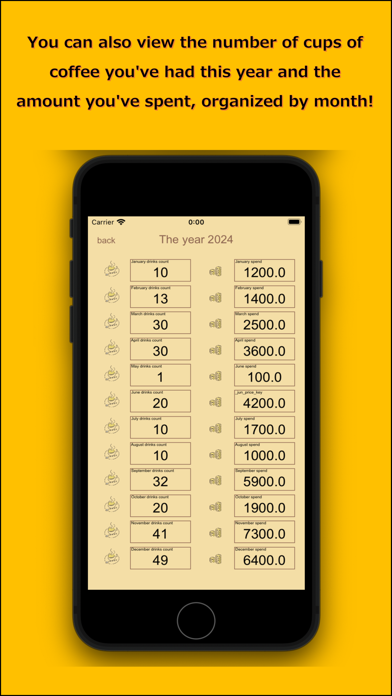
Additional calendar buttons take you to screens where you can review the cups and spending recorded monthly and annually.