

Exam Creator: Test Maker
Exam Creator: Test Maker is made and published by Yung-Hsin Shieh. AppBrain is an independent app data site and isn't affiliated with Yung-Hsin Shieh. The app name, icon, screenshots and description belong to Yung-Hsin Shieh and are shown as published on the App Store.
AppBrain's verdict
- Last updated
- September 29, 2026
Rankings
App Store top chartsApp Store Rankings for Exam Creator: Test Maker
Competitors
Similar apps and more from Yung-Hsin ShiehAlternatives to Exam Creator: Test Maker


More from Yung-Hsin Shieh

Releases
Updates seen on the App Store- Version
- 1.2.6
- Launched
- August 2026
No changelog data
User feedback
Ratings and reviews on the App StoreComments on Exam Creator: Test Maker for iOS
We don't have enough comments to show example comments. Please check back later.
Technology
Found in the app by AppBrain- Price
- Free
- App size
- 233.9 MB
- Content rating
- Everyone
Technologies used by Exam Creator: Test Maker
About the app and developer
About Exam Creator: Test Maker
Exam Creator: Test Maker is an education app developed by Yung-Hsin Shieh.
User Ratings
The app has no ratings yet.
App Information
Exam Creator: Test Maker is freely available from the App Store. The app size is 233.91 MB. The latest version available is 1.2.6. The last update was on September 29, 2026.
Technical Requirements
The app has a content rating of Everyone. The app has been available on the App Store since August 2026.
Developer information for Yung-Hsin Shieh
Address:
Store listing
By Yung-Hsin Shieh, from the App Store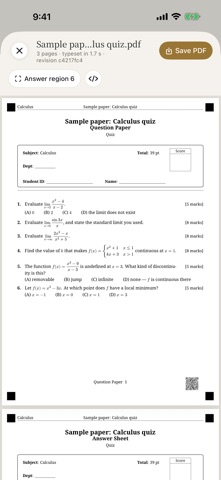


Description by Yung-Hsin Shieh Written by the developer, not by AppBrain. Click to read.
Typesetting Is Built In
The app carries a complete LaTeX typesetting engine and the fonts it needs, so it still sets a paper as an A4 PDF in airplane mode. Equations, tables, answer grids, headers and footers, a long proof that runs across a page break — the typesetting engine lays all of it out. Nothing here is a web page printed to PDF.
A Question Bank You Reuse
Questions live in the bank, filed under six levels: domain, subject, course, chapter, section, topic. Filter them by difficulty, question type, tags, source, academic year, or which paper they have already appeared on. This year’s paper is next year’s starting point: duplicate it, swap out a few questions, leave the rest.
Questions From Your Own Material
Paste your key points, import a PDF, or photograph the board or your own handouts. PDFs and photos are sent once, at import, to the AI service you chose, which reads them; the app then splits the text that comes back into passages on the device, retrieves what fits, and writes questions from that. Each question records the document and the page it drew from, so you can check it on the spot.
Solutions
Generate solutions only for the questions that do not have one, or redo a single question on its own — changing one question does not mean paying for the whole paper again. The solutions can be in a different language from the paper, and you can add a standing instruction of your own, such as “end each one with the mistake students usually make”.
Sixteen Languages
Traditional Chinese, Simplified Chinese, English, Japanese, Korean, German, French, Spanish, Portuguese, Italian, Dutch, Polish, Russian, Turkish, Vietnamese, Indonesian. The header wording printed on the paper follows.
Before export, the app checks that the fonts can actually draw every character on the paper. If one is missing, the export stops and names the character and the question it sits in. It does not print blanks.
Handoff to AI Grader Pro
The exported PDF carries four alignment squares and a QR code on every page, and the answer region coordinates are measured while typesetting and written into the file. AI Grader Pro crops straight to them and grades.
Your Data Stays Yours
No account, no cloud sync. The AI features use your own API key, and the key is kept in the system Keychain on this device. You can also point the app at an Ollama or LM Studio you run yourself, in which case nothing leaves your own network. Without AI, nothing needs a network: picking from the bank, writing your own questions and typesetting the PDF all happen on the device. Only the AI features go online — importing material sends the PDF or photos you attach, and generating sends the request for questions.
Subscription
Writing questions, the question bank, typesetting, and the full preview are free and unlimited. The only thing that needs a subscription is taking the finished paper out — saving it as a PDF, printing it, or sharing it. The subscription comes with a 14-day free trial.
Pro Monthly · Pro Yearly
Your local price is shown in the app and on this page.
The subscription renews automatically until you cancel it in your App Store account settings. Renewal is charged within 24 hours before the period ends.
Questions are still generated with your own API key, and the provider bills you for that directly, as it always has. The subscription does not cover those charges.
Terms of Use (EULA): https://www.apple.com/legal/internet-services/itunes/dev/stdeula/